

Ever feel like your home is full of gadgets that don’t quite talk to each other? You’re juggling calendars, photos, and entertainment across different screens, and it’s exhausting. This guide cuts through the noise to showcase the best electronics for simplifying your daily life, from smart kitchen hubs to versatile gaming consoles. Whether you’re a busy parent, a tech enthusiast, or someone looking for a thoughtful gift, our curated picks will help you find the perfect addition to your space.
We’ve evaluated a range of popular devices, focusing on usability, connectivity, and how well they fit into real-world routines. Our goal is to highlight products that genuinely enhance your home, not just fill a shelf. For more lifestyle tech inspiration, check out our guide on top beauty gadgets for women that blend function with fun.



Buying Guide: What to Consider When Choosing Electronics
Before you hit that buy button, think about what role the device will play in your home. Are you solving a specific problem, like organization, or adding entertainment value? Understanding your primary need will guide every other decision.
Display Quality and Size
The screen is your window to the content, whether it’s a family calendar, a movie, or a photo slideshow. A larger, high-resolution display, like the Full HD 15.6-inch screen on the Amazon Echo Show 15, makes everything easier to read and enjoy. For a compact frame, a 10-inch touchscreen like the Skylight Digital Picture Frame offers a crisp 1280×800 resolution.
Consider where you’ll place the device. A kitchen hub benefits from a bigger, brighter screen that you can glance at from across the room. A picture frame on a side table might not need to be as large, but clarity still matters for viewing your favorite memories.
Smart Features and Ecosystem Integration
The best electronics don’t just work in isolation; they integrate seamlessly with your existing smart home setup. Look for devices that support popular voice assistants like Alexa or Google Assistant, and check compatibility with your current smart lights, locks, or thermostats. The Echo Show 15, for instance, acts as a central hub for controlling compatible devices.
Also, consider subscription requirements. Some digital calendars and picture frames offer full functionality without a monthly fee, while others may require a subscription for cloud storage or advanced features. Always read the fine print to avoid surprises down the road.
Ease of Setup and Daily Use
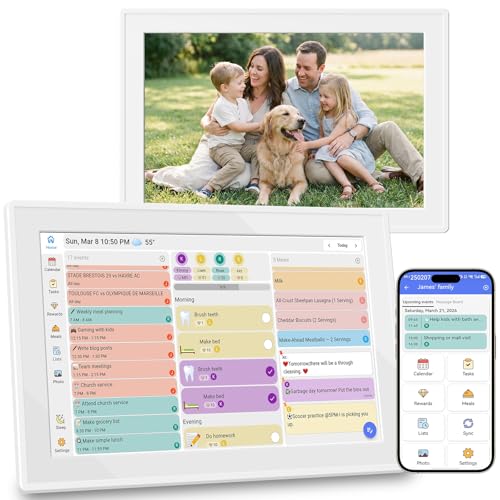
No one wants a device that takes hours to configure. Look for products with straightforward setup processes, like the Skylight frame, which simply needs power, Wi-Fi, and a unique email address to start receiving photos. The Oqsonwu Digital Calendar syncs with your existing Google or iCloud calendars, so you don’t have to re-enter everything manually.
Think about the interface, too. A touchscreen that’s responsive and intuitive makes daily interactions a pleasure. For a gaming console like the Nintendo Switch, ease of use means seamless switching between TV, tabletop, and handheld modes.
For more ideas on integrating tech into your daily wellness routine, explore our picks for beauty devices for smooth skin that offer high-tech pampering at home.
Final Thoughts
In the end, the best electronics are the ones that make your life easier and more enjoyable. If you’re looking to centralize your family’s schedule and entertainment, the Amazon Echo Show 15 (newest model) is a powerhouse that combines a smart display with Fire TV. For a dedicated, clutter-free way to display cherished photos, the Skylight Digital Picture Frame is a thoughtful choice that keeps memories front and center. Whichever you choose, you’re investing in a device designed to enrich your home.
Frequently Asked Questions
Can a smart display replace a traditional calendar?
Yes, absolutely. Smart displays like the Amazon Echo Show 15 offer customizable widgets that show your calendar, to-do lists, and reminders at a glance. They sync with your existing digital calendars, so you always have the most up-to-date schedule without writing anything down.
Do digital picture frames require a subscription?
Not necessarily. Many digital frames, such as the Skylight Digital Picture Frame, offer cloud-based storage without a mandatory subscription. However, some brands may offer premium features like unlimited video storage or advanced sharing options for a monthly fee. Always check the product details to understand what’s included.
Is the Nintendo Switch good for family gaming?
Absolutely. The Nintendo Switch is designed for versatile play, supporting local co-op and multiplayer games in TV, tabletop, or handheld mode. With a library of family-friendly titles like Mario Kart and Super Mario Party, it’s a fantastic way to bring everyone together. For more tech gift ideas, see our list of best beauty products on Amazon for other popular picks.
How do I choose between a digital calendar and a smart display?
It depends on your primary need. If you want a dedicated, low-distraction organizer for schedules and chores, a digital calendar like the Oqsonwu is ideal. If you also want to stream videos, make video calls, and control smart home devices, a smart display like the Echo Show 15 offers more versatility in one device.


