

You snap a great photo on your iPhone, but it stays trapped in your camera roll. You want tangible prints to hang on the fridge, slip into a scrapbook, or hand to a friend. We’ve reviewed the top photo printers for iPhone to help you find the one that fits your lifestyle.
This guide covers portable and home-friendly models from trusted brands like KODAK, Liene, and Nelko. Whether you need a pocket-sized gadget for travel or a dock for your desk, we have a recommendation for you. We also share a few tips to help you choose wisely.



Buying Guide
Print Size and Paper Options
Consider what you plan to do with your prints. Standard 4×6-inch photos are great for frames and albums, while 2×3-inch or 3×3-inch sticky-backed prints work well for journals, scrapbooks, and decorating. Some models, like the Liene Amber M110 Bluetooth Photo Printer 80, offer dual paper sizes for more flexibility.
Think about the paper types you prefer. Glossy finishes are classic, but matte or textured options can reduce glare. Sticky-backed paper is a fun bonus for creative projects. Choose a printer that supports the sizes and finishes you’ll use most often.
Connectivity and Ease of Use
Most iPhone-compatible printers use Bluetooth or Wi-Fi to connect wirelessly. Bluetooth is typically simple to pair and works well on the go. Wi-Fi connections can be more stable for larger files and often support multiple devices at once. Look for a model with a straightforward setup process.
Consider the companion app. A good app lets you edit, add filters, and create collages before printing. Some apps even offer ID photo templates. Choose a printer with an app that feels intuitive and has the features you care about.
Print Quality and Durability
The print technology matters for color accuracy and longevity. Dye-sublimation printers apply a protective layer that makes prints water-resistant, scratch-proof, and fade-resistant. This is a significant advantage over some other methods. Look for details about the print resolution and the quality of the lamination layer.
Consider how long you want your prints to last. If you’re printing memories for keepsakes, choose a printer that uses a lamination process. This ensures your photos stay vibrant for years, even with handling. You can find more details in our guide to home photo printers.
Portability and Design
If you want to print on the go, consider the size and weight of the printer. Pocket-sized models are easy to toss in a bag for trips or parties. Some models come with a built-in battery, which is essential for wireless printing away from home.
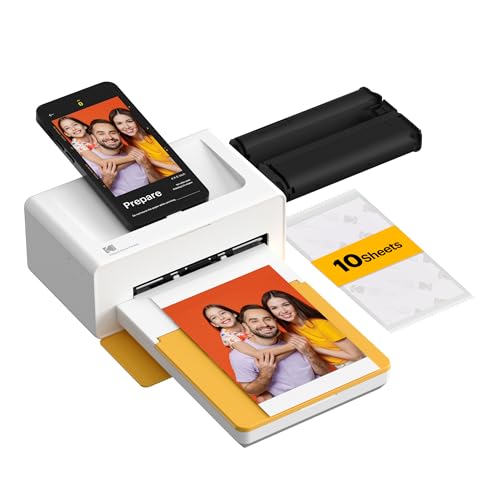
For a desk setup, a docking station like the KODAK Dock Plus 4×6 Photo Printer offers a stable base and can charge your phone while printing. Think about where you’ll most often print and choose a design that fits that space. Also, check the paper capacity to avoid frequent refills.
Final Thoughts
After reviewing these options, the right pick depends on your needs. For a versatile, on-the-go printer with dual paper sizes, consider the Liene Amber M110 Bluetooth Photo Printer 80. If you prefer a stable home station for standard 4×6 prints, the KODAK Dock Plus 4×6 Photo Printer is a solid choice. Both offer excellent print quality and easy iPhone connectivity, so you can start printing memories right away.
Frequently Asked Questions
What is the best photo printer for iPhone for 2026?
The best photo printer for iPhone in 2026 depends on your needs. For a portable option, the Liene Amber M110 Bluetooth Photo Printer 80 is a great choice. For a home station, the KODAK Dock Plus 4×6 Photo Printer offers reliable performance.
How do I connect my iPhone to a photo printer?
Most modern photo printers connect via Bluetooth or Wi-Fi. Simply power on the printer, enable Bluetooth or connect to its Wi-Fi hotspot on your iPhone, and open the companion app. The app will guide you through the printing process.
Are dye-sublimation photo prints durable?
Yes, dye-sublimation prints are known for their durability. The lamination layer protects against water, scratches, and fading. This makes them ideal for keepsakes and photos you handle frequently. You can learn more about compact photo printers in our related guide.
Can I print sticky-backed photos with these printers?
Yes, many of the printers we reviewed support sticky-backed paper. For example, the Liene Amber M110 Bluetooth Photo Printer 80 comes with 3-inch square sticker paper. The Nelko PP01 Photo Printer also uses adhesive-backed paper for creative projects.



