You have a stack of cherished photos from family trips, birthday parties, and quiet weekends. You want to turn them into a scrapbook that tells your story, but the prints from your home inkjet either fade or lack the crisp detail you need. The right photo printer can make all the difference. In this guide, we review six of the best photo printers for scrapbooking, covering portable models for on-the-go crafting and desktop units for batch printing. Whether you need 4×6 inch standard prints or 2×3 inch stickers for embellishing pages, our picks deliver vibrant colors, durable finishes, and easy connectivity. For more options, check out our roundup of the best home photo printers for everyday use.


Buying Guide: What to Look for in a Photo Printer for Scrapbooking
Print Size and Format Versatility
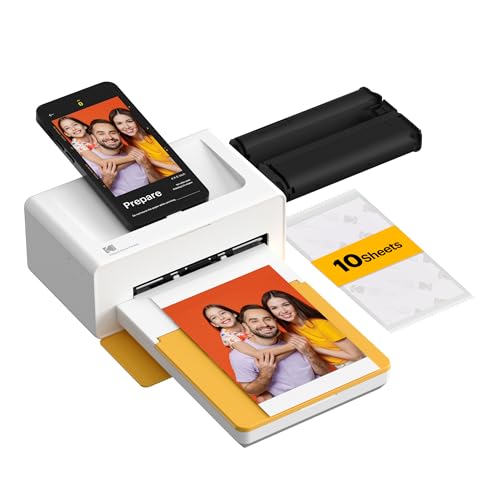
Scrapbooking often calls for a mix of standard 4×6 inch photos and smaller 2×3 inch prints for tags, pockets, or borders. A printer that handles both sizes saves you from owning multiple devices. Look for models with dual paper trays or the ability to switch between paper types easily. The Liene Amber M110 Bluetooth Photo Printer 80 excels here, offering both 4×6 and 3×3 inch sticky-backed paper in one unit. If you mostly work with 4×6 prints, the Liene M100 4×6 Photo Printer delivers consistent results.
Print Quality and Longevity
Dye-sublimation technology produces photos with deep color penetration and a protective laminate layer that resists water, fingerprints, and fading. This is ideal for scrapbooks that will be handled often. All the printers we selected use dye-sublimation except the Nelko PP01 Photo Printer, which uses advanced inkjet for sharp 600 DPI prints on sticky-backed paper. For archival quality, dye-sublimation is the safer bet. Read our review of top instant photo printers to compare technologies.
Portability and Connectivity
If you attend scrapbooking crops, retreats, or work from different rooms, a portable printer is a game changer. Look for Bluetooth or Wi-Fi connectivity that works with both iOS and Android. The KODAK Mini 2 Retro 2×3 Portable Photo Printer fits in a bag and pairs in seconds, while the Liene Pearl N200 Pro Portable Photo Printer adds a built-in camera and AI filters for instant fun. For desktop stability, the KODAK Dock Plus 4×6 Photo Printer doubles as a charging dock. See our compact photo printer guide for more travel-friendly options.
Special Features for Creative Freedom
A robust app with editing tools, frame templates, and sticker printing expands your scrapbooking possibilities. The Nelko PP01 app offers collages, filters, and AI editing; the Liene Pearl N200 Pro includes AI style transfer and one-touch print with CCD filters. If you love adding stickers to your pages, sticky-backed paper options from Liene and Nelko let you peel and place prints anywhere. The KODAK printers rely on their own app for borders and cropping, which is straightforward for most users.
Final Thoughts
After reviewing these six photo printers, two stand out for scrapbooking enthusiasts. For crafters who value versatility and print quality, the Liene Amber M110 Bluetooth Photo Printer 80 offers dual paper trays and water-resistant dye-sublimation prints in both standard and sticker sizes. For those who prefer a compact, sticker-focused solution with creative app features, the Liene Pearl N200 Pro Portable Photo Printer delivers AI enhancements and fast Bluetooth printing. Whichever you choose, you will add vibrant, durable photos to your scrapbooks for years to come.
Frequently Asked Questions
What size photo printer is best for scrapbooking?
A printer that can handle 4×6 inch prints and smaller 2×3 inch or 3×3 inch sticker paper gives you the most flexibility. Models like the Liene Amber M110 and KODAK Mini 2 Retro offer both sizes. If you mostly print standard 4×6 photos, the Liene M100 or KODAK Dock Plus are excellent choices. In 2026, dual‑tray printers are becoming more common for scrappers.
Are dye-sublimation or inkjet printers better for scrapbooking?
Dye-sublimation printers produce prints that are water‑, scratch‑, and fade‑resistant, which is ideal for albums you will handle often. Inkjet printers like the Nelko PP01 can also deliver sharp, vibrant photos on sticky‑backed paper, but they may be less durable over time. For long‑lasting scrapbooks, dye‑sublimation is the recommended technology.
Can I print sticky-backed photos for scrapbooking?
Yes, several printers on our list support adhesive paper. The Liene Amber M110 includes a tray for 3×3 inch sticker paper, and the Liene Pearl N200 Pro comes with 50 sheets of 2×3 inch adhesive paper. The Nelko PP01 also prints on sticky‑backed 2×3 inch paper. These are perfect for adding instant embellishments to your pages.
How do I connect a photo printer to my phone for scrapbooking?
Most modern photo printers use Bluetooth or Wi‑Fi to connect with your smartphone. Simply download the brand’s app, turn on the printer, and pair via the app. The Liene Pearl N200 Pro pairs in 13 seconds, and the KODAK Mini 2 Retro connects through the KODAK Photo Printer app. For detailed steps, see our home photo printer guide.