

🔥 TV Black Friday Deals 2026: picks worth watching →
Running a busy warehouse, retail store, or home office means you need labels that are clear, durable, and printed fast. Whether you are shipping packages, organizing inventory, or creating name badges, a reliable barcode printer saves time and reduces errors. In this guide, we evaluate two top contenders from Brother: the ultra-flexible QL-820NWB and the high-speed QL-800. Both deliver professional results, but they cater to different workflows. By the end, you will know which model fits your labeling needs for 2026.
If you are exploring broader label printing options, check out our Best Label Printers in 2026: Brother QL-820NWB Review for a deeper dive into this model’s capabilities.
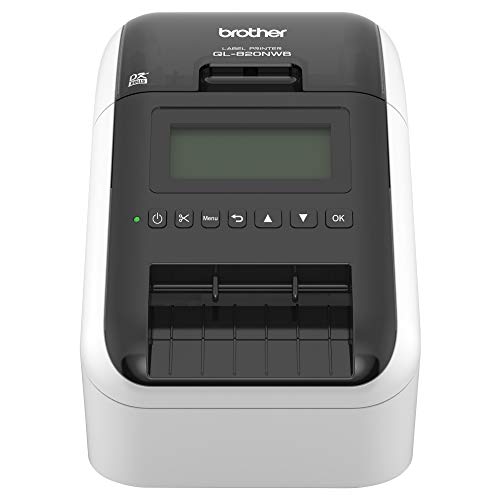


Buying Guide for Barcode Printers
Choosing the right barcode printer involves balancing speed, connectivity, label versatility, and ease of use. Here are the key factors to consider before making your purchase for 2026.
Connectivity Options
Modern workplaces demand flexible connectivity. The Brother QL-820NWB stands out with Bluetooth, Ethernet, Wi-Fi, and USB host interfaces, allowing you to print from virtually any device on your network. In contrast, the Brother QL-800 relies on a USB cable connection, which is ideal for a dedicated workstation. If you need to print from multiple computers or mobile devices, a network-enabled model is essential. For more on printer connectivity, see our best printers for photos and documents guide.
Print Speed and Resolution
Speed matters when you have hundreds of labels to produce daily. The QL-820NWB churns out up to 110 standard address labels per minute at 300 dpi, while the QL-800 delivers 93 labels per minute at the same crisp resolution. Both offer excellent clarity for barcodes and text. However, if you prioritize maximum throughput, the QL-820NWB has a slight edge. For high-volume shipping, that extra speed can translate into significant time savings.
Label Versatility and Color Printing
Both printers support Brother’s DK pre-sized labels and continuous-length tapes up to 3 feet. A standout feature is the ability to print in black and red using the DK 2251 label roll. The QL-820NWB and QL-800 both offer this dual-color capability, which is great for highlighting warnings or priority shipments. If you need custom banners or signage, the continuous tape option is invaluable. For more on color printing, visit our best printers for black and white photos article.
Standalone Use and Display
The QL-820NWB features a monochrome LCD screen that allows you to print without a computer, making it perfect for quick label jobs on the go. The QL-800 lacks a display and requires a connected PC or Mac. If you value independence from a computer, the QL-820NWB is the better choice. For digital creativity, check out Top Nail Art Printers for Digital Creativity in 2026 for inspiration.
Final Thoughts
Both the Brother QL-820NWB and the Brother QL-800 High-Speed Professional Printer are outstanding barcode printers that deliver professional results. The QL-820NWB shines with its versatile connectivity and standalone LCD display, ideal for dynamic environments where you need to print from multiple devices or on the move. On the other hand, the QL-800 offers impressive speed and dual-color printing at a lower investment, making it a smart pick for dedicated workstations with high label volume. Whichever you choose, Brother’s reliability and 300 dpi resolution ensure your barcodes and labels look sharp every time.
Frequently Asked Questions
What is the difference between the Brother QL-820NWB and QL-800?
The QL-820NWB adds Bluetooth, Wi-Fi, Ethernet, and a USB host port, plus a monochrome LCD for standalone use. The QL-800 connects via USB only and lacks a screen. Both print at 300 dpi and support black/red labels.
Can these printers print on continuous tape?
Yes, both models accept Brother DK continuous-length tapes up to 3 feet long, allowing you to create custom banners, signs, and cable wraps. The auto-cutter on the QL-800 ensures precise finishing.
Are Brother barcode printers compatible with Mac and Windows?
Absolutely. Both printers work with Windows and Mac systems, and the QL-800 features Plug & Label technology that integrates with Microsoft Word, Excel, and Outlook without extra software. For more on printer compatibility, see our Printers category page.
Do I need special software to create barcodes?
Brother includes P-touch Editor software with both models, which offers barcode templates and design tools. You can also use third-party label software. The built-in auto-cutter and 300 dpi resolution ensure professional barcode quality.


