

Are you tired of running out of ink at the worst possible moment? Or perhaps you need a reliable printer that can keep up with your home office demands. Epson offers a wide range of printers, from cartridge-free EcoTank models to high-speed Workforces. In this guide, we have evaluated the best Epson printers for 2026, focusing on print quality, ink efficiency, and overall value. Whether you need a budget-friendly all-in-one or a professional-grade machine, we have you covered. For a broader look at printing solutions, check out our full lineup of printer reviews.



Buying Guide: What to Look for in an Epson Printer
Print Quality and Features
Epson printers are known for their exceptional print quality thanks to Micro Piezo Heat-Free Technology. This innovative system produces sharp, smudge-resistant text and vibrant color photos on a variety of paper types. Models like the Epson Expression Premium XP-6100 use a five-color ink system for stunning photo prints. For everyday documents, DURABrite Ultra instant-dry pigment inks ensure professional results. If you frequently print images, look for a model with dedicated photo trays and borderless printing capabilities.
Ink Efficiency and Cost Savings
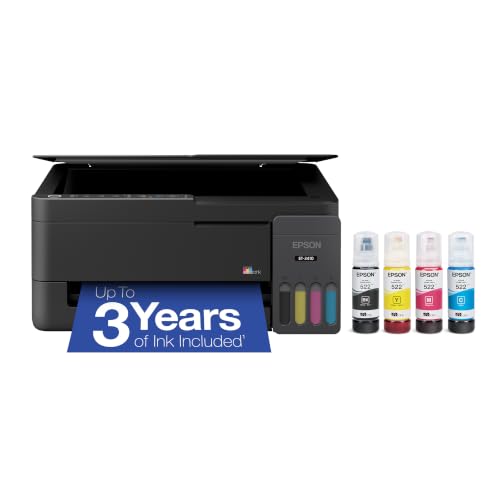
One of the biggest advantages of Epson printers is the EcoTank series, which uses supersized refillable ink tanks instead of traditional cartridges. Each set of ink bottles can print thousands of pages, drastically reducing the cost per page. For example, the Epson EcoTank ET-2410 includes enough ink to last up to three years, equivalent to about 80 cartridges. This is a game-changer for home users and small offices that print frequently. For more insights on cost-effective printing, read our guide to professional printers.
Speed and Productivity
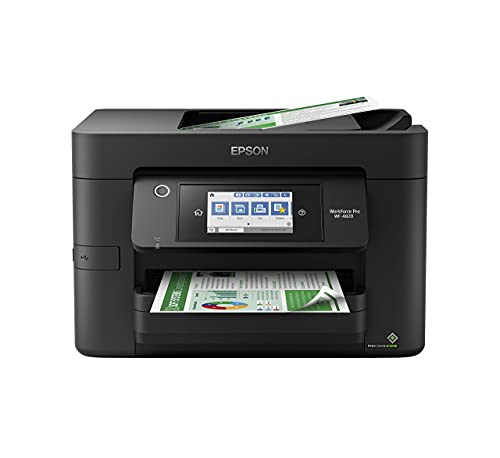
For busy environments, print speed and workflow features matter. The Epson Workforce Pro WF-4820 delivers up to 25 pages per minute in black and includes automatic two-sided printing and a 35-page automatic document feeder. Its PrecisionCore Heat-Free Technology ensures fast first-page-out times, making it ideal for high-volume tasks. If you work with a Chromebook, check out the best printers for Chromebook for compatibility tips.
Connectivity and Convenience
Modern Epson printers offer a variety of wireless options, including built-in Wi-Fi, Wi-Fi Direct, and Bluetooth Low Energy for easy setup. The Epson Smart Panel app lets you print and scan from your smartphone, while voice assistant support (Alexa, Google Assistant) enables hands-free printing. For iPhone users, our top printers for iPhone guide details the best mobile-compatible models. Mac users can also find dedicated recommendations in our top printers for mac users guide.
Final Thoughts
After evaluating the best Epson printers for 2026, we recommend the Epson EcoTank ET-4800 Wireless Color All-in-One for home users who want virtually zero ink costs and solid all-around performance. For office professionals who need speed, reliability, and advanced features, the Epson Workforce Pro WF-4820 Wireless Color is our top choice. Whichever model you choose, Epson offers a printer that fits your needs and budget without the ongoing expense of cartridges.
Frequently Asked Questions
Which Epson printer is best for home use?
The Epson EcoTank series is ideal for home use because it eliminates expensive cartridges. Models like the ET-4800 and ET-2410 deliver excellent print quality with very low cost per page. They are perfect for families, students, and remote workers who print a variety of documents and photos.
Is EcoTank worth the higher upfront cost?
Yes, the upfront cost is offset by the included ink that can last for years. You can print up to 6,500 color pages before refilling, and replacement ink bottles are remarkably affordable compared to cartridge equivalents. Over time, you save significantly on consumables.
What is the difference between EcoTank and Workforce series?
EcoTank printers focus on low running costs with high-capacity ink tanks, making them best for moderate to high volume printing. Workforce printers emphasize speed and office features like automatic duplexing, larger paper trays, and faster print speeds. Choose Workforce if you need high productivity; choose EcoTank for the lowest cost per page.
Can I print wirelessly from my phone with Epson printers?
Yes, most newer Epson printers support Apple AirPrint, Mopria Print Service, and the Epson Smart Panel app. You can print directly from your smartphone or tablet with ease. For iPhone-specific recommendations, see our best printers for iPhone article.



