You’re deep into a ranked match, your reflexes are sharp, and then your mouse battery dies. It’s a frustrating scenario that a wireless gaming mouse with a charging dock solves elegantly. These setups let you drop your mouse onto a base for effortless recharging, ensuring you’re always ready to play. In this guide, we’ve evaluated the best wireless gaming mouse with charging dock for 2026, covering everything from budget-friendly options to premium esports performers. Whether you prioritize featherlight weight, high-DPI sensors, or customizable RGB, there’s a model here for you. For more on battery performance, check out our roundup of the best gaming mouse with long battery life.

![DAREU Sakura Pink Wireless Gaming Mouse with Charging Dock Rechargeable RGB,12K DPI,6 Programmable Buttons High-Precision Sensor [300IPS] [1000Hz] for PC Notebook Mac](https://m.media-amazon.com/images/I/31r-BpIwBEL._SL500_.jpg "DAREU Sakura Pink Wireless Gaming Mouse with Charging Dock Rechargeable RGB,12K DPI,6 Programmable Buttons High-Precision Sensor [300IPS] [1000Hz] for PC Notebook Mac")


Buying Guide: What to Look for in a Wireless Gaming Mouse with Charging Dock
Sensor and DPI Performance
A high-quality optical sensor is the heart of any gaming mouse. Models like the ATTACK SHARK X11 and EPOMAKER NEX Lite use the PAW3311 sensor, offering up to 22,000 or 12,000 DPI respectively, with 300 IPS tracking and 35G acceleration. This ensures pixel-perfect aiming and smooth cursor movement across fast-paced shooters and strategy games. For competitive play, look for a sensor with adjustable DPI levels and a 1,000Hz polling rate.
Weight and Ergonomics
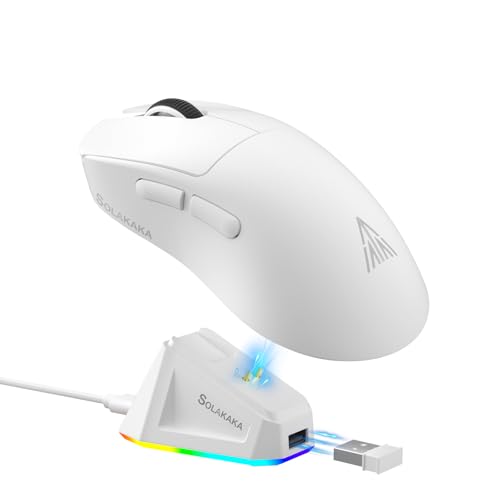
Lightweight mice reduce fatigue during long sessions. Many of our picks weigh between 62 and 85 grams, with the SOLAKAKA SM822 and ATTACK SHARK X11 coming in at just 62g. Ergonomics also matter: the DAREU Sakura Pink offers a claw-grip-friendly symmetrical shape, while the EPOMAKER NEX Lite is designed for medium-to-large hands. If you prefer a palm grip, see our guide to the best wireless gaming mouse for palm grip.
Connectivity and Battery Life
Tri-mode connectivity (2.4GHz, Bluetooth, USB-C wired) gives you flexibility across devices. The Razer Viper Ultimate uses Razer HyperSpeed wireless for ultra-low latency, and its battery lasts up to 70 hours. For extended play, a charging dock is a lifesaver: simply place the mouse on its base after each session. Many docks also store the USB receiver, keeping your desk tidy.
Charging Dock Design and Extra Features
Not all docks are equal. Magnetic alignment, like on the DAREU Sakura Pink and SOLAKAKA SM822, ensures effortless placement. RGB lighting on the dock adds ambiance, and some models, like the EPOMAKER NEX Lite, include OLED screens that display DPI, battery, and connection mode. Programmable buttons let you customize macros, explore our list of the best gaming mouse with programmable buttons for more ideas.
For those who love RGB aesthetics, we also have a roundup of the best gaming mouse with RGB. And if you need more than five buttons, check out the best gaming mouse with extra buttons.
Final Thoughts
Whether you’re a competitive esports player or a casual gamer, a wireless gaming mouse with a charging dock eliminates battery anxiety and keeps your setup streamlined. For top-tier performance and a proven track record, the Razer Viper Ultimate Lightweight Wireless delivers a 74g frame, 20K DPI sensor, and 70-hour battery life with a stylish RGB dock. If you’re on a budget but don’t want to compromise on features, the ATTACK SHARK X11 Wireless Gaming Mouse offers a PAW3311 sensor, tri-mode connectivity, and a magnetic charging dock at an accessible price point. Choose the one that fits your grip and playstyle, and enjoy uninterrupted gaming sessions.
Frequently Asked Questions
How does a charging dock work with a wireless gaming mouse?
The dock connects to your computer via USB and provides a dedicated spot to store and recharge the mouse. Most docks use pogo pins or magnetic contacts to transfer power, so you simply set the mouse on the base and it begins charging automatically. Some docks also double as a receiver hub for the 2.4GHz dongle.
What is the advantage of a magnetic charging dock?
Magnetic docks ensure perfect alignment every time, so you don’t have to fiddle with connectors. They also hold the mouse securely, preventing accidental disconnections if you bump the desk. Many users find this design more convenient than traditional contact-based docks.
Are wireless gaming mice with charging docks good for competitive gaming?
Yes, when they feature low-latency wireless technology (like 2.4GHz) and a high-performance sensor. Models such as the Razer Viper Ultimate and ATTACK SHARK X11 offer 1,000Hz polling rates and sub-millisecond response times, making them suitable for fast-paced titles. The charging dock ensures you never have to pause a match to swap batteries.
How long does the battery last on these mice?
Battery life varies by model. The Razer Viper Ultimate lasts up to 70 hours, while lightweight options like the ATTACK SHARK X11 and EPOMAKER NEX Lite typically offer 30 to 50 hours depending on RGB usage. Charging docks make it easy to top off the battery between sessions, so you rarely run out. For more on marathon sessions, see our best gaming mouse with long battery life guide.