

You’ve pieced together the perfect water-cooling loop—a high-performance CPU block, a powerful pump, and a radiator that promises to keep temperatures low. But when you go to mount it all, you realize your current case can’t fit the 360mm radiator, and the pump has nowhere to go. This is a common problem for PC builders who want the superior cooling and quiet operation that water cooling offers. This guide is here to help you avoid that frustration. We’ve reviewed a curated selection of PC cases specifically designed to accommodate water cooling components, whether you’re using an all-in-one (AIO) cooler or a custom loop. We’ll cover key features like radiator support, pump mounting options, and overall airflow, so you can choose a case that not only fits your hardware but also makes building and maintaining your system a breeze.





Buying Guide: What to Look for in a Water Cooling Case
When you’re choosing a case for water cooling, you can’t just grab any tower that looks cool. You need to pay close attention to a few critical specifications that will determine whether your build is a success or a headache. Let’s break down the most important factors to consider before you make a purchase.
Radiator Support and Clearance
The first thing to check is radiator support. Not all cases can fit a 360mm radiator, which is the most common size for high-performance cooling. Look for cases that explicitly state support for 360mm radiators, and also check where they can be mounted—top, front, or bottom. This matters because a thick radiator in the front might interfere with a long graphics card.
Also, consider the thickness and length of the radiator. Some cases have limited space for push-pull fan configurations, so measure the available space in your case. For more in-depth guidance on this, you can check our guide on 360mm radiator cases to see which models offer the most flexibility.
Pump and Reservoir Mounting Options
For custom water cooling loops, you need a place to mount the pump and reservoir. Some cases come with dedicated brackets or mounting points for these components. Others might require you to use drive bays or get creative with zip ties. Check if the case has multiple mounting positions, as this gives you more flexibility in designing your loop’s layout.
If you’re using an all-in-one cooler, you don’t need to worry about pump mounting since it’s integrated into the CPU block. However, you still need to ensure that the case has enough clearance for the pump and tubes. For a deeper dive into AIO-specific cases, read our article on 360mm AIO cases.
Airflow and Fan Mounting
Water cooling is only effective if the hot air inside the case is exhausted properly. A case with poor airflow will cause your water temperature to rise, reducing cooling performance. Look for cases with multiple fan mounts (at least 3-4) and good intake and exhaust paths. Mesh front panels are excellent for airflow, but they can let in more dust.
Also, check the maximum number of fans the case can support. More fans mean better airflow, but also more noise. You’ll want to strike a balance. For more tips on maximizing airflow, see our guide to high-airflow PC cases.
Drive Bays and Cable Management
Water cooling components, especially pumps and reservoirs, can take up a lot of space. You’ll want a case that offers plenty of room for drives and cables. Look for cases with a clean interior and multiple cable routing grommets. Good cable management not only looks better but also improves airflow by keeping cables out of the way.
Consider the number of 2.5-inch and 3.5-inch drive bays you need. Some cases have drive cages that can be removed to make room for a larger radiator. If you’re planning a custom loop, you might want to consider a case with a separate compartment for the PSU and drives, which helps with cable management. For more options, check out our overall best PC cases list.
Final Thoughts
Choosing the right case for water cooling is a critical decision that affects both performance and aesthetics. For most builders, we recommend the be quiet! Light Base 500 PC Case for its excellent balance of radiator support, pre-installed fans, and clean design, while those on a tighter budget or with a smaller footprint might prefer the Cooler Master N200 – Mini Tower Computer Case for its compact size and versatility. Both cases offer great water cooling potential, so you can build with confidence.
Frequently Asked Questions
What is the best case for a 360mm radiator?
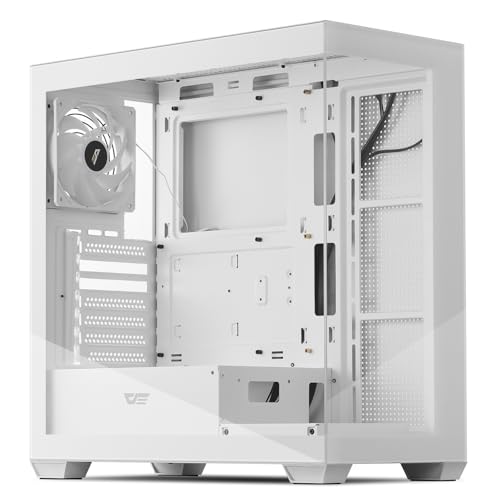
The best case for a 360mm radiator depends on your specific needs, but cases like the be quiet! Light Base 500 and the darkFlash ATX Mid-Tower offer excellent support. Look for a case that allows the radiator to be mounted on the top or front, and ensure there’s enough clearance for your GPU. Always check the radiator’s thickness and fan configuration to avoid clearance issues.
Can I water cool a CPU in a mini tower case?
Yes, many mini tower cases like the Cooler Master N200 support a 240mm liquid cooler, which is sufficient for most CPUs. However, you’ll have limited space for custom water cooling loops. If you’re planning a custom loop, you might want to consider a larger mid-tower or full-tower case for easier installation and more room for components.
Do I need a special case for water cooling?
While you don’t necessarily need a special case, using a case designed for water cooling makes the process much easier. These cases have pre-drilled holes for tube routing, dedicated pump mounts, and extra clearance for radiators and reservoirs. This reduces the risk of leaks and makes maintenance simpler, so it’s worth the investment.
Is it better to mount a radiator on the top or front?
Mounting a radiator on the top is generally better for overall system airflow, as it exhausts hot air directly out of the case. Front mounting can provide cooler intake air for the radiator, but it can raise the temperature of other components like the GPU. The best choice depends on your case’s design and your personal preference for noise and temperature.

