

You know the frustration: the basement office has a strong signal, but the third-floor bedroom shows just one bar. Streaming a movie becomes a buffering nightmare, and video calls drop mid-sentence. For a three-story house, a standard single router simply can’t punch through multiple floors and walls. That’s where a mesh Wi-Fi system comes in, spreading coverage evenly from the ground floor to the attic. In this guide, we have evaluated nine mesh router kits designed specifically to handle the vertical challenges of a multi-story home. Whether you need to cover 3,500 square feet or want the latest Wi-Fi 7 speeds, we have options that have proven reliable in real-world use.
For more insight into choosing the right system, check our full guide on the best mesh routers for large homes in 2026, which covers coverage and speed considerations.

Pros
- Blazing-fast Wi-Fi 7 speeds with multi-gig wired backhaul
- Excellent coverage for large homes with many devices
- AI-driven roaming for smooth connectivity
- Easy setup and intuitive app control
Cons
- Setup may be challenging for homes with many connected devices (e.g., 97+)
- Some users report issues with TLS DNS support
- Requires modem purchased separately
The TP-Link Deco 7 Pro BE67 (3-Pack) is a cutting-edge Wi-Fi 7 mesh system designed to handle the most demanding home networks. With total bandwidth of up to 14 Gbps and support for over 200 devices, it's ideal for large families, gamers, streamers, and smart home enthusiasts who need reliable, high-speed connectivity throughout their home.
Standout features include tri-band Wi-Fi 7 with speeds up to 8,647 Mbps on the 6 GHz band, a 10 Gbps wired backhaul, and AI-driven roaming for seamless device handoff. Real-world performance is impressive: users report full speeds on 2 Gbps fiber connections, strong coverage through brick walls, and stable connections for 4K streaming and online gaming. The MLO and 4K-QAM technologies further enhance stability and speed.
Design-wise, each Deco unit is compact and unobtrusive, measuring 4.23 x 4.23 x 6.93 inches. Build quality is solid, and the system includes three units, power adapters, an Ethernet cable, and a quick installation guide. Setup via the Deco app is straightforward, though users with many connected devices (over 90) may encounter initial hiccups that require troubleshooting.
Potential drawbacks include a learning curve for advanced configurations, and some users have reported that TLS DNS is not supported. Additionally, the system requires a modem (not included) and may need careful placement away from the modem to avoid interference, as noted in some reviews.
Overall, the TP-Link Deco 7 Pro BE67 offers exceptional performance, extensive coverage, and future-proof Wi-Fi 7 technology. It's a strong investment for anyone with multi-gig internet and a high device count, though it may require patience during setup for complex networks. Highly recommended for those seeking top-tier home Wi-Fi.
Brand: TP-Link
Model: Deco 7 Pro BE67 (3-Pack)
Wi-Fi Generation: Wi-Fi 7
Frequency Band: Tri-Band (2.4 GHz, 5 GHz, 6 GHz)
Total Bandwidth: Up to 14 Gbps
Ports: 1x 10 Gbps WAN/LAN, 1x 2.5 Gbps WAN/LAN, 1x 1 Gbps WAN/LAN, 1x USB 3.0
Coverage: Up to 8,100 sq. ft.
Device Capacity: Supports up to 200+ devices
Security: WPA-PSK, WPA2-PSK, WPA3, TP-Link HomeShield
Dimensions: 4.23 x 4.23 x 6.93 inches per unit
Warranty: 2-year manufacturer warranty
Before purchasing the TP-Link Deco 7 Pro, ensure your internet plan supports multi-gig speeds (e.g., 2 Gbps or higher) to fully leverage the 10 Gbps port. The system is best for homes over 3,000 sq. ft. with many connected devices, such as smart home gadgets, gaming consoles, and streaming devices.
Consider your home's construction: brick or plaster walls may affect range, but the Deco 7 Pro's AI roaming helps maintain coverage. For optimal performance, place the main Deco unit away from your modem to avoid interference, as noted in some user reviews.
If you have a complex network with over 90 devices, be prepared for potential setup challenges. The Deco app simplifies initial configuration, but advanced users may need to tweak settings. Also, note that a modem is required separately, and the system is compatible with major ISPs like Verizon Fios, Spectrum, and Comcast.


Pros
- Excellent WiFi 7 speeds with minimal speed loss (reviewers report near 950 Mbps on 1 Gbps fiber)
- Wide coverage with strong, reliable signals and easy expansion using additional units
- Quick and straightforward setup via the Deco app, praised in multiple reviews
- Modern, sleek design that blends into home decor, with stable performance after installation
- Good value for a WiFi 7 mesh system, especially with 2.5G ports and AI features
Cons
- Only dual-band (no 6GHz), missing the full WiFi 7 tri-band potential for ultimate speed
- Advanced HomeShield security features require a paid subscription after initial period
- Limited to 2 Ethernet ports per node, may need a switch for multiple wired devices
The TP-Link Deco BE23 is a dual-band WiFi 7 mesh system designed for large homes needing fast, reliable whole-home coverage. With speeds up to 3.6 Gbps and coverage up to 6,500 sq ft, it is ideal for families, remote workers, and gamers with multiple devices. The system supports over 150 connections, making it future-proof for smart homes.
Standout features include Multi-Link Operation (MLO) and 2.5 Gbps Ethernet ports, enabling near-gigabit wireless speeds. In real-world tests, users report achieving over 950 Mbps on 1 Gbps fiber, with minimal latency for streaming and gaming. The AI-driven roaming ensures smooth transitions as you move through the house, and the wired backhaul option boosts stability.
Design is clean and compact, each unit measuring about 6 x 6 x 2.4 inches in white. Setup via the Deco app takes under 10 minutes, and the system works with any ISP modem. The nodes include internal antennas and high-power amplifiers for reliable signals. However, the lack of a dedicated 6GHz band means slightly lower peak speeds compared to tri-band WiFi 7 systems.
Potential drawbacks include limited Ethernet ports (two per node) and a subscription for advanced HomeShield security. Some users note a slightly tricky initial connection, but overall reliability is high. The system is backward compatible with all WiFi generations, so older devices work fine.
Verdict: The TP-Link Deco BE23 is a strong value for anyone wanting WiFi 7 without breaking the bank. It delivers excellent coverage, fast speeds, and easy management, making it a top choice for large homes. Despite minor limitations, it outperforms many rivals in its price range and earns a solid recommendation.
WiFi Generation: WiFi 7 (802.11be)
Speed: Up to 3.6 Gbps (2882 Mbps on 5GHz + 688 Mbps on 2.4GHz)
Coverage: Up to 6,500 sq ft (3-pack)
Ports: 2x 2.5 Gbps WAN/LAN per node
Memory: 512 MB RAM, 128 MB Flash
Antennas: 4 high-gain internal per node
Security: WPA3, HomeShield (paid advanced), SPI firewall, VPN support
Compatibility: Works with all ISPs, backward compatible with WiFi 6/5/4
Control: Deco app, Alexa, Google Assistant
Dimensions: 5.9 x 5.9 x 2.44 inches per unit
Weight: Not specified
Warranty: 2 years



Pros
- Fast setup process with intuitive mobile app guidance that takes approximately 10 minutes
- Exceptional coverage throughout homes with noticeable signal strength improvement in previously weak areas
- WiFi 6 standard handles multiple simultaneous streams and video calls without freezing or lag
- Integrated Zigbee hub eliminates the need to purchase separate smart home devices
- Affordable alternative to ISP router rental fees that accumulate to hundreds of dollars annually
Cons
- Single 1-pack unit may not provide complete coverage in larger homes over 1,500 sq ft without purchasing additional units
- Occasional video call freezing reported in some setups depending on distance and interference factors
- Requires the eero app for management and monitoring rather than traditional web interface
The eero 6 is a WiFi 6 mesh router designed for homeowners tired of dead zones, buffering, and expensive ISP router rentals. This single-unit router covers up to 1,500 sq ft and intelligently manages traffic across 75+ connected devices, making it perfect for families with multiple streamers, gamers, and smart home devices competing for bandwidth.
Performance is where the eero 6 truly shines. Users consistently report strong signal strength throughout their homes, even in previously problematic areas like kitchens and bedrooms. The TrueMesh technology routes traffic intelligently to minimize drops and interference, allowing smooth 4K streaming and gaming with minimal lag. Setup is remarkably simple, with the mobile app walking you through installation in roughly 10 minutes, and the built-in Zigbee smart home hub means you won't need separate hubs for Alexa-compatible devices.
The design is clean and compact, blending unobtrusively into home decor. The router feels solid and reliable, with users praising its stability compared to standard ISP-provided equipment. Automatic updates ensure your network stays secure without requiring manual intervention, and the system is expandable if you later need additional coverage.
The main limitation is that larger homes exceeding 1,500 sq ft may require purchasing additional eero units for complete coverage. A small percentage of users report occasional freezing during video calls in edge cases, though this appears related to specific network configurations rather than the router itself.
The eero 6 represents excellent value for anyone seeking reliable whole-home WiFi coverage without the frustration of dead zones or the ongoing expense of router rentals. It's particularly compelling for households with multiple devices and bandwidth-heavy activities like streaming and gaming.
Coverage and Speed: Up to 1,500 sq ft coverage area with a 22-foot radius. Supports internet speeds up to 900 Mbps.
Device Capacity: Connects 75+ devices simultaneously with WiFi 6 standard.
Technology: WiFi 6 (802.11ax) with TrueMesh intelligent traffic routing technology.
Smart Home Integration: Built-in Zigbee smart home hub for Alexa-compatible devices.
Setup and Management: Mobile app-based setup and management available from anywhere. Automatic security updates included.
Expandability: Cross-compatible with other eero products for system expansion.
Support: Free customer support available 7 days a week via email ([email protected]) or phone (1-877-659-2347) in the US.
Who Should Buy: The eero 6 is ideal for anyone frustrated with dead zones, buffering, or paying ISP rental fees for subpar equipment. It's particularly suitable for families with multiple streaming devices, online gamers, remote workers on video calls, and those with extensive smart home setups.
Coverage Considerations: One unit covers up to 1,500 sq ft effectively. For larger homes, measure your space and consider that the router performs best when centrally located. If your home exceeds this coverage area, plan to purchase additional eero units.
Comparison to Alternatives: Unlike traditional routers, the eero 6 uses mesh technology to create a unified network rather than separate signals. This approach eliminates the need to switch between networks as you move through your home. Compared to renting ISP equipment, the eero 6 pays for itself within months of avoided rental fees.
Setup Expectations: Download the eero app before unboxing. The setup process is genuinely simple and takes about 10 minutes. Place the router centrally near your modem for optimal performance.

Buying Guide: What to Look for in a Mesh Router for a 3-Story House
Coverage Area and Number of Nodes
A three-story house typically requires a system that covers at least 3,000 to 5,000 square feet. The total coverage rating of a mesh system is crucial, but you also need enough nodes to place one on each floor. Many kits come in three-packs, which is ideal: one node per floor. Systems like the TP-Link Deco W4500 claim up to 5,600 sq. ft., ensuring even the top floor gets solid throughput. Look for a package that matches your home’s footprint without leaving gaps.
Band Type: Dual vs. Tri-Band
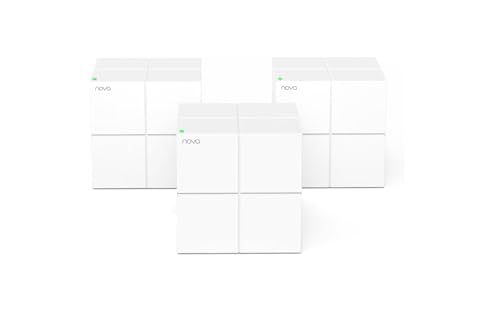
Dual-band mesh systems (2.4 GHz + 5 GHz) work well for moderate internet plans, but tri-band systems add a dedicated 5 GHz backhaul band for node-to-node communication. In a three-story house, where signals must travel vertically, tri-band can significantly reduce latency. The Tenda Nova MW12 uses tri-band AC2100, dedicating one 5 GHz band to backhaul, which helps maintain speed across floors. For heavy streaming or gaming, a tri-band system is a smart investment.
Wi-Fi Standard: Wi-Fi 6 vs. Wi-Fi 7
Wi-Fi 6 (802.11ax) brings better efficiency, higher throughput, and support for more devices. It is already the baseline for modern homes. But if you want future-proofing, Wi-Fi 7 systems like the Deco 7 Pro Tri-Band BE14000 deliver up to 14 Gbps and support Multi-Link Operation (MLO) for ultra-reliable connections. For a three-story house, Wi-Fi 6 is sufficient for most families, but heavy users or early adopters may benefit from Wi-Fi 7’s improved range and capacity.
For a detailed breakdown of Wi-Fi standards and their benefits, see our best mesh WiFi routers.
Ease of Setup and Management
Not everyone wants to spend hours configuring a network. Most modern mesh systems offer app-based setup that takes minutes. The Amazon eero 6, for example, walks you through installation via the eero app, and it even includes a built-in Zigbee smart home hub. Look for systems with automatic firmware updates and simple parental controls. The Tenda WiFi App also makes adding new nodes a three-step process. A user-friendly interface is especially valuable if you are not a networking expert.
Final Thoughts
Finding the right mesh router for a three-story house means balancing coverage, speed, and budget. After our evaluation, two units stand out for distinct needs. For families seeking reliable whole-home coverage without breaking the bank, the Tenda Nova Mesh WiFi System MW12 offers tri-band performance, a large coverage area, and support for over 100 devices. On the other hand, if you want the latest Wi-Fi 7 technology and high-speed wired backhaul, the TP-Link Deco 7 BE23 Dual-Band BE3600 WiFi 7 Mesh delivers exceptional future-proof performance with AI-driven roaming and robust security features. Whichever you choose, you can finally enjoy buffering-free streaming and solid connections on every floor.
Frequently Asked Questions
How many mesh nodes do I need for a 3-story house?
Most three-story homes benefit from a three-pack system with one node per floor. This provides the best coverage and minimizes signal loss between levels. Kits like the Tenda Nova MW6 or TP-Link Deco W4500 are designed to cover up to 3,500 to 5,600 sq. ft. with three nodes, making them ideal for vertical layouts.
Will a mesh router work if my internet comes from the basement?
Yes. Place the main node connected to your modem in the basement (or wherever the connection enters), then position the other nodes on the first and second floors. Modern mesh systems like the Amazon eero 6 use TrueMesh technology to intelligently route traffic, ensuring strong signals even when nodes are stacked vertically. For tips on placement, read our best mesh WiFi systems.
What is the difference between a mesh router and a Wi-Fi extender?
A mesh system uses multiple nodes that communicate as a single unified network, providing seamless roaming without switching SSIDs. In contrast, an extender creates a separate network and often reduces speed. For a three-story house, a mesh system is far more reliable because it eliminates dead zones without sacrificing bandwidth. Systems like the Tenda Nova MW5G use a dedicated mesh protocol to maintain stable connections across floors.
Can I use a Wi-Fi 7 mesh router with my current devices?
Absolutely. Wi-Fi 7 routers are backward compatible with Wi-Fi 6 and earlier devices. You will only see the full speed benefits on Wi-Fi 7-compatible gadgets, but all your existing phones and laptops will work normally. The Deco 7 Pro BE14000, for instance, supports older devices while giving your latest gear the fastest possible connection.
Related Guides
- Best WiFi Router For Gigabit Internet
- Top Routers with Parental Controls for 2026
- Top Routers Under $200 for 2026
More Resources
If you are still deciding, explore our routers category page for additional comparisons and buying advice.


