🔥 TV Black Friday Deals 2026: picks worth watching →
Your Android phone memory is full again, and you can’t install that new app or save another video. It’s a familiar frustration. Adding a microSD card is the quickest way to reclaim your freedom, but not all cards deliver the speed your device needs. In this guide, we review the best SD cards for Android phones in 2026, focusing on real-world performance, capacity options, and compatibility. Whether you shoot a lot of 4K video, play demanding games, or just want extra room for music and photos, we have you covered. For even more storage solutions, check out our roundup of top SD cards for raspberry pi projects.


Buying Guide
Read and Write Speed
The speed rating of a microSD card directly affects how quickly your phone loads apps, saves photos, and transfers files. Look for the UHS Speed Class and Video Speed Class ratings. For Android phones, a card with U1 or U3 and V10 or V30 ensures smooth Full HD video recording. The Sandisk Ultra cards in our list offer up to 195MB/s read speeds when paired with a compatible reader, which means less time waiting and more time using your device. If you frequently copy large files to your computer, a faster card will pay off.
App Performance (A1/A2 Rating)
Not all microSD cards are created equal for running apps. The Application Performance Class (A1 or A2) ensures the card can handle random read/write operations needed by modern apps. A1-rated cards like the Sandisk Ultra models deliver faster app launches and smoother multitasking right from the card. If you install heavy games or productivity tools on external storage, an A1 (or better A2) card makes a real difference. For more on memory card performance in portable devices, see our best micro SD cards for nintendo 3DS guide.
Capacity and Compatibility
Android phones generally support microSDXC cards up to 1TB or more, but check your device specs first. The Sandisk Ultra line offers capacities from 128GB to 1.5TB, giving you plenty of room for movies, music, and backups. However, a card that’s too large might be overkill if you only need extra space for documents. On the other hand, a smaller 128GB card can be a cost-effective way to refresh an older phone. Also consider whether you need an adapter or a dedicated card reader. The best SD cards for nintendo 3DS article covers similar capacity considerations for handheld gaming.
Durability and Warranty
A microSD card may live inside your phone for years, so it must withstand heat, moisture, and physical shock. Sandisk backs its Ultra cards with a 10-year limited warranty, reflecting confidence in their reliability. The Acer card reader also features a heat-resistant aluminum body and protective covers on both ends. For travel or outdoor use, choosing a card with proven durability prevents data loss. If you need a rugged storage solution for another device, our best micro SD cards for steam deck list includes similarly durable options.
Final Thoughts
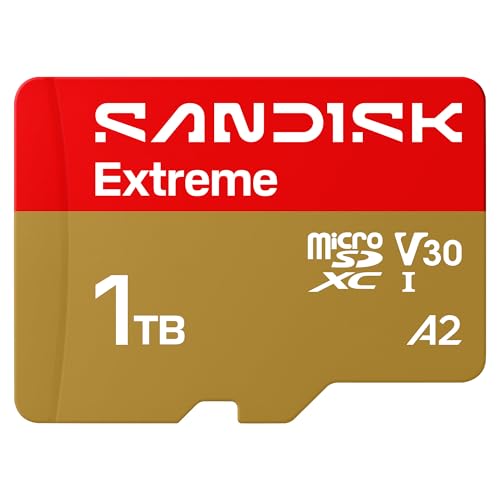
After reviewing the top contenders, the clear choice for most Android users is the SANDISK 256GB Ultra microSD Card + Adapter because it offers an excellent balance of speed, capacity, and value with A1 app performance and up to 150MB/s reads. However, if you need the absolute fastest file transfers for large video files and already have a compatible USB reader, the SANDISK 128GB Ultra microSD UHS-I Card steps up to 195MB/s and still provides A1 rating for apps. Both cards are dependable, widely compatible, and backed by strong warranties, so you can expand your phone’s storage with confidence.
Frequently Asked Questions
Can I use any microSD card in my Android phone?
Most Android phones support microSD, microSDHC, and microSDXC cards. However, you should check your phone’s official specifications for the maximum capacity and recommended speed class. Using a card that’s too slow may cause lag in apps or video recording. Always format the card in your phone before first use for best compatibility.
What is the difference between A1 and A2 microSD cards?
A1 and A2 are Application Performance Classes that guarantee minimum random read/write speeds. A2 cards have higher minimums (4000 read IOPS, 2000 write IOPS) compared to A1 (1500 read IOPS, 500 write IOPS), which means better performance for app storage. The Sandisk Ultra cards in this guide are A1-rated, so they work well for most apps. For very demanding games, an A2 card would be ideal, but it is not required for standard use.
How do I move apps to the SD card on Android?
On Android versions 6.0 and later, you can adopt the SD card as internal storage, which allows apps to be moved automatically. Alternatively, you can manually move apps via Settings > Apps > [app name] > Storage > Change. Not all apps support running from the SD card, but most games and media apps do. For a step-by-step walkthrough, see our guide on best SD cards for steam deck, which covers similar storage management.
Do I need a separate card reader for my Android phone?
Not necessarily. Many Android phones have a dedicated microSD slot, so you can insert the card directly. But if your phone lacks a slot or you need to transfer files to a computer quickly, the acer SD Card Reader USB C is a handy tool. It supports both microSD and full-size SD cards, transfers data at up to 5Gbps, and works with USB-C and USB-A devices. It is especially useful for backing up photos from a camera or drone.