

Tired of being stuck at your desk during video calls? Wireless webcams free you to move around your office, classroom, or studio without losing video quality. Whether you’re presenting at a whiteboard, demonstrating a product, or just want to adjust your camera angle mid-meeting, a wireless setup offers unmatched flexibility. This guide reviews the top wireless webcams of 2026, covering models from Gsou, OBSBOT, Hollyland, and more. We focus on key features like video resolution, battery life, and connectivity to help you find the perfect match. For a deeper look at wired alternatives, check our Best USB Webcams for 2026 guide.
In this review, we evaluated eight wireless webcams based on real-world performance, ease of use, and value. Whether you need a budget-friendly option for Zoom calls or a professional 4K camera for streaming, our picks have you covered.



Buying Guide for Wireless Webcams
Wireless Range and Connectivity
The most important factor is how far you can roam. Most wireless webcams use a 2.4GHz USB receiver, offering a range of 65 feet or more. Some models, like the j5create Wireless Extender, use 5GHz for lower latency but require line-of-sight. For large rooms or open spaces, prioritize models with a proven range. If you plan to use the camera in a different room than your computer, check that the signal can penetrate walls.
For a comparison of wired options, see our Best Webcams for Laptops in 2026 guide.
Video Quality and Resolution
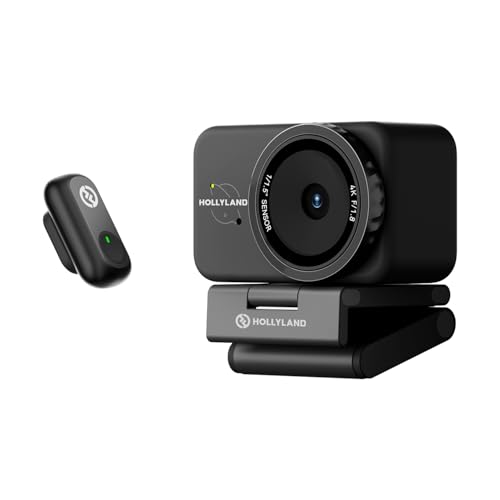
1080p at 30fps is the standard for smooth video calls, but 4K models like the OBSBOT Tail Air and Hollyland Lyra offer superior clarity for streaming. Look for a wide field of view (at least 80 degrees) to capture more of your background. Manual focus rings, like on the Gsou W33, let you fine-tune sharpness for close-ups. Avoid cameras that only support 720p for professional use.
For high-resolution streaming setups, our Best Graphics Cards for Streaming in 2026 guide can help.
Battery Life and Power Options
Wireless webcams come in two flavors: battery-powered or USB-powered. Battery models like the Gsou 1080P (5200mAh) last up to 9 hours, perfect for all-day meetings. Others, like the SynthMeet 1080P, require a USB cable for power but still offer wireless video transmission. If you need portability, choose a model with a built-in rechargeable battery and consider charging time.
Compatibility and Ease of Use
Most wireless webcams are plug-and-play with Windows, macOS, and Chrome OS. Check that the camera works with your preferred software—Zoom, Teams, OBS, etc. Some models like the Hollyland Lyra offer advanced AI tracking and auto-framing, which require software installation. For gaming and streaming, ensure low latency and support for popular platforms. For more on gaming performance, see our top graphics cards for overwatch guide.
Also consider mounting options: tripod threads, magnetic bases, and monitor clips add flexibility. Privacy shutters are a welcome feature for security-conscious users.
Final Thoughts
Choosing the right wireless webcam depends on your primary use case. For long meetings and flexible placement, the Gsou Wireless Webcam for PC/Wireless Streaming offers excellent battery life and reliable 1080p video. If you need professional 4K quality with AI tracking for streaming or presentations, the OBSBOT Tail Air 4K Streaming Camera delivers studio-grade performance in a compact design. Both models provide the freedom to move without compromising on video clarity, making them standout choices for 2026.
Frequently Asked Questions
Are wireless webcams as reliable as wired ones?
Yes, modern wireless webcams use dedicated 2.4GHz or 5GHz connections that deliver low-latency, stable video. They are as reliable as wired models for most applications, especially in open spaces. For the highest reliability in professional studios, some users still prefer wired, but wireless technology has advanced significantly. Compare with our Best USB Webcams for 2026 to see the differences.
How long do wireless webcam batteries last?
Battery life varies by model. Entry-level cameras may last 4 to 5 hours, while premium models like the Gsou 1080P with 5200mAh battery can run up to 9 hours on a single charge. Always check the manufacturer’s specifications and consider your typical meeting length. Some cameras can be used while charging via USB.
Can I use a wireless webcam for live streaming on Twitch or YouTube?
Absolutely. Many wireless webcams support 1080p at 30fps, which is sufficient for most live streams. For higher quality, 4K models like the OBSBOT Tail Air or Hollyland Lyra provide excellent results. Ensure your streaming software recognizes the camera and that you have a strong wireless signal. For GPU-intensive streaming, a good graphics card helps—see our Best Graphics Cards for Apex Legends in 2026 guide for recommendations.
What is the best wireless webcam for Zoom meetings in 2026?
For Zoom meetings, look for a webcam with good low-light performance, a built-in noise-canceling microphone, and plug-and-play compatibility. The Gsou Wireless Webcam with Auto Privacy Cover offers a manual focus ring and a privacy shutter, making it a strong choice. The SynthMeet 1080P is a budget-friendly option with a noise-reducing mic. Both work seamlessly with Zoom.


