

You are a tutor preparing for a late-afternoon session. The student is struggling with a geometry problem, and you need to share a hand-drawn diagram in real time. Your laptop’s built-in camera cannot capture the paper clearly, and the lighting in your room is dim. This is where a dedicated webcam or document camera transforms your online tutoring. In this guide, we evaluate three versatile options: a flexible document camera, a budget-friendly 1080p conference camera, and a feature-rich streaming webcam with an integrated ring light. Each product serves different tutoring scenarios, from showing physical documents to maintaining eye contact during live lessons. If you are using a Linux system, check out our best webcams for ubuntu guide for compatibility insights.




Buying Guide: What to Look for in a Webcam for Online Tutoring
Image Quality and Resolution
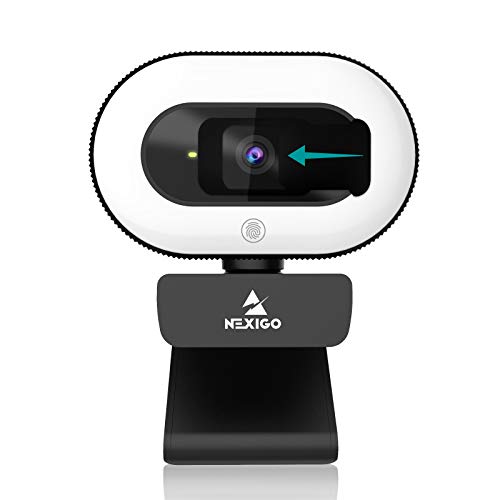
For online tutoring, clarity is paramount. A 1080p resolution ensures that text, diagrams, and facial expressions are sharp. Higher resolution, like 8MP from the Sonew document camera, is ideal for capturing fine details on printed materials. Look for autofocus features, as they eliminate the need to manually adjust the lens when switching between whiteboard and face. The NexiGo N930E offers intelligent autofocus that keeps you in focus even as you move closer to the camera.
Lighting and Low-Light Performance
Many tutoring sessions happen in rooms with variable lighting. A webcam with a built-in ring light, like the NexiGo StreamCam N930E, provides three levels of adjustable lighting to eliminate shadows and glare. This is especially helpful if you teach in the evening or from a corner with poor natural light. For document cameras, the Sonew model relies on external lighting, but its flexible arm helps position the camera to avoid reflections. If you use a Mac Mini, our Best Webcams for Mac Mini guide covers compatible models with good low-light performance.
Ease of Use and Compatibility
Plug-and-play functionality is a must for busy educators. All three products connect via USB 2.0 and require no additional drivers. The Gadpiparty camera is especially simple: just plug it in and start streaming. The NexiGo and Sonew also offer straightforward setup, though the Sonew document camera has a stable base that may need a bit more desk space. Compatibility with major operating systems (Windows, macOS, Chrome OS, Linux) ensures you can use the webcam with your existing devices. For MacBook Pro users, see our Best Webcams for MacBook Pro recommendations.
Built-In Microphone and Audio Quality
Clear audio is as important as video. The NexiGo N930E includes a noise-canceling microphone that reduces background hum, ideal for tutoring from a busy home. The Gadpiparty camera also has a built-in mic, though it is basic. For document cameras like the Sonew, you may need a separate microphone if you plan to narrate while showing documents. If you rely on Windows Hello for secure logins, check our Best Windows Hello Facial Recognition Webcams for options that combine security with tutoring needs.
Final Thoughts
After evaluating these three webcams, the best choice depends on your tutoring style. For teachers who frequently demonstrate handwritten work or show physical objects, the Document Camera USB 2.0 8MP Overhead Projector from Sonew offers unmatched flexibility with its adjustable arm and high-resolution imaging. If you primarily conduct face-to-face video sessions and want excellent lighting control, the NexiGo StreamCam N930E with Software provides a built-in ring light and autofocus that keep you looking professional in any environment. Both are reliable tools that will elevate your online tutoring in 2026.
Frequently Asked Questions
Can I use a document camera for online tutoring? Yes, document cameras like the Sonew are excellent for showing textbooks, worksheets, and 3D objects. They provide a top-down view that a regular webcam cannot match.
Do I need a webcam with a ring light for tutoring? A ring light helps if you tutor in dim or uneven lighting. The NexiGo N930E has adjustable brightness levels, making it easier for students to see your face clearly.
What resolution is best for online tutoring in 2026? 1080p is the standard for clear video. For document cameras, 8MP provides extra detail for fine print. Both work well with platforms like Zoom and Google Meet.
Are these webcams compatible with Mac computers? Yes, all three models work with macOS 10.6 and higher. For specific Mac models, refer to our Best Webcams for Mac guide for additional compatibility details.


