

🔥 TV Black Friday Deals 2026: picks worth watching →
Staring into a grainy, pixelated webcam during an important meeting can hurt your professional image. You deserve a camera that makes you look sharp and keeps your logins secure, especially if you are working from home or streaming content. This guide covers the best webcams for Windows, focusing on models that offer Windows Hello facial recognition, high-resolution video, and built-in microphones for 2026.
Whether you need a budget-friendly 2K camera for daily calls or a premium 4K streaming powerhouse, we have assessed seven verified options. For more options tailored to specific setups, check out our roundup of top Windows Hello webcams.


Buying Guide
Resolution and Video Quality
For most Windows users, a 1080p webcam delivers sharp, clear video that works well for meetings and streaming. If you want the ultimate clarity, 4K models provide exceptional detail and are ideal for content creation or high-end conferencing. Consider your primary use: you can find reliable facial recognition webcams that also offer 4K quality.
Look for features like autofocus and low-light correction. These ensure you stay in focus even if you move and look professional in dim lighting.
Windows Hello Compatibility
Windows Hello allows you to log into your PC instantly by simply looking at your webcam. Many top webcams now include dedicated infrared sensors for this feature, making it faster and more secure than typing a password. If you use Windows 10 or 11, this is a game-changer for daily convenience.
Not every webcam supports it, so verify compatibility before purchasing. Models that include both optical and IR sensors offer the most reliable performance.
Microphone and Audio Quality
Your voice matters as much as your video. Look for built-in microphones with noise reduction technology. Dual omnidirectional mics are common on higher-end models and can pick up your voice clearly from a few feet away while filtering out background noise like fans or keyboard clicks.
If you frequently work in noisy environments, consider a webcam with advanced noise-canceling features. Good audio makes a noticeable difference in meetings.
Field of View and Mounting Flexibility
A wider field of view (around 80 to 95 degrees) lets you fit more into the frame, perfect for group calls or showing your workspace. Narrower angles (like 65 degrees) are better for single-person head-and-shoulders shots. Also consider how the camera mounts: most attach to monitors or laptops, but a tripod-ready base gives you more placement options.
Models with pan, tilt, and zoom controls add extra flexibility, letting you adjust the frame without moving the camera.
Final Thoughts
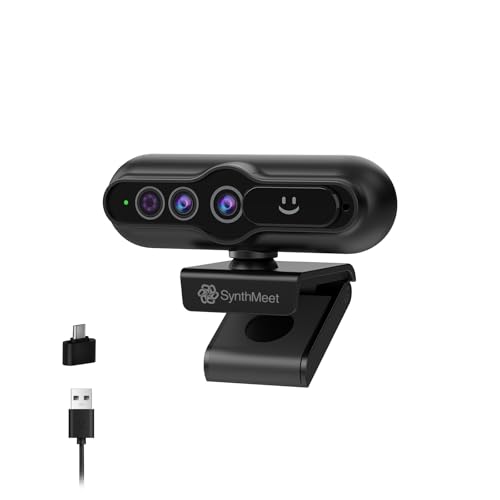
After reviewing the top options, the best webcam for most Windows users balances security, video quality, and audio performance. For a premium experience with flawless Windows Hello login, choose the 4K Webcam with Windows Hello, Facial Recognition from SynthMeet. If you want a versatile 1080p model with a wide lens and dual mics at a more accessible price, the Lenovo HD 1080p Webcam (510 FHD) is a solid choice that works perfectly for meetings and streaming.
Frequently Asked Questions
What is the best webcam for Windows Hello in 2026?
The best webcams for Windows Hello include models from SynthMeet and Lenovo that integrate dedicated IR sensors. For a reliable option with fast login, the 4K SynthMeet camera is highly rated.
Does a 4K webcam work on all Windows computers?
Yes, most 4K webcams are plug-and-play with USB or USB-C connections and work on Windows 10 and 11. However, ensure your computer has a capable graphics processor to handle 4K video without lag.
How do I set up Windows Hello on my webcam?
After plugging in a compatible webcam, go to Windows Settings, select Accounts, then Sign-in options, and choose Windows Hello Face. Follow the on-screen instructions to position your face in front of the camera.
Do these webcams work with streaming software like OBS?
Yes, all the reviewed webcams, including the Logitech Brio and Lenovo models, are compatible with streaming software such as OBS Studio, Zoom, and Microsoft Teams.


