🔥 TV Black Friday Deals 2026: picks worth watching →
When every millisecond counts, your laptop can be the difference between victory and defeat. Competitive gaming demands hardware that delivers ultra-smooth visuals, lightning-fast response times, and consistent high frame rates. Whether you are climbing the ranks in Valorant, dominating in Call of Duty, or mastering League of Legends, having the right machine is non-negotiable. In this guide, we review the top gaming laptops for competitive gaming in 2026, focusing on models with the latest RTX 50 series GPUs, high refresh rate displays, and AI-enhanced performance to give you a genuine edge.





What to Look For in a Competitive Gaming Laptop
Display Refresh Rate and Response Time
Your display is your window to the game. For competitive play, a high refresh rate minimizes motion blur and ensures you see enemy movements as they happen. Look for panels with at least 144Hz, though 180Hz or higher can make a noticeable difference in fast-paced shooters. Response times under 5ms are preferable to minimize ghosting. Many of the laptops we reviewed feature 144Hz or 180Hz screens, with some offering WQXGA resolution for sharper details without sacrificing speed.
GPU Performance and AI Features
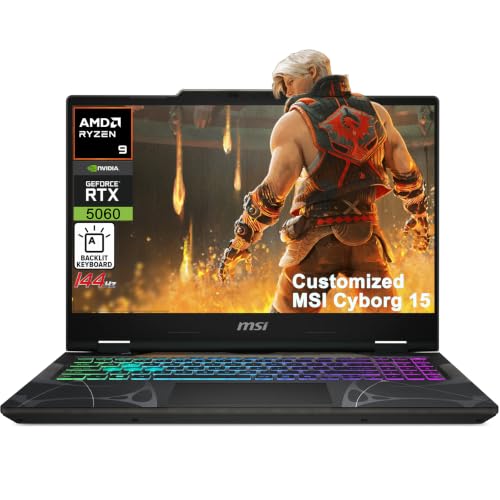
Graphics processing power directly affects frame rates and visual fidelity. The latest NVIDIA GeForce RTX 50 series GPUs, such as the RTX 5060, bring full ray tracing and DLSS 4 technology. DLSS uses AI to boost frame rates while maintaining image quality, giving you a competitive advantage in supported titles. For competitive gaming, raw performance matters, but AI enhancements can optimize settings on the fly. Models with high AI TOPS ratings, like the Acer Nitro V 16S, leverage neural rendering to deliver smoother gameplay. For a broader look at gaming laptops, visit our top-rated gaming laptops for casual gamers guide if you also play less demanding games.
Processor and Thermal Design
A fast CPU ensures your laptop can keep up with game logic and multitasking. Intel Core 7 and AMD Ryzen 7 processors with high turbo frequencies are ideal. Equally important is cooling. Sustained performance requires effective thermal management, so look for laptops with advanced cooling chambers or dual fans. Alienware’s Cryo-Chamber technology and MSI’s Cooler Boost design are excellent examples. Overheating can lead to throttling, which ruins your gaming session. Choosing a well-cooled laptop helps maintain peak performance during long sessions.
RAM and Storage Speed
Modern competitive games benefit from fast memory and storage. At least 16GB of DDR5 RAM is recommended, and 32GB provides future-proofing. NVMe SSDs reduce load times significantly, allowing you to jump into matches quickly. Some models offer expandable storage via extra M.2 slots. If you often carry your laptop to LAN events, lightweight designs and durable builds are also important. Check out our best laptop backpacks for students for carrying solutions.
Final Thoughts
Choosing the right competitive gaming laptop comes down to balancing refresh rates, GPU power, and build quality. For an all-around powerhouse with cutting edge AI and a vibrant 180Hz display, we recommend the Acer Nitro V 16S AI Gaming Laptop. If you prefer a premium design with proven Alienware cooling and a WQXGA screen, the Alienware 16 Aurora Gaming Laptop is an outstanding choice. Whichever you pick, you will gain a reliable tool to elevate your esports performance.
Frequently Asked Questions
What specs are most important for competitive gaming?
A high refresh rate display (144Hz or higher), a powerful GPU (like the RTX 4060 or above), and a fast CPU are critical. Low input lag and good cooling also matter. In 2026, AI features like DLSS 4 can give you extra FPS without sacrificing visuals.
Is an RTX 50 series laptop worth it for esports?
Yes, especially if you play titles that support ray tracing or want the highest frame rates. The RTX 5060 and similar GPUs offer DLSS 4 multi frame generation, which can push frame rates beyond what the display can handle. For pure esports titles like CS2 or Valorant, even an RTX 4050 can suffice, but the 50 series provides future-proofing.
How much RAM do I need for competitive gaming in 2026?
16GB is the current sweet spot, but 32GB is becoming more common for multitasking and future titles. Faster DDR5 RAM helps reduce loading times and stutter. Many gaming laptops now come with 16GB or 32GB, so choose based on your budget.
Do AI features really improve gaming performance?
AI technologies like NVIDIA DLSS and AMD FSR use machine learning to upscale lower resolution images, effectively boosting FPS with minimal quality loss. In 2026, many games support these features, making them a valuable addition for competitive gamers who want higher frame rates without lowering settings. For more on versatile gaming laptops, see our best gaming laptops for everyday use guide.