

🔥 TV Black Friday Deals 2026: picks worth watching →
You’re on a construction site, the dust is thick, and your laptop slips from the workbench. It hits the concrete, but you don’t flinch because you’re using a rugged business laptop built for the job. Whether you’re in field service, public safety, or industrial operations, you need a machine that can survive the same conditions you do. In this guide, we’ve evaluated the best rugged business laptops for 2026 to help you find a durable, powerful companion that won’t let you down when the going gets tough.
We focused on models from Dell’s Latitude Rugged line, which are engineered to military-grade standards for drops, vibration, and extreme temperatures. If you’re also exploring other options for heavy workloads, check out our top picks for business laptops built for demanding tasks.


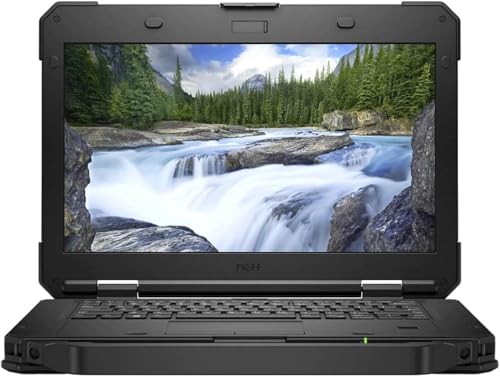


Buying Guide: How to Choose the Best Rugged Business Laptop
Before you commit to a rugged laptop, consider what matters most for your specific work environment. Not all rugged laptops are created equal, and the right choice depends on your daily tasks, the conditions you face, and your performance needs.
What Is a Rugged Laptop, and Do You Need One?
A rugged laptop is built with a reinforced chassis, sealed ports, and shock-mounted components to withstand drops, vibrations, dust, and extreme temperatures. Unlike a standard business laptop, these machines are designed to keep working even after accidental bumps or exposure to harsh environments.
If you work in construction, warehousing, automotive diagnostics, or field service, you need the extra durability. For typical office work, a standard business laptop might suffice, but if you’re frequently on the move or in unpredictable settings, a rugged model offers peace of mind.
Performance and Processing Power
Rugged laptops come with a range of processors, from older dual-core chips to the latest quad-core options. For basic tasks like email, spreadsheets, and light multitasking, a dual-core processor is sufficient. However, if you run diagnostic software, work with large files, or handle data-intensive applications, you’ll want a quad-core processor with higher clock speeds.
Consider the RAM and storage as well. More memory allows for smoother multitasking, while solid-state drives (SSDs) provide faster boot times and quicker file access. For example, the Dell Latitude Rugged 5430 Laptop (2022) with its Intel Core i7-1185G7 and 32GB RAM is a strong performer for heavy workloads. If you need more guidance on choosing a laptop for heavy workloads, our heavy-duty business laptop guide covers additional options.
Display and Touchscreen Features
Your laptop’s display is your window to your data, so it needs to be clear and readable in any lighting condition. Many rugged laptops offer full HD (1920×1080) resolution with options for touchscreens. Some models feature outdoor-viewable technology that reduces glare and boosts brightness for use in direct sunlight.
Touchscreens are particularly useful in the field, allowing you to navigate maps, fill out forms, or present data without a mouse. When choosing a display, consider the resolution, brightness, and whether a touchscreen is essential for your workflow.
Ports and Connectivity
When you’re working in the field, you need to connect to various devices, such as diagnostic tools, external monitors, or USB drives. Look for a rugged laptop with a good selection of ports, including USB-A, USB-C, HDMI, and an Ethernet port for wired network connections.
Some models also offer VGA or serial ports, which are still used in industrial settings. Make a list of the devices you need to connect and ensure the laptop has the necessary ports. The Dell Latitude Rugged 5414 Laptop, for example, includes both HDMI and VGA, making it versatile for older equipment.
Final Thoughts
Choosing the best rugged business laptop comes down to matching the machine’s durability, performance, and features with your specific work demands. For a balanced combination of power and portability, the Dell Latitude Rugged 5420 Laptop 14-Inch FHD i7 is a solid choice, while the Dell Latitude Rugged 5414 Laptop offers a more budget-friendly option without sacrificing essential ruggedness. Whichever you choose, you’ll be investing in a laptop that’s built to keep up with you, no matter where the job takes you.
Frequently Asked Questions
What is the difference between a rugged laptop and a standard laptop?
Rugged laptops are built with reinforced chassis, shock-mounted screens, and sealed ports to withstand drops, dust, and extreme temperatures. Standard laptops are not designed for harsh environments and may fail in such conditions. If you work in demanding settings, a rugged laptop is a worthwhile investment.
Can I use a rugged laptop for everyday office work?
Yes, rugged laptops can handle typical office tasks like email, web browsing, and document editing. They are often heavier and thicker than standard business laptops, but their durability doesn’t compromise performance. If you need a laptop that can transition from the office to the field, a rugged model is a versatile choice.
What does “renewed” mean for rugged laptops?
Renewed laptops are pre-owned or refurbished units that have undergone professional inspection, testing, and cleaning to ensure they meet quality standards. They may come with compatible accessories and a warranty, but not in the original packaging. Renewed rugged laptops offer a cost-effective way to get durable performance.
How much RAM do I need in a rugged business laptop?
For basic tasks, 8GB to 16GB of RAM is usually sufficient. For more demanding applications like virtualization, large spreadsheets, or diagnostic software, 32GB or more is recommended. Consider your typical workflow to determine the right amount of memory for your needs.


