🔥 Tablet Black Friday Deals: picks worth watching →
You have a tablet ready for PUBG Mobile, but every match feels like a struggle. Swiping and tapping with thumbs leaves you a second behind opponents who seem to shoot and move faster. The solution isn’t a new tablet, it’s the right accessory. In 2026, a growing number of players are adding dedicated game controllers and triggers to their tablets, turning a standard slate into a competitive gaming machine. This guide reviews four top-rated accessories that can elevate your PUBG Mobile performance on any tablet, from iPads to Android models. We focus on what matters: sensitivity, comfort, compatibility, and extra features that give you an edge.



Buying Guide: What to Look for in a Tablet PUBG Mobile Accessory
1. Sensitivity and Responsiveness
The best triggers respond instantly to your touch without noticeable delay. Capacitive silicone pads or metal sensors mimic human finger contact, so the tablet registers every press as a real tap. Avoid models that require Bluetooth pairing or batteries, mechanical or capacitive triggers are plug-and-play and never drop connection. For PUBG Mobile, even a fraction of a second matters when aiming or firing.
2. Comfort and Ergonomics
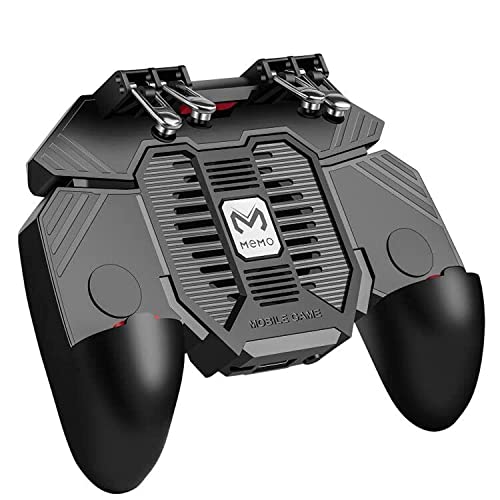
Long gaming sessions can cause hand fatigue. Look for controllers that attach securely to the back of the tablet and place triggers close to your natural finger position. Grips that extend the tablet into a console-like shape reduce strain. Some accessories include cooling fans to prevent overheating, which also helps maintain performance. Check that the design doesn’t block your view of the screen or press against volume buttons.
3. Compatibility with Tablet Size and Games
Not all triggers fit every tablet. Measure your device thickness, most accessories support tablets up to 6.5 inches or larger, but some are limited. Also confirm that the game you play (PUBG Mobile, Call of Duty Mobile, Fortnite) allows custom key mapping. All four products in this list work with PUBG Mobile and similar titles that let you drag and customize on-screen buttons. For more on choosing the right tablet for younger players, see our guide on best tablets for kids.
4. Extra Features Worth Having
Some triggers offer adjustable fire rates, recording functions, or built-in power banks. A burst-fire mode can simulate rapid taps for automatic weapons. A recording function lets you save custom click patterns. Cooling fans help prevent thermal throttling during intense matches. While not essential, these extras can give you a competitive advantage. For seniors who enjoy mobile gaming, our best tablets for seniors guide covers larger screens that benefit from these accessories.
Final Thoughts
Choosing the right accessory for PUBG Mobile on your tablet comes down to how you play. If you want a simple, no-fuss solution that works instantly, the Ytuomzi Mobile Game Controller for iPad/Tablets offers metal sensors and a comfortable back grip at a reasonable price. For players who want adjustable burst-fire and recording capabilities, the VLUOO Tablet Gaming Triggers provide advanced features without complexity. Both enhance your aim and reaction time, letting you focus on strategy instead of fumbling with on-screen controls. No matter your tablet model, these accessories transform your device into a true gaming companion.
Frequently Asked Questions
Are tablet game controllers worth it for PUBG Mobile?
Yes, especially if you find yourself losing close-range fights. Triggers let you aim and shoot with separate fingers, reducing reaction time. In 2026, many top players use controllers to gain a millisecond advantage. They are affordable and require no app or battery.
Do these triggers work with iPad?
Most triggers in this list are compatible with iPads and Android tablets. Check the product description for size limits. The Ytuomzi and VLUOO models work with tablets up to 12.9 inches. For smaller tablets, see our best learning tablets for kids guide for compatible devices.
How do I install triggers on my tablet?
Installation is straightforward. Most triggers attach via suction cups or clips on the back of the tablet. You then drag the in-game fire and aim buttons to positions that align with the triggers. No tools or software are needed. The process takes less than a minute.
Can I use multiple triggers at once?
Yes. Some accessories come with four triggers (L1/R1 and L2/R2) allowing four-finger control. The DELAM model even supports six-finger operation with a cooling fan. Using multiple triggers lets you perform complex actions like shooting while moving and jumping simultaneously.