

🔥 TV Black Friday Deals 2026: picks worth watching →
Imagine you are in a coffee shop, working on a design project on your tablet, and you need to present your work to a client on a large monitor. Or you are at home, wanting to stream a movie from your tablet to your living room TV. Many modern tablets lack a built-in HDMI port, relying instead on USB-C or wireless connections. That is where the right accessory makes all the difference. In this guide, we review the best tablets with HDMI output solutions, adapters, splitters, and wireless transmitters that turn your tablet into a powerful multimedia hub. Whether you own an iPad Pro, Samsung Galaxy Tab, or any USB-C tablet, these products let you mirror or extend your screen with ease. For more on tablet connectivity, check out our roundup of the best WiFi tablets.





![avedio links HDMI Splitter 1 in 2 Out [with 4 Ft Hdmi Cable], Mirror Only](https://m.media-amazon.com/images/I/412VNL8UP8L._SL500_.jpg "avedio links HDMI Splitter 1 in 2 Out [with 4 Ft Hdmi Cable], Mirror Only")

Buying Guide: What to Look for in a Tablet HDMI Accessory
Connection Type: USB-C vs. Wireless vs. Splitter
The first decision is how you want to connect. USB-C to HDMI adapters are the most common: they plug directly into your tablet’s USB-C port (must support DisplayPort Alt Mode) and output video to an HDMI display. These are simple, reliable, and work with most modern tablets. Wireless HDMI transmitters free you from cables, but they require a receiver connected to the display and may introduce slight latency. HDMI splitters are for duplicating one signal to multiple screens, useful if you already have an HDMI source. For most tablet users, a USB-C adapter or a wireless kit offers the best flexibility. If you are exploring tablets with advanced features, our best 5G tablets guide covers models with fast connectivity.
Resolution and Refresh Rate Support
Not all adapters support the same video quality. Look for 4K resolution at 60Hz for the sharpest, smoothest output, especially if you plan to watch movies or give presentations. Many budget adapters cap at 4K@30Hz, which is fine for static slides but may feel choppy for video. Also check if the adapter supports HDR or deep color if you need vibrant visuals. For tablet users who draw or take notes, see our top tablets with stylus for creative work.
Power Delivery and Additional Ports
When you plug an adapter into your tablet, you lose the USB-C port for charging. Some adapters include a pass-through USB-C port that supports Power Delivery (PD), allowing you to charge your tablet while displaying video. This is crucial for long sessions. Other adapters add extra USB ports or card readers, turning your tablet into a mini docking station. Consider how many ports you need before buying. For a full list of tablet accessories, visit our tablets category page.
Build Quality and Portability
You will likely carry this accessory with your tablet, so size and durability matter. Look for compact, lightweight adapters with braided cables and aluminum housings that resist heat and wear. Avoid flimsy plastic that may break after a few uses. A well-built adapter lasts for years and provides reliable signal without interference.
Final Thoughts
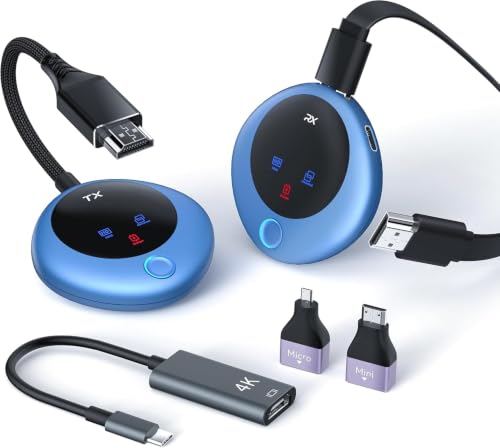
Adding HDMI output to your tablet opens up a world of possibilities, from big-screen entertainment to professional presentations. For a simple, reliable wired connection, the Anker USB C to HDMI Adapter (4K@60Hz) offers excellent build quality and plug-and-play ease. If you prefer a cable-free setup with long range, the Wireless Type-C Transmitter and HDMI Receiver lets you mirror your tablet to a display up to 328 feet away. Both options are top-rated and compatible with most USB-C tablets, ensuring you get the best experience for your needs.
Frequently Asked Questions
Can any tablet output video via USB-C?
Not all tablets support video output over USB-C. Your tablet must have a USB-C port that supports DisplayPort Alternate Mode (DP Alt Mode). Most modern iPad Pro models, Samsung Galaxy Tab S series, and many Windows tablets do. Check your device specifications before buying an adapter. For a list of compatible tablets, see our best tablets with detachable keyboards guide, which includes many models with DP Alt Mode.
Will a USB-C to HDMI adapter work with my iPhone?
Yes, iPhones from the iPhone 15 series onward use USB-C and support video output via DisplayPort Alt Mode. Earlier iPhones with Lightning ports require a Lightning to HDMI adapter (like the Apple Digital AV Adapter). The adapters in this guide are compatible with iPhone 15/16/17 and later models.
Does a wireless HDMI transmitter add noticeable lag?
Most modern wireless HDMI kits use dual-band chips and boast latency under 0.01 seconds, which is imperceptible for movies and presentations. For gaming, some users may notice slight delay, but for general use, the convenience of no cables outweighs the minimal lag. If you need zero latency, a wired adapter is the safer choice.
Can I extend my tablet screen instead of mirroring?
Screen extension (using the external display as a second desktop) depends on your tablet’s operating system. Android tablets generally only support mirroring via USB-C adapters, while some Windows tablets and iPads with iPadOS 16 or later can extend the display. Wireless transmitters often offer both mirror and extend modes for compatible devices. Check your tablet’s settings and the accessory’s features before purchase.


