🔥 TV Black Friday Deals 2026: picks worth watching →
You need a tablet that can run full desktop applications, connect to external monitors, and handle both productivity and entertainment. Windows tablets deliver that versatility by combining the portability of a slate with the full power of a PC. In this guide, we have reviewed the best windows tablets for 2026, covering rugged models for demanding environments, affordable 2-in-1s for students and remote workers, and premium options for professionals who need uncompromised performance. For more tablet recommendations, visit our Tablets category.


What to Look for in a Windows Tablet
Performance and Processing Power
The heart of any Windows tablet is its processor and memory. For smooth multitasking, look for at least an Intel Pentium or Celeron processor, with 8GB of RAM being the sweet spot for running Office apps, browsing, and streaming. Higher-end models feature Intel Core or 13th Gen chips for demanding tasks like video editing or programming. Storage options range from 128GB to 512GB SSDs, and many tablets support microSD expansion for additional files.
Display Quality and Touch Responsiveness
A vibrant touchscreen is essential for note-taking, drawing, or watching media. Full HD (1920×1200) IPS panels offer sharp details and wide viewing angles. Brightness matters, especially for outdoor use; 400 nits or higher is recommended. If you are also considering Android tablets for media consumption, our best Android tablets for watching movies guide highlights similar display priorities. For digital artists, touch responsiveness is key; explore our best android tablets for digital art picks for insights on pen support and screen quality.
Build Quality, Ruggedness, and Battery Life
Windows tablets come in various form factors. Rugged models are shockproof, dustproof, and drop-resistant, ideal for fieldwork or industrial settings. Lighter 2-in-1s with detachable keyboards are perfect for students and commuters. Battery capacity around 6000mAh provides a full day of mixed use. For outdoor adventures, you might also explore our outdoor-ready essentials for complementary gear.
Connectivity and Ports
Check for USB-C, USB-A, HDMI, and headphone jacks. Dual-band WiFi and Bluetooth 5.0 ensure fast wireless connections. Some tablets include full-size USB ports for peripherals like keyboards or scanners, while others rely on USB-C hubs. Versatile connectivity transforms your tablet into a true desktop replacement.
Final Thoughts
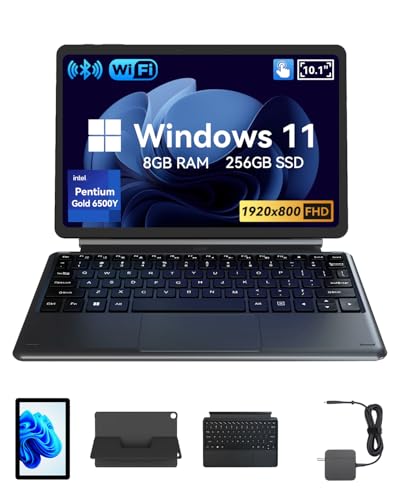
Choosing the best windows tablet depends on your lifestyle and needs. For those who work in demanding conditions or require maximum durability, the Fusion5 Built in USA 10.1” Windows 11 stands out with its rugged design, generous warranty, and powerful Intel 13th Gen processor. If you prefer a lightweight, versatile 2-in-1 that transitions easily between laptop and tablet modes, the QAZIPO 2-in-1 Laptop/Tablet offers excellent value with a vivid touchscreen and ample memory. Both options deliver the full Windows experience in portable packages, so you can stay productive wherever you go.
Frequently Asked Questions
Can a Windows tablet replace a laptop? Yes, for many users. With a detachable keyboard and full Windows 11 operating system, a Windows tablet can handle office work, web browsing, media streaming, and light creative tasks. Models with Intel processors and 8GB or more RAM come close to laptop performance. For heavy gaming or professional video editing, a dedicated laptop may still be preferable. For note-taking on the go, check out our best android tablets for note taking guide for alternatives.
What is the difference between Windows 11 Home and Pro on a tablet? Windows 11 Pro includes advanced features like BitLocker encryption, Remote Desktop, and Group Policy management, making it ideal for business users and IT professionals. Windows 11 Home is sufficient for everyday tasks like browsing, Office apps, and entertainment. Most consumer tablets come with Home, while rugged or business-oriented tablets often include Pro.
How much RAM do I need for a Windows tablet? For basic tasks like web browsing, email, and streaming, 4GB may suffice but can feel sluggish. For smooth multitasking with multiple apps and browser tabs, 8GB is recommended. Power users running demanding software should look for 12GB or more. Storage also matters; SSDs provide fast boot times and app loading.
Are rugged Windows tablets worth the investment? Absolutely if you work in harsh environments such as construction sites, warehouses, or outdoor field services. Rugged tablets are built to withstand drops, dust, and spills, and often come with extended warranties that cover accidental damage. The peace of mind and reliability can justify the higher price tag compared to standard consumer tablets.