🔥 Tablet Black Friday Deals: picks worth watching →
You have a flash drive, an external mouse, or a printer that needs a wired connection. But the tablet you are eyeing only has a single USB-C port, or worse, none at all. For many professionals, students, and field workers, a USB port is non-negotiable. Whether you need to transfer files quickly, connect a keyboard for long typing sessions, or plug in a scanner, a Windows tablet with a built-in USB port saves you from carrying extra adapters. In this guide, we have evaluated five top-rated Windows tablets that include USB-A or USB-C ports, covering everything from a budget-friendly 2-in-1 to a rugged work tablet built in the USA. If you want to explore more options, check out our roundup of the best Windows tablets in 2026.





Buying Guide: What to Look for in a Windows Tablet with USB Port
USB Port Type and Number
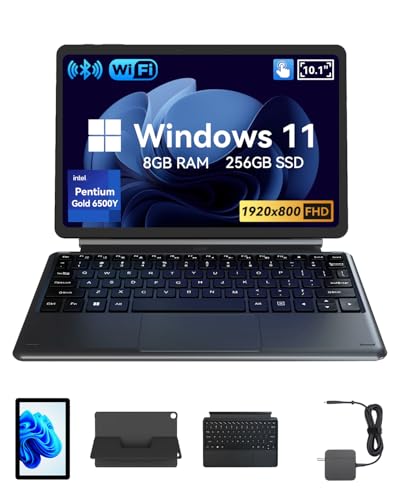
Not all USB ports are equal. Full-size USB-A ports let you plug in standard peripherals like thumb drives and mice without an adapter. USB-C ports offer faster data transfer and can also charge the device. Some tablets include both. For example, the Microsoft Surface Pro 5 comes with a USB 3.0 Type-A port, while the QAZIPO 2-in-1 models offer USB-C and USB-A. If you need to connect multiple devices at once, consider a model with at least two ports or a compact hub like the Denlane USB C Hub USB Hub 3.0 for Laptop to expand your options.
Performance and Memory
A tablet that handles multitasking, office apps, and video calls needs a capable processor and enough RAM. The Fusion5 model packs an Intel 13th Gen N100 with 12GB of RAM, making it ideal for demanding workflows. For lighter use, the QAZIPO 2-in-1 with Intel Pentium Gold and 8GB RAM is sufficient for browsing, note-taking, and streaming. Always check the storage, SSDs are faster and more reliable than eMMC drives. If you need a detachable keyboard for productivity, see our top picks for Windows tablets with detachable keyboards.
Portability and Build Quality
Whether you commute daily or work on a construction site, weight and durability matter. The QAZIPO tablets weigh just over a pound and are less than half an inch thick, slipping easily into a bag. The Fusion5, on the other hand, is rugged, shockproof, and dust-resistant, with a 6000mAh battery for long shifts. It also comes with a 2-year warranty that covers accidental damage, a rare perk. For a more traditional laptop-tablet hybrid, the Microsoft Surface Pro 5 offers a premium metal build and a high-resolution 12.3-inch touchscreen. You can also browse our favorite Windows tablets with keyboards for more portable options.
Display Quality and Touch Responsiveness
A crisp, bright display makes a huge difference when reading documents, editing photos, or watching videos. Look for Full HD (1920×1080 or 1920×1200) IPS panels with good brightness. The Fusion5 offers 500 nits for outdoor visibility, while the Microsoft Surface Pro 5 boasts a 2736×1824 resolution with an anti-glare coating. All the tablets we reviewed have responsive touchscreens, but if you plan to use a stylus, check for active pen support. The Surface Pro 5 works with the Surface Pen, while the QAZIPO models support basic capacitive styluses.
Final Thoughts
Choosing the right Windows tablet with a USB port depends on your primary use case. If you need raw power, a full-size USB-A port, and a proven operating system for professional software, the Microsoft Surface Pro 5 Tablet PC is a reliable workhorse that handles demanding tasks with ease. For those who work in challenging environments, warehouses, outdoor job sites, or classrooms, the Fusion5 Built in USA 10.1” Windows 11 offers rugged durability, a generous warranty, and both USB-C and USB-A ports. Whichever you choose, you will enjoy the flexibility of connecting your favorite peripherals without dongles.
Related Guides
Frequently Asked Questions
Do all Windows tablets have USB ports?
No, not all Windows tablets include a full-size USB port. Many budget models rely solely on USB-C or micro-USB. The models we reviewed all feature at least one USB-A or USB-C port. For example, the Microsoft Surface Pro 5 has a USB 3.0 Type-A, while the QAZIPO 2-in-1 includes both USB-C and USB-A. Always check the specifications before buying.
Can I use a USB hub with a Windows tablet?
Yes, you can expand the number of ports using a USB hub. The Denlane USB C Hub USB Hub 3.0 for Laptop is a compact, affordable option that adds four USB-A ports, a USB-C data port, and an SD card reader. It works with any Windows tablet that has a USB-C or USB-A port. Just make sure the tablet supports OTG or host mode, most Windows tablets do.
What is the best Windows tablet with USB port for outdoor use?
For outdoor or industrial use, the Fusion5 Built in USA 10.1” Windows 11 is our top recommendation. It is rugged, shockproof, and dustproof, with a bright 500-nit display and a 6000mAh battery. It also includes a full-size USB-A, USB-C, and HDMI port, so you can connect external monitors and peripherals even in harsh conditions. Its 2-year warranty with accidental damage coverage adds extra peace of mind.
How much RAM do I need in a Windows tablet?
For basic tasks like web browsing, email, and streaming, 8GB of RAM is sufficient. If you plan to run multiple applications, edit documents, or use creative software, consider a model with 12GB or more. The Fusion5 and both QAZIPO tablets offer 8GB or 12GB options, while the Microsoft Surface Pro 5 comes with 8GB. More RAM helps the tablet stay responsive over time, especially with Windows 11 updates.