

🔥 TV Black Friday Deals 2026: picks worth watching →
Your Amazon Fire tablet is a versatile device for reading, streaming, and browsing, but typing on the glass screen can slow you down. Whether you are a student taking notes, a professional drafting emails, or a creative writing on the go, adding a physical keyboard can turn your Fire into a capable laptop alternative. In this guide, we evaluate the top keyboards for Amazon Fire tablets in 2026, focusing on compatibility, typing comfort, and build quality. We have selected models that work seamlessly with the latest Fire HD 10, Fire Max 11, and older generations. For more insights on tablet productivity tools, check out our guide to keyboards for Android tablets.


Buying Guide: What to Look for in a Fire Tablet Keyboard
Compatibility with Your Fire Tablet Model
Not all keyboards work with every Fire tablet. Some are designed exclusively for the Fire Max 11 (13th generation), while others fit the Fire HD 10 and 10 Plus (11th/13th gen). Always check your tablet’s generation in Settings before purchasing. For universal Bluetooth options, you can use keyboards that pair with any Fire model, but case-integrated designs offer a more seamless experience. Learn more about pairing options in our best Bluetooth keyboards for tablets roundup.
Typing Experience and Backlighting
Look for keyboards with well-spaced keys and adequate travel for comfortable typing. Backlit keys are a plus for low-light environments; some models offer rainbow or 7-color backlighting. Integrated trackpads can replace a mouse, making navigation smoother. If you prioritize portability, slim Bluetooth keyboards without a case may be lighter.
Battery Life and Connectivity
Bluetooth keyboards need recharging or battery replacement. Many offer 50+ hours of use and auto-sleep to conserve power. Some cases, like the official Amazon Fire Max 11 Keyboard Case, use Pogo pins to draw power directly from the tablet, eliminating the need for separate charging. For reliable wireless performance, consider models with Type-C charging and long standby times. Our best wireless keyboards for tablets article covers more battery-saving features.
Protection and Portability
A keyboard case doubles as a protective cover, shielding your Fire from drops and scratches. Look for a sturdy outer shell, a soft inner lining (often with a honeycomb pattern for heat dissipation), and a built-in stylus holder. Multi-angle stands allow you to adjust the viewing position for typing or watching media. For a broader look at tablet accessories, visit our Tablets category page.
Final Thoughts
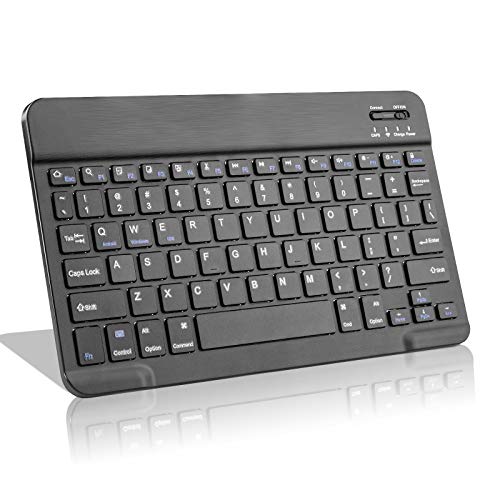
After reviewing the top options, our recommendation depends on your needs. If you own a Fire Max 11 and want a flawless, charger-free experience, the Amazon Fire Max 11 Keyboard Case offers a magnetic attachment, integrated trackpad, and zero setup. For Fire HD 10 users seeking an affordable yet feature-rich solution, the EDIVIA Amazon Fire HD 10/11/8 Bluetooth keyboard is slim, lightweight, and budget-friendly. Both options will significantly enhance your productivity on the go.
Related Guides
Frequently Asked Questions
Are Fire tablet keyboards compatible with all models?
No, compatibility varies. Many keyboard cases are designed specifically for certain generations (e.g., Fire HD 10 11th/13th gen or Fire Max 11 13th gen). Universal Bluetooth keyboards work with any Fire tablet but lack the integrated case design. Always verify your model before buying.
Can I use a Bluetooth keyboard with my Fire tablet?
Yes, Fire tablets support Bluetooth keyboards. Simply enable Bluetooth in Settings, put the keyboard in pairing mode, and select it. This works with any standard Bluetooth keyboard, including those from EDIVIA or MePadKey. For a step-by-step guide, see our Bluetooth keyboard guide.
Do keyboard cases protect my tablet?
Most keyboard cases offer 360-degree protection with a hard outer shell and soft inner lining. They also include features like auto sleep/wake and built-in stands. Models with honeycomb interiors help with heat dissipation, and many have pen holders for stylus storage.
How long does the battery last on a Fire tablet keyboard?
Rechargeable Bluetooth keyboards typically last 40 to 90 hours on a full charge, depending on backlight usage. Many have auto-sleep modes to extend standby time. The official Amazon Fire Max 11 Keyboard Case never needs charging because it draws power directly from the tablet.


