

You’ve just settled in for a movie night, but the dialogue sounds like it’s coming from inside a pillow, and the action scenes lack any punch. This is a common frustration with built-in TV speakers, which are often thin and underpowered. If you’re looking to transform your viewing experience, a dedicated soundbar is the simplest and most effective upgrade you can make.
In this guide, we’ve evaluated three of the most promising soundbars on the market for 2026: the Amazon Fire TV Soundbar Plus, the ULTIMEA 5.1CH Surround Sound Bar System, and the Bose TV Speaker (2nd Gen). We’ll break down their key features to help you decide which one fits your space, your TV, and your listening habits. Whether you’re a casual viewer or a home theater enthusiast, this guide is for you. For a broader look at what’s available, check out our roundup of the best soundbars.




Buying Guide
Channel Configuration and Surround Sound
The first thing to consider is the channel configuration, which refers to the number of audio channels and how they’re arranged. A 3.1 channel system, like the Amazon Fire TV Soundbar Plus, includes a dedicated center channel for dialogue, plus left and right speakers, and a built-in subwoofer. This is a great all-around choice for most rooms.
For a more immersive experience, a 5.1 channel system, such as the ULTIMEA, adds rear surround speakers to place you in the middle of the action. If you have a smaller space or prefer a minimalist setup, a 3.1 or even a 2.0 soundbar might be sufficient. Think about your room size and how much you value a wide, enveloping soundstage.
Dialogue Clarity and Voice Enhancement
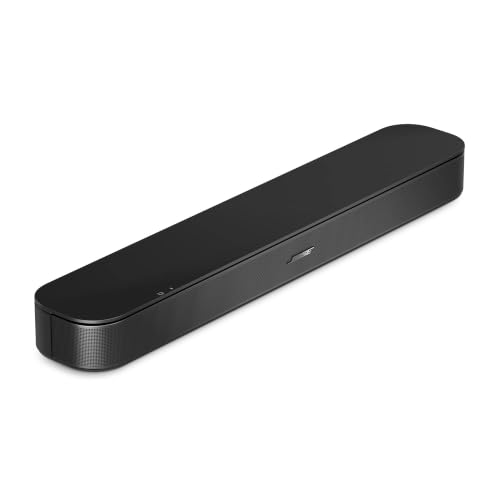
One of the most common reasons people buy a soundbar is to improve dialogue clarity. Look for a soundbar with a dedicated center channel or a specific dialogue enhancement feature. The Bose TV Speaker (2nd Gen) has a proprietary Dialogue Mode that raises vocals, while the ULTIMEA uses VoiceMX technology to isolate speech from background effects.
These features are invaluable for watching news, dramas, or any content with heavy accents or quiet conversations. If you often find yourself rewinding to catch a line, this should be a top priority in your search.
Connectivity and Ease of Setup
Modern soundbars should integrate seamlessly with your TV. The most important connection is HDMI eARC, which allows for high-bandwidth, lossless audio like Dolby Atmos and simplifies control with a single remote. Both the Amazon Fire TV Soundbar Plus and the ULTIMEA support HDMI eARC, making them future-proof choices.
Bluetooth is also a must-have for streaming music from your phone or tablet. All three models we’re looking at offer Bluetooth, but the ULTIMEA’s Bluetooth 5.4 is the newest and most stable version. Setup should take under ten minutes, so look for a model that includes all necessary cables and offers an intuitive setup process.
Smart Features and Control
Some soundbars offer smart features like voice assistant support or app-based control. The Amazon Fire TV Soundbar Plus is designed to work seamlessly with Fire TV devices, allowing you to control everything with one remote. The ULTIMEA has an advanced app that provides a 10-band graphic EQ and 121 sound presets for fine-tuning your audio.
If you love tweaking settings, app control is a fantastic feature. If you prefer simplicity, a soundbar with a clear remote and basic controls might be all you need. Consider your tech comfort level and how much control you want over the sound profile.
Final Thoughts
Choosing the right soundbar ultimately comes down to your priorities: if you want a compact, no-fuss solution with excellent dialogue clarity and a trusted brand name, the Bose TV Speaker (2nd Gen) is a superb choice. For those who crave a more immersive, room-filling surround sound experience and love having granular control over their audio, the ULTIMEA 5.1CH Surround Sound Bar System with Dolby delivers incredible value and performance. Both are excellent upgrades that will bring your favorite movies and shows to life.
Frequently Asked Questions
What is the difference between 3.1 and 5.1 channel soundbars?
A 3.1 channel soundbar has a dedicated center channel for dialogue plus left and right speakers, and a subwoofer. A 5.1 channel system adds two rear or side-firing speakers to create a more immersive, three-dimensional sound field with true surround effects. The choice depends on your room size and how much you want to feel like you’re inside the action.
Do I need a soundbar with Dolby Atmos?
Dolby Atmos is a surround sound technology that adds height and dimension to the audio, making it sound like objects are moving around you. If you watch a lot of action movies or modern streaming content, it’s a fantastic feature to have. However, it’s not essential for everyone; if you primarily watch news or talk shows, a standard soundbar with clear dialogue will be perfectly sufficient.
How do I connect a soundbar to my TV?
The best way to connect a soundbar is via the HDMI eARC port on your TV. This single cable carries high-quality audio and allows you to control the soundbar with your TV remote. If your TV is older and lacks HDMI eARC, you can use an optical audio cable (sold separately) for a solid connection. For more details on setting up your home theater, you can visit our soundbars category page for more tips.
Related Guides
- Top Black Friday TV Deals to Watch in 2026
- Best TVs for Budget Conscious Buyers in 2026
- Top 4K TV Picks
Will a soundbar improve the sound of my TV’s built-in apps?
Yes, absolutely. A soundbar will process any audio your TV sends to it, whether it’s from built-in apps, a cable box, or a gaming console. This means you’ll immediately benefit from clearer dialogue, richer bass, and a wider soundstage, regardless of the source. Just make sure your TV’s audio output is set to “external speakers” or “HDMI ARC” in the settings.


