Late at night, you are cramming for an exam while your roommate streams a movie and your friend plays an online game. Your WiFi slows to a crawl, and your video call freezes. If this sounds familiar, it is time to upgrade your home network. In this guide, we evaluate the best routers for students, focusing on models that balance speed, coverage, and value for dorm rooms, apartments, and shared living spaces. Whether you need a simple plug-and-play option or a feature-rich device for heavy usage, these picks will keep you connected without stress.
For more tips on choosing the right gear, check out our guide on routers for first-time buyers.


Pros
- Exceptional value at under $50 with WiFi 6 performance that rivals much more expensive routers
- Intuitive mobile app setup and management makes configuration effortless for non-technical users
- Consistent coverage across 1,500 sq ft with minimal dead zones according to verified customer feedback
- Excellent device capacity of 20 simultaneous connections handles modern multi-device households
- Responsive customer support available to troubleshoot connection issues
Cons
- Limited coverage area of 1,500 sq ft means larger homes may require mesh WiFi systems like Orbi
- Some users report router failures after 6-12 months of use, raising durability questions
- Advanced security features require paid NETGEAR Armor subscription after 30-day trial period
The NETGEAR Nighthawk R6700AX is a WiFi 6 router designed specifically for apartment dwellers and small homeowners who need reliable connectivity without breaking the bank. This 4-stream AX1800 model combines modern WiFi 6 technology with practical features that address real-world connectivity challenges like buffering streams, dropped video calls, and gaming lag.
Performance is where this router shines for its price point. It delivers up to 1.8 Gbps across dual 2.4 GHz and 5 GHz bands, with coverage extending to 1,500 square feet. The standout feature is its ability to handle 20 connected devices simultaneously without performance degradation, a critical advantage in today's multi-device households. Users consistently report fast, stable connections throughout their homes, with the Nighthawk app providing intuitive network management and speed testing capabilities.
Setup and design are refreshingly straightforward. The included Nighthawk app walks users through configuration with guided steps, typically taking under 30 minutes from unboxing to full operation. The compact black design fits discretely on shelves or dressers, and four Gigabit Ethernet ports allow direct wired connections for devices requiring maximum stability like gaming consoles and streaming players. WPA3 encryption and automatic security updates provide protection without requiring additional subscriptions.
The main limitations are coverage area and reported durability concerns. The 1,500 sq ft range suits apartments and smaller homes but falls short for larger residences, which NETGEAR addresses by recommending their Orbi mesh systems. Additionally, some customer reports indicate router failures after extended use, though responsive support has successfully resolved most technical issues when contacted.
The Nighthawk R6700AX represents strong value for budget-conscious buyers upgrading from older routers. It delivers WiFi 6 performance, handles modern device density, and offers straightforward setup that appeals to non-technical users. While not premium-tier, it successfully solves connectivity problems in apartments and small homes at a price point that makes upgrading accessible to most households.
Wireless Performance: WiFi 6 (802.11ax), 4-stream AX1800, up to 1.8 Gbps total speed, dual-band (2.4 GHz and 5 GHz)
Coverage and Capacity: Up to 1,500 square feet coverage, supports 20 simultaneous connected devices
Connectivity: 4x Gigabit Ethernet ports (1000 Mbps), WiFi 6 wireless connectivity, compatible with cable, fiber, DSL, and satellite internet
Security: WPA3 encryption, WPA2 backward compatibility, automatic firmware updates, guest network isolation, optional NETGEAR Armor subscription
Setup and Control: Free Nighthawk mobile app (iOS/Android), web browser access, push-button controls, FCC certified for US use
Physical Specs: 2 internal antennas, 0.64 kg weight, black color, includes ethernet cable and power adapter
Warranty: 1-year limited warranty with free expert help included
Who Should Buy: This router is ideal for apartment renters, small home owners, and anyone upgrading from WiFi 5 or earlier. It suits households with 10-20 connected devices including smartphones, laptops, smart speakers, security cameras, and streaming devices. Budget-conscious buyers seeking WiFi 6 performance without premium pricing will find excellent value.
Who Should Look Elsewhere: Larger homes exceeding 1,500 sq ft should consider NETGEAR Orbi mesh systems for better coverage. Users with 30+ connected devices or demanding professional needs may benefit from higher-tier routers. Those requiring maximum durability guarantees should research reliability ratings before purchasing.
Key Considerations: Verify your internet provider compatibility before purchase, most major ISPs work seamlessly. Ensure your modem is active before router setup. Consider placement in a central location for optimal coverage. Plan ahead if migrating from an existing router by noting your network settings beforehand. Budget for optional NETGEAR Armor subscription if advanced security features are desired beyond the 30-day trial.
Setup Tips: Download the Nighthawk app before setup begins, have your internet provider information handy, use the QR code on the instruction sheet for quick app access, and allow 20-30 minutes for complete configuration. Verify all devices reconnect properly after initial setup to ensure optimal performance.

Pros
- Exceptional range and WiFi signal strength even at distances from the router
- Simple setup process that takes just minutes with clear instructions
- Handles multiple devices and heavy network traffic without lag or performance drops
- Excellent value for the price with WiFi 6 performance at an affordable cost
- CISA Secure-by-Design pledge ensures advanced security features built into the device
Cons
- Requires a separate modem for internet connection, which may be an additional purchase
- Phone app setup can be problematic for some users, though web browser setup is more reliable
- Dual-band design does not support the 6 GHz band like higher-end WiFi 6 routers
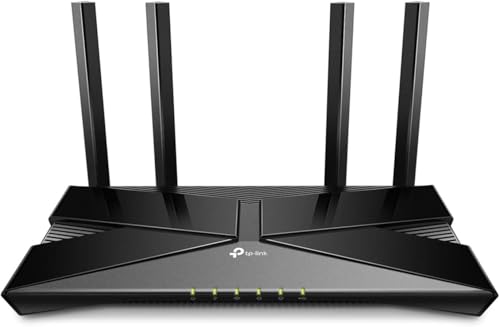
The TP-Link Archer AX21 is a dual-band WiFi 6 router engineered for households seeking a significant upgrade from older networking equipment. It delivers 1.8 Gbps total bandwidth (1200 Mbps on 5 GHz, 574 Mbps on 2.4 GHz) and is compatible with all major internet service providers. This router is ideal for families with multiple connected devices, gamers, streamers, and anyone frustrated with slow or unreliable WiFi performance.
The standout feature of this router is its exceptional range and coverage capability. Four high-gain antennas combined with advanced beamforming technology focus signal strength toward your devices, ensuring strong connections even in distant rooms or areas with obstacles. WiFi 6 technology with OFDMA support allows the router to communicate with multiple devices simultaneously, eliminating the congestion and slowdowns common with older routers handling heavy network traffic.
Setup is remarkably straightforward, with users reporting successful connections in just minutes using either the mobile app or web browser interface. The router features a modern, compact black design that fits discreetly in most home environments. Built-in security includes WPA3 protocol support and compliance with the CISA Secure-by-Design pledge, giving you confidence in your network's protection. Additional features include VPN server support, parental controls, and Alexa voice integration for hands-free management.
The primary consideration is that this router requires a separate modem for internet connectivity, which may mean an additional purchase if you don't already have one. The phone app can occasionally present setup challenges, though the web browser interface provides a more reliable alternative. As a dual-band router, it does not support the 6 GHz band available on premium WiFi 6E models.
The Archer AX21 represents exceptional value for budget-conscious buyers seeking genuine WiFi 6 performance. With industry-leading support, a 2-year warranty, and proven reliability from a trusted networking brand, this router delivers the speed and coverage upgrades that frustrated users consistently praise in real-world usage.
Wireless Performance: WiFi 6 (802.11ax), AX1800 with 1.8 Gbps total bandwidth, 1200 Mbps on 5 GHz band, 574 Mbps on 2.4 GHz band.
Connectivity: 4 high-gain fixed antennas, beamforming technology, OFDMA support, 5 ports (Gigabit Ethernet), Alexa voice control compatible.
Security: WPA/WPA2, WPA/WPA2-Enterprise (802.1x), WPA3 protocol, OpenVPN and PPTP VPN server support, CISA Secure-by-Design pledge signatory.
Physical: Dimensions 10.28 inches L x 5.3 inches W x 1.61 inches H, weight 1.1 pounds, black color, 12V power adapter included.
Support: 2-year manufacturer warranty, 24/7 technical support at +1 866-225-8139, compatible with Internet Explorer 11+, Firefox 12.0+, Chrome 20.0+, Safari 4.0+.
Is This Router Right for You? The Archer AX21 is ideal if you're upgrading from a router older than 5 years, experiencing slow speeds despite paying for higher-tier internet plans, or adding numerous smart home devices that overwhelm your current network. It's perfect for households with 2,000-3,000 square foot homes seeking reliable coverage without premium pricing.
What You'll Need: A cable or DSL modem (not included), active internet service provider subscription, and a compatible browser for setup. Most major ISPs like Comcast, Charter, AT&T, Verizon, and Spectrum are fully supported without additional configuration.
Setup Expectations: Plan 10-15 minutes for initial configuration using either the Tether mobile app or web browser interface. The included ethernet cable and quick installation guide make the process straightforward even for non-technical users. Consider using the web browser setup method if you encounter app-related issues.
Performance Considerations: Actual speeds depend on your internet plan, distance from the router, obstacles like walls, and the number of connected devices. The router's 1.8 Gbps capacity is more than sufficient for gigabit internet plans and handles streaming, gaming, and video conferencing simultaneously without degradation.
Buying Guide
Speed and Performance
For students, internet speed directly affects productivity. Look for routers that support the latest WiFi standards, such as WiFi 6, which offers faster data transfer and better handling of multiple devices. A dual-band router with AC or AX ratings ensures smooth streaming, gaming, and video calls. Pay attention to Mbps ratings on both the 2.4 GHz and 5 GHz bands, as this determines how well your router handles heavy usage.
When comparing speeds, consider your typical online activities. If you attend virtual classes, stream lectures, or upload assignments, a router with at least 1.2 Gbps aggregate speed is a strong choice. For more details on everyday use, see our recommendations for everyday routers.
Coverage and Number of Devices
Dorm rooms and apartments vary in size, but most student living spaces are under 1,500 square feet. A router that covers up to 1,200 to 2,000 square feet should be sufficient. However, walls and interference from neighboring networks can reduce range. Look for beamforming technology, which focuses the signal toward connected devices, improving reliability.
Additionally, consider how many devices will connect simultaneously. With laptops, phones, tablets, gaming consoles, and smart speakers, a router that supports MU-MIMO (Multi-User, Multiple Input, Multiple Output) can handle up to 20 or more devices without slowdowns. This is critical in shared living situations where multiple people are online at once.
Ease of Setup and Management
Students often have limited time and technical expertise. A router that is easy to set up via a mobile app or web browser is ideal. Features like guest networks, parental controls, and simple firmware updates add convenience. Security is also important; look for routers with WPA3 encryption and built-in firewall protection to keep your data safe.
For budget-conscious shoppers, we have also curated a list of routers under $100 that offer excellent value.
Ports and Connectivity
While WiFi is essential, having wired ports can improve performance for demanding tasks like online gaming or large file transfers. Gigabit Ethernet ports ensure fast, stable connections for desktops, gaming consoles, or streaming devices. Some routers also include USB ports for sharing printers or storage, which can be useful for group projects.
If you live in a larger space or need more coverage, consider a mesh system or a router that can be paired with extenders. Alternatively, check out our budget options under $50 for basic needs.
Final Thoughts
Choosing the right router can transform your student experience, making slow internet a thing of the past. For most students, the NETGEAR WiFi 6 Router 4-Stream (R6700AX) offers outstanding performance at a budget-friendly price, while the ASUS RT-AX1800S Dual Band WiFi 6 Extendable provides excellent security and parental controls for families. Both models deliver reliable speed and coverage for dorm rooms and apartments, ensuring you stay connected for classes, entertainment, and everything in between.
Frequently Asked Questions
What is the best WiFi router for college students in 2026?
The best router depends on your budget and needs. For most students, the NETGEAR WiFi 6 Router (R6700AX) offers excellent speeds and coverage under $100. If you need advanced security and parental controls, the ASUS RT-AX1800S is a strong choice. Both support the latest WiFi 6 standard and are easy to set up.
Can I use a router in a dorm without a modem?
Many dorms provide Ethernet ports in each room, allowing you to connect a router directly without a separate modem. Just plug the router into the wall jack using an Ethernet cable, and you can set up a WiFi network. Confirm with your university’s IT department for specific requirements.
Do I need a WiFi 6 router as a student?
While not strictly necessary, a WiFi 6 router is a wise investment for the future. It handles multiple devices more efficiently and offers better speeds than older WiFi 5 models. If you have many smart devices or often stream 4K content, WiFi 6 will provide a smoother experience.
How much should I spend on a student router?
You can find excellent routers for under $100 that meet most student needs. The TP-Link AC1900 and NETGEAR R6700AX are both affordable and reliable. If you need advanced features like mesh compatibility or stronger security, consider spending a bit more on models like the ASUS RT-AX1800S.