

Imagine coming home with your hands full of groceries, fumbling for keys in the dark. A fingerprint smart lock eliminates that hassle, letting you unlock your door with a simple touch. In 2026, these locks have become more advanced, featuring AI learning scanners that adapt to your fingerprint over time. Whether you are a homeowner, a renter, or an Airbnb host, this guide covers three top-rated models to help you find the perfect fit for your front door. For more options, check out our roundup of the best smart lock for front door picks.

Pros
- Fast and reliable fingerprint recognition that improves with use via AI learning.
- Easy installation and setup, with simple app connectivity and intuitive controls.
- Auto-lock feature provides peace of mind and prevents accidental lockouts.
- Long battery life with convenient USB-C emergency backup power.
- Sleek, durable design with tempered glass that resists scratches and smudges.
Cons
- Occasional fingerprint misreads may require a backup method like a keypad code or key.
- Keypad beep volume could be louder for better audible feedback when pressing numbers.
- A rare lockout issue was reported where the lock froze after multiple failed scans, requiring a reboot via the app.
The Wyze Auto-Lock Bolt v2 is a smart deadbolt that combines fingerprint recognition, AI learning, and Wi-Fi connectivity for a seamless keyless entry experience. Designed for homeowners who want to upgrade their front door security without sacrificing convenience, this lock offers multiple ways to enter: a fast fingerprint scanner, a backlit keypad with anti-peep technology, a physical backup key, or remote control via the Wyze app.
Standout features include the AI self-learning fingerprint scanner, which adapts to your unique touch over time to reduce failed scans and speed up unlocks. In real-world use, the lock opens in about half a second, and the auto-lock function engages within 5 to 10 seconds after closing the door, ensuring you never leave your home unsecured. The built-in Wi-Fi allows you to check the lock status and grant temporary access to guests from anywhere, and when paired with a Wyze Video Doorbell, you can unlock directly from the live feed.
Design and build quality are impressive for the price point. The lock body is made of aluminum with a tempered glass fingerprint sensor that resists scratches and smudges. It carries BHMA2 certification for durability and an IP53 rating for weather resistance, making it suitable for covered outdoor installations. Installation is straightforward, especially if you already have a standard deadbolt, and the included 8 AA batteries promise up to 8 months of use. A USB-C port provides emergency power if the batteries die.
Potential drawbacks are minor but worth noting. Some users reported occasional fingerprint misreads, especially if fingers are wet or dirty, so having a backup code is recommended. The keypad beep volume could be louder for better auditory confirmation, and a small number of users experienced a lockout situation after multiple failed scans, though a quick app reboot resolved it. Overall, these issues are infrequent and do not detract from the lock's reliability.
Verdict: The Wyze Auto-Lock Bolt v2 offers an exceptional balance of features, performance, and value. With its fast AI-learning fingerprint sensor, robust auto-lock, long battery life, and remote access, it is a top choice for anyone seeking a smart lock that simplifies daily entry while enhancing security. Highly recommended for homeowners who want a reliable, feature-rich upgrade without breaking the bank.

Pros
- Multiple unlocking options provide flexibility and backup.
- Fast and accurate fingerprint scanner for quick entry.
- Easy DIY installation with no drilling required.
- App allows remote code generation and lock monitoring.
- Sturdy build quality with a modern, sleek appearance.
Cons
- WiFi gateway required for remote and Alexa voice control, sold separately.
- Bluetooth range may be limited for some users.
- Some users may need to scan fingerprints at multiple angles for best recognition.
The Yamiry Smart Door Handle Lock with Keypad is a versatile 6-in-1 keyless entry deadbolt designed for front doors. It combines a fingerprint knob, Bluetooth app control, keypad, key fob, and physical keys, with optional Alexa voice control via a separate WiFi gateway. This lock is perfect for homeowners, landlords, and Airbnb hosts seeking convenience and enhanced security.
Installation is straightforward and takes about 10 minutes with a screwdriver, fitting standard American wooden doors. The fingerprint reader is fast and accurate, responding instantly. The mobile app is easy to set up, allowing you to generate temporary passcodes for guests and track unlock history remotely.
The lock feels sturdy with its stainless steel and zinc construction, and the matte black finish gives it a modern look. Users report reliable performance, and the reversible handle works for both left and right-handed doors. The auto-lock feature adds an extra layer of security.
A key drawback is that the WiFi gateway must be purchased separately for remote control and Alexa integration. Some users may also need to register fingerprints at multiple angles for optimal recognition. Bluetooth range can be limited, so proximity to the door is needed for app control without WiFi.
Overall, the Yamiry smart lock offers excellent value with its multiple unlocking options, easy installation, and robust app features. It is a solid choice for anyone wanting to upgrade to a smart lock without breaking the bank. Its design and performance make it a reliable addition to any home or rental property.
Pros
- Six versatile unlocking methods accommodate different preferences and scenarios.
- Self-learning AI adapts to your fingerprints for quicker, more reliable access.
- Long 8-month battery life reduces the need for frequent replacements.
- Built-in Wi-Fi enables remote control without a separate bridge.
- Easy installation compatible with most standard deadbolts.
Cons
- Battery life may vary with heavy usage, potentially falling short of 8 months.
- Physical keys are included but the lock's keyway may not be compatible with existing key systems.
- Lack of Z-Wave or Zigbee support may limit integration with some smart home hubs.
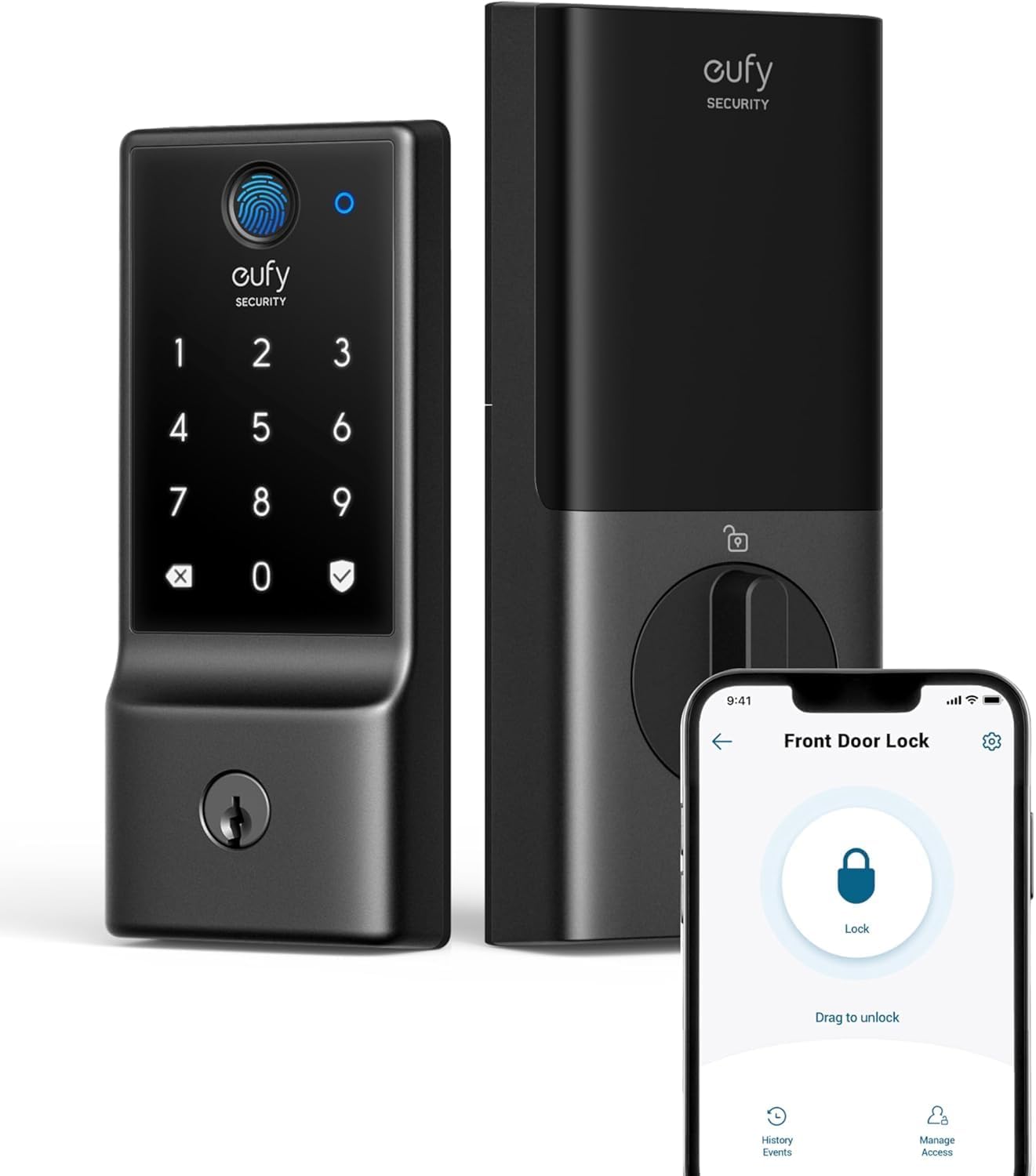
The eufy Security Smart Lock C220 is a versatile keyless entry deadbolt designed for modern homes. It offers six ways to unlock your door: a fast fingerprint sensor, a backlit keypad, a physical key, the eufy Security app, your Apple Watch, or voice commands via Alexa or Google Assistant. This flexibility makes it an excellent choice for families with varying needs and tech preferences.
Its standout feature is the self-learning AI, which adapts to your fingerprints over time for faster and more accurate unlocks. The built-in Wi-Fi allows remote control from anywhere without an extra hub, a convenience many smart locks lack. The lock also integrates with eufy's ecosystem, enabling automated routines with other eufy devices.
Installation is straightforward, taking about 15 minutes on a standard deadbolt without drilling. The lock feels solid, made from aluminum with a polished black finish, and carries a BHMA Grade 3 certification for durability after over 100,000 cycles. Its wide operating temperature range and IP53 waterproof rating make it suitable for exterior doors in most climates.
Potential drawbacks include battery life that may vary with heavy usage, and the lock's digital nature means you'll need to replace 8 AA batteries every 8 months or so. Also, the physical keys are provided, but the lock's keyway may not match your existing house keys.
Overall, the eufy Security Smart Lock C220 delivers strong performance, reliable security, and exceptional convenience at a competitive price. It is an ideal upgrade for homeowners seeking a smart, keyless entry solution that blends cutting-edge technology with robust build quality.


Pros
- Multiple entry methods (fingerprint, code, app, card, key) for convenience and backup.
- Integrated camera and two-way audio enhance home security and visitor communication.
- Remote app control with guest codes and activity tracking adds flexibility for homeowners and landlords.
- Auto-lock feature provides peace of mind by ensuring the door always locks behind you.
- Easy installation and wide compatibility with standard door preparations save time and effort.
Cons
- No mention of smart home integration (e.g., Alexa, Google Assistant) for voice control.
- Battery life details are not provided, so users may need to monitor power levels frequently.
- Limited to 2.4GHz WiFi networks, which could be a constraint for some users with dual-band routers.
The syndesmos Smart Door Lock with Camera is a versatile 6-in-1 keyless entry deadbolt designed for modern homes and rental properties. It combines a fingerprint scanner, passcode pad, smartphone app, IC card, physical key, and remote access into one sleek black unit. This lock is ideal for homeowners who want to ditch physical keys or for landlords managing short-term rentals who need secure, remote access control.
Standout features include the built-in 780P HD camera and two-way audio, which effectively turn your door into a video doorbell. You can see, hear, and talk to visitors in real time through the app, adding a layer of security and convenience. The auto-lock function is another highlight, automatically securing the door after it closes, which is perfect for busy families or when your hands are full. The app also allows you to share temporary codes and view activity logs, giving you full control over who enters and when.
Installation is straightforward and takes about 15 minutes on most standard doors with adjustable backset. The durable black finish should hold up well against daily use. While the product feels solid, it lacks details on battery life and smart home integration with platforms like Alexa or Google Assistant, which may be a dealbreaker for some users. Additionally, it only supports 2.4GHz WiFi, so ensure your network is compatible.
In real-world use, the fingerprint scanner is responsive, and the keypad works reliably. The video quality is adequate for identifying visitors, though it may not match higher-end dedicated doorbells. The app interface is intuitive but could benefit from more customization options for notifications. Overall, the syndesmos lock offers excellent value for its price, blending security, convenience, and modern features.
Verdict: If you need an affordable, feature-packed smart lock with video capabilities and multiple entry methods, the syndesmos Smart Door Lock is a strong contender. It's especially well-suited for rental owners or families seeking keyless convenience and remote monitoring. Just be aware of the limited smart home integration and plan for regular battery checks.
Buying Guide
Fingerprint Scanner Speed and Accuracy
The core of any fingerprint smart lock is its scanner. Look for models with AI self-learning technology that improves recognition over time. This reduces failed attempts and ensures quick entry, even if your finger is wet or dirty. The Wyze Auto-Lock Bolt v2, for example, unlocks in under a second and adapts to your unique touch.
Battery Life and Backup Options
Smart locks rely on batteries, so long life is crucial. Many models offer up to 8 months of use with standard AA batteries. Consider locks that include emergency backup, such as a USB-C port or physical key override, to avoid being locked out. The eufy Security Smart Lock C220 provides both a long battery life and backup key option.
Integration and Smart Home Compatibility
If you use smart home devices, choose a lock that integrates with your ecosystem. Built-in Wi-Fi lets you control the lock from anywhere via an app, while voice control through Alexa or Google Assistant adds convenience. Some locks also work with Apple Watch or key fobs. For those interested in subscription-free options, see our guide on the best smart lock without subscription.
Installation and Door Compatibility
Most fingerprint smart locks are designed for easy DIY installation. Look for models that fit standard American wooden doors with minimal drilling. Reversible handles and adjustable spacers ensure compatibility with both left- and right-handed doors. The Yamiry Smart Door Handle Lock installs in about 10 minutes using just a screwdriver.
Final Thoughts
Choosing the right fingerprint smart lock depends on your priorities: if you value lightning-fast AI learning and built-in Wi-Fi, the Wyze Auto-Lock Bolt v2, Fingerprint Keyless Entry is a top contender. For a versatile lock with multiple access methods and easy installation, the Smart Door Handle Lock with Keypad from Yamiry offers great flexibility for landlords and families alike. Both models deliver reliable security and convenience for 2026.
Related Guides
Frequently Asked Questions
How does a fingerprint smart lock work?
It uses a biometric scanner to read your fingerprint, matching it against stored data to unlock the door. Many models now include AI that learns and improves accuracy over time.
Can I still use keys with a fingerprint smart lock?
Yes, most fingerprint smart locks include a physical key override as a backup. This ensures you can always access your home if the battery dies or the scanner fails.
Are fingerprint smart locks secure?
Yes, they offer strong security with features like anti-peep keypads and tamper alarms. Many are BHMA certified for durability and have been evaluated for thousands of lock cycles.
Do I need Wi-Fi to use a fingerprint smart lock?
Not always. Some locks work via Bluetooth or keypad without Wi-Fi, but built-in Wi-Fi allows remote control and integration with smart home systems. For offline options, explore the best smart lock for Airbnb picks that offer flexibility.


