Imagine you are a trader, a video editor, or a programmer. You need to monitor multiple data streams, timelines, or code windows simultaneously. A single laptop screen feels cramped, and even two displays can leave you switching tabs. This is where the best dock for triple monitors becomes an essential tool. It transforms your laptop into a powerful workstation with three external screens, boosting your efficiency and reducing eye strain.
In this guide, we evaluate two leading docking stations: the Anker Laptop Docking Station Dual Monitor and the MOKiN USB C Docking Station 3 Monitors Display. We cover their features, performance, and suitability for different users. If you are exploring options for a dual monitor setup, check our best dock for dual monitors guide as well.

Pros
- Dual HDMI ports support 4K resolution, perfect for multi-monitor setups.
- 85W Power Delivery pass-through charging keeps your laptop charged without extra adapters.
- Includes Ethernet, USB-A, and SD card slots for versatile connectivity.
- Compact and portable design fits easily into a laptop bag.
- Anker's 18-month warranty and reliable build quality.
Cons
- On macOS, both external monitors display identical content (mirror only), not extend.
- No USB-C data port; only one USB-C port is used for PD charging input.
- Not compatible with Linux systems.
The Anker PowerExpand 8-in-1 USB-C Hub is a versatile docking station designed to add essential ports to modern laptops with USB-C connectivity. It's an excellent choice for professionals and students who need to connect multiple monitors, Ethernet, and SD cards without carrying a bulky dock. The hub supports Windows 10/11 and ChromeOS, while Mac users should note the dual monitor limitation.
Standout features include dual HDMI ports that deliver 4K@60Hz to a single display or 4K@30Hz to two displays. This allows for efficient multitasking and a more immersive viewing experience. The 85W Power Delivery pass-through charging is a game-changer, as it keeps your laptop powered during heavy use without needing a separate charger. The integrated Gigabit Ethernet port ensures stable internet connectivity, a must for video calls and large file transfers.
Design-wise, the hub is compact and lightweight, measuring just 4.6 x 2.0 x 0.7 inches and weighing 0.2 pounds. Its gray finish and minimalist look blend well with most laptops. The ports are well-spaced, reducing interference when connecting multiple cables. Anker's build quality is evident, and the included 18-month warranty adds confidence.
One drawback is that on macOS, the dual HDMI outputs only mirror the display, not extend it, which limits multi-monitor functionality for Mac users. Additionally, there is no USB-C data port, so you lose one USB-C port for charging. The hub is also not compatible with Linux, which may be a dealbreaker for some users.
Overall, the Anker PowerExpand 8-in-1 USB-C Hub offers excellent value for Windows users seeking a portable, affordable docking solution. Its dual 4K display support, fast charging, and reliable connectivity make it a strong contender in the compact hub market. For Mac users, consider if mirroring meets your needs. If not, look for a hub that supports extended displays on macOS.
Pros
- Supports up to three independent 4K@60Hz displays for enhanced productivity
- Innovative smart LCD with weather and workstation monitoring
- Wide port selection with high-speed data transfer (10Gbps)
- Privacy lock button adds security for sensitive information
- Stable, non-slip design with suction cups
Cons
- Triple display extension only works on Windows, not macOS or other systems
- Charger not included, requires powerful 100W+ adapter for full load
- Limited to 85W pass-through charging, which may not suit high-power gaming laptops
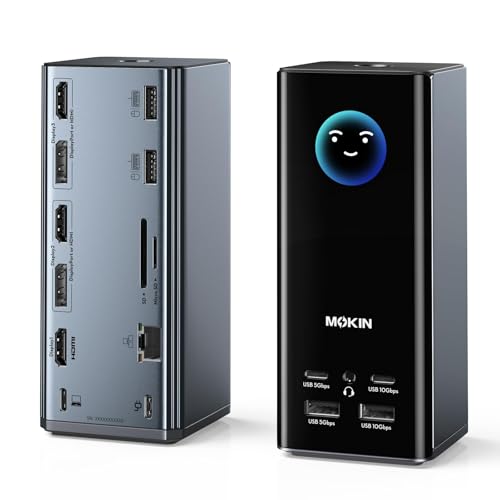
The MOKiN 17-in-1 USB C Docking Station is a comprehensive solution for professionals who need to connect multiple monitors, peripherals, and power their laptop from a single hub. It is especially suited for Windows users in creative fields, programming, trading, or any multi-tasking role that benefits from a triple 4K display setup.
Standout features include the ability to drive three 4K@60Hz monitors using any combination of three HDMI and two DisplayPort outputs. The integrated smart LCD screen is a unique touch, displaying real-time weather (via WiFi) and workstation metrics like charging wattage and port status. This eliminates the need to check your phone or system settings for basic info.
Design and build quality are solid: the dock has a compact footprint with silicone suction cups that keep it firmly in place. The 17 ports cover all essential connections, including 10Gbps USB-C and USB-A, Gigabit Ethernet, and a 104MB/s SD/microSD card reader. The 100W PD input provides 85W pass-through charging, which is adequate for most ultrabooks and thin laptops.
However, there are a few drawbacks. The triple display extension feature is limited to Windows systems; macOS only supports mirroring. The dock itself does not include a power adapter, so you must supply a 100W+ USB-C charger for full functionality. Also, the 85W charging output may not be enough for high-performance gaming laptops that require more power.
Overall, the MOKiN USB C Docking Station offers an impressive blend of multi-monitor support, smart display features, and versatile connectivity at a competitive price. It is a strong choice for Windows users who want to streamline their workspace and enjoy a little extra convenience from the weather and status LCD.


Pros
- Triple display support for Windows users boosts productivity.
- High-speed data transfer up to 10Gbps for fast file transfers.
- 100W Power Delivery keeps laptop charged during use.
- Includes both HDMI and DisplayPort for flexible monitor connections.
- Compact and lightweight design, easy to carry.
Cons
- Triple display feature only works on Windows, not Mac (Mac extends only one monitor).
- Effective power delivery is 87W, not 100W, due to the hub's own power consumption.
- No user reviews yet, so long-term reliability is unverified.
The LIONWEI 13-in-1 USB C Hub Docking Station is designed for laptop users who need to expand their connectivity. It targets professionals, gamers, and creatives who require multiple monitors, fast data transfer, and reliable charging from a single device.
Standout features include dual 4K HDMI ports and a DisplayPort, allowing triple display output on Windows systems at 4K@60Hz. The 100W Power Delivery (87W effective) keeps your laptop charged, while 10Gbps USB-C and USB 3.1 ports enable rapid file transfers. The inclusion of Gigabit Ethernet ensures stable internet for streaming or work.
Design-wise, the docking station is compact and lightweight, fitting easily into a laptop bag. The plug and play setup means no driver installations are needed, making it user-friendly. Build quality feels solid, though the all-plastic body may not feel premium.
One drawback is that Mac users can only extend one external monitor, not two or three. Additionally, the 100W PD is reduced to 87W after powering the hub, which might be a concern for power-hungry laptops. Also, the product has no reviews yet, so real-world performance is unconfirmed.
Overall, the LIONWEI 13-in-1 Docking Station offers excellent value for Windows users needing a versatile hub. With its dual 4K output, fast charging, and multiple ports, it is a solid choice for boosting productivity at a reasonable price.
Buying Guide
Number of Display Outputs
The most critical factor is how many monitors the dock can support. For a triple monitor setup, you need at least three video outputs. The MOKiN dock offers three HDMI and two DisplayPort outputs, giving you flexible combinations. The Anker dock has two HDMI ports, which limits you to dual monitors. If three displays are non-negotiable, choose a dock with three or more outputs.
Resolution and Refresh Rate
High resolution matters for detailed work. Look for docks that support 4K at 60Hz per monitor. The MOKiN dock delivers triple 4K@60Hz, ensuring crisp and smooth visuals. The Anker dock provides 4K@60Hz on a single display but drops to 4K@30Hz when using two monitors. For tasks like video editing or stock trading, higher refresh rates reduce motion blur and improve readability.
Port Variety and Expandability
A good dock should replace the need for multiple adapters. Assess the number and type of ports: USB-A, USB-C, Ethernet, SD card reader, and audio jack. The MOKiN dock is a 17-in-1 hub with ample high-speed data ports. The Anker dock is an 8-in-1 model, sufficient for basic needs but fewer connections. If you connect many peripherals, a dock with more ports saves desk space.
Compatibility and Power Delivery
Ensure the dock works with your laptop’s operating system and port type. Both docks support USB-C, USB4, and Thunderbolt. Windows users get extended displays, while macOS may mirror screens. Also, check power delivery: the MOKiN dock offers 100W input and 85W pass-through charging, while the Anker dock supports up to 85W. For a seamless experience, see our best docking station for Windows laptop guide.
Final Thoughts
After reviewing both options, we recommend the MOKiN USB C Docking Station 3 Monitors Display for professionals who need true triple 4K support and extensive port options, making it ideal for trading or creative work. For users with a tighter budget or those who only require dual monitors, the Anker Laptop Docking Station Dual Monitor remains a solid choice with reliable performance and a trusted brand. Whichever you pick, you will enjoy a more organized and productive workspace.
Related Guides
Frequently Asked Questions
Can I use a USB C dock for triple monitors with a MacBook?
Yes, but note that macOS typically mirrors displays when using multiple video outputs from a single dock. For extended displays on macOS, you may need a dock that supports DisplayLink technology or use a separate adapter. Always check the dock’s compatibility with your MacBook model and macOS version.
What is the difference between a docking station and a USB hub?
A docking station usually provides video outputs, Ethernet, and power delivery, while a USB hub only expands USB ports. For connecting multiple monitors, you need a docking station with dedicated video ports. A hub cannot drive external displays on its own.
Will a triple monitor dock work with my laptop from 2026?
Most modern laptops with USB-C ports that support DisplayPort Alt Mode or Thunderbolt 3/4 can use these docks. However, verify your laptop’s specifications for video output capability and power delivery limits. For older laptops, consider a dock with DisplayLink for broader compatibility.
Do I need a separate power adapter for the dock?
Yes, most docks require an external power adapter to charge your laptop and run all ports. The MOKiN and Anker docks both include a power adapter, though the charger may need to be purchased separately for full power delivery. Check the product details to ensure you have the right power supply.