🔥 TV Black Friday Deals 2026: picks worth watching →
Imagine walking through your home while your favorite playlist follows you from room to room, or hosting a backyard party where everyone can request songs directly from their iPhones. That is the magic of AirPlay speakers. Whether you are an Apple Music devotee, a podcast enthusiast, or someone who simply wants high-quality wireless audio, choosing the right AirPlay speaker can transform your listening experience. In this guide, we have evaluated the top models of 2026 to help you find the perfect match for your space and lifestyle. For a deeper dive into AirPlay 2 features, check out our dedicated AirPlay 2 speaker review.




Buying Guide: What to Look for in AirPlay Speakers
Sound Quality and Room-Filling Power
AirPlay speakers come in all shapes and sizes, but sound quality remains the most important factor. Look for models with dedicated tweeters and woofers that deliver clear highs and deep bass. Some speakers, like those from Bose and Denon, use advanced DSP tuning to fill larger rooms without distortion. For multiroom setups, consider whether each speaker can handle its own equalization or if you prefer a consistent profile across zones. If you are building a whole-home system, our guide to multiroom speakers offers additional insights.
Connectivity and Ecosystem Compatibility
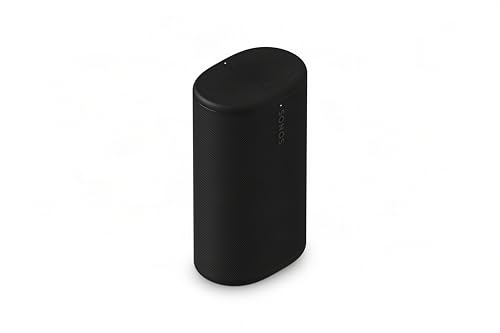
Beyond AirPlay 2, check for support of Bluetooth, Spotify Connect, or voice assistants like Alexa and Siri. Some speakers (like the WiiM Mini) act as receivers, turning existing stereos into AirPlay devices. Others, such as the Sonos Roam 2, offer both Wi‑Fi and Bluetooth for true portability. If you use Android devices, ensure the speaker also supports Google Cast or Bluetooth, since AirPlay is exclusive to Apple. For a broader look at Wi‑Fi speakers, see our best Wi‑Fi speakers roundup.
Portability vs. Home Integration
Decide whether you need a speaker that stays put or one you can take to the beach. Portable models like the Sonos Roam 2 are rugged and waterproof (IP67), with battery life up to 10 hours. Home-focused options like the Bose New Lifestyle Ultra Speaker or the Denon Home 150 NV are designed for a fixed spot and often deliver richer, more immersive sound. If you want a single speaker that works in both settings, look for one with a rechargeable battery and Wi‑Fi connectivity.
Multiroom and Smart Features
AirPlay 2 natively supports multiroom audio, allowing you to group speakers in the Apple Home app. Some brands, like Sonos and WiiM, offer their own multiroom ecosystems that also work with AirPlay. Consider how many speakers you plan to use and whether you want voice control. The best smart speakers integrate seamlessly with your smart home, but for pure audio performance, dedicated AirPlay speakers often win out.
Final Thoughts
After reviewing the top contenders, we recommend the Bose New Lifestyle Ultra Speaker for those who want a premium, room-filling AirPlay experience with TrueSpatial Audio and adjustable EQ, perfect for dedicated home listening. On the other hand, if portability and durability matter most, the Sonos Roam 2 delivers impressive sound in a waterproof, go-anywhere design with up to 10 hours of battery life. Both models offer excellent AirPlay 2 integration, so your choice comes down to whether you need a stationary powerhouse or a versatile travel companion.
Frequently Asked Questions
What are the best AirPlay speakers for 2026?
The top picks include the Bose New Lifestyle Ultra Speaker for home audio, the Sonos Roam 2 for portability, and the WiiM Amp for upgrading existing passive speakers. Each excels in different use cases, so consider your priorities.
Can I use AirPlay speakers with Android?
AirPlay is Apple’s protocol and does not natively work with Android. However, many AirPlay speakers also support Bluetooth or Google Cast, making them usable with Android devices. The Dio Node speakers, for example, work with AirPlay 2 but also support Bluetooth streaming.
Do I need a Wi‑Fi network to use AirPlay speakers?
Yes, AirPlay streaming requires a Wi‑Fi network for best performance. Some speakers, like the Sonos Roam 2, also have Bluetooth for offline use, but AirPlay features depend on a stable network connection.
Can I use two different AirPlay speakers together?
AirPlay 2 supports multiroom audio with different speaker models, as long as they are AirPlay 2 compatible. You can group them in the Apple Home app and play the same or different audio in each room. Brands like Sonos and Denon also offer their own grouping capabilities within their apps.