

If you are building a smart home or diving into high-resolution streaming, you need a router that can handle massive bandwidth without stuttering. ASUS has emerged as a leader in WiFi 7 technology, offering routers that combine blazing speed with rock-solid stability. In this guide, we review the best ASUS WiFi 7 routers of 2026 to help you find the perfect upgrade for your network. For a broader look at top networking gear, check out our Routers category page.


Pros
- Ultrafast WiFi 7 with 4096-QAM boosts single-band speed by 1.2 times.
- Five 2.5GbE LAN ports provide high-speed wired connectivity for demanding devices.
- AiMesh support allows easy expansion to a mesh system for whole-home coverage.
- Commercial-grade security with AiProtection, VPN, and safe browsing features.
- Easy setup and user-friendly ASUS router app for remote management.
Cons
- Some users report performance drop for newer devices (e.g., iPhone 17 Pro) at distance.
- A small number of reviews mention Ethernet port issues within the first month.
- Warranty concerns raised by a few customers, though ASUS offers a 3-year warranty.
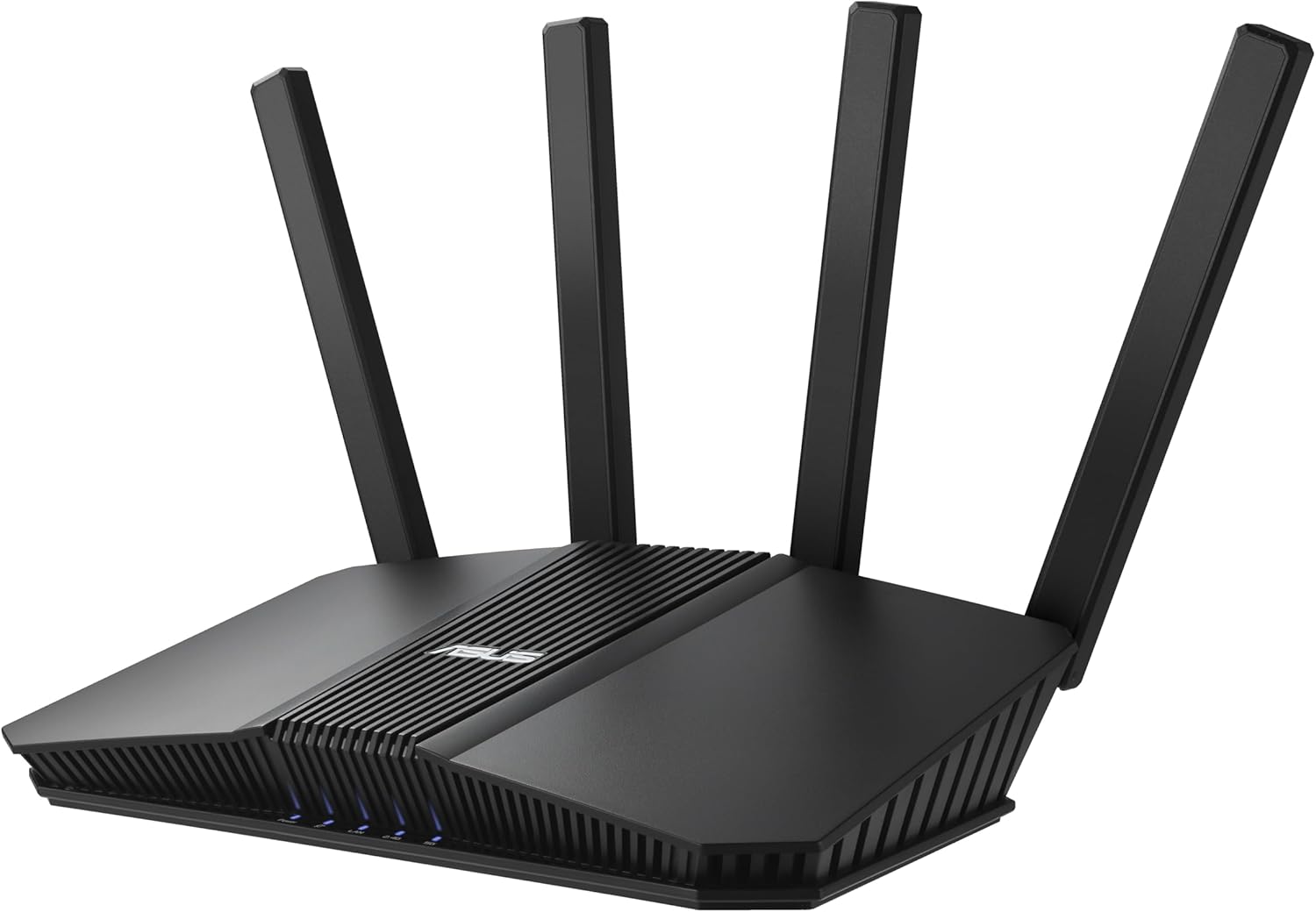
The ASUS RT-BE82U is a dual-band WiFi 7 router designed for users who need blazing-fast speeds and robust security. With speeds up to 6500 Mbps and five 2.5GbE ports, it targets gamers, streamers, and smart home owners who want a future-proof, mesh-capable network backbone.
Standout features include true WiFi 7 performance with 4096-QAM, which boosts single-band throughput by 1.2 times. The five 2.5GbE ports ensure wired devices like PCs and consoles get maximum bandwidth. AiMesh technology lets you add additional ASUS routers to create a seamless whole-home mesh network, ideal for larger homes or dead zones.
Setup is incredibly easy via the ASUS Router app, with intuitive controls for QoS, guest networks, and IoT segregation. The commercial-grade AiProtection Pro, powered by Trend Micro, provides continuous security scans, VPN support, and safe browsing. Real-world performance is excellent, with users reporting strong coverage across 1600 sq. ft. homes.
A few drawbacks include a reported performance drop for newer iPhones at long range, and rare Ethernet port failures noted in early reviews. The warranty is 3 years, though some customers have expressed concerns. Overall, the RT-BE82U offers outstanding value for its price, especially for a WiFi 7 router with multi-gig ports.
Verdict: The ASUS RT-BE82U is a top-tier choice for anyone looking to upgrade to WiFi 7 without breaking the bank. Its combination of speed, ports, security, and mesh expandability makes it ideal for demanding home networks. Despite minor issues, it delivers reliable performance and future-proofing.


Pros
- Exceptional range and WiFi signal strength even at distances from the router
- Simple setup process that takes just minutes with clear instructions
- Handles multiple devices and heavy network traffic without lag or performance drops
- Excellent value for the price with WiFi 6 performance at an affordable cost
- CISA Secure-by-Design pledge ensures advanced security features built into the device
Cons
- Requires a separate modem for internet connection, which may be an additional purchase
- Phone app setup can be problematic for some users, though web browser setup is more reliable
- Dual-band design does not support the 6 GHz band like higher-end WiFi 6 routers
The TP-Link Archer AX21 is a dual-band WiFi 6 router engineered for households seeking a significant upgrade from older networking equipment. It delivers 1.8 Gbps total bandwidth (1200 Mbps on 5 GHz, 574 Mbps on 2.4 GHz) and is compatible with all major internet service providers. This router is ideal for families with multiple connected devices, gamers, streamers, and anyone frustrated with slow or unreliable WiFi performance.
The standout feature of this router is its exceptional range and coverage capability. Four high-gain antennas combined with advanced beamforming technology focus signal strength toward your devices, ensuring strong connections even in distant rooms or areas with obstacles. WiFi 6 technology with OFDMA support allows the router to communicate with multiple devices simultaneously, eliminating the congestion and slowdowns common with older routers handling heavy network traffic.
Setup is remarkably straightforward, with users reporting successful connections in just minutes using either the mobile app or web browser interface. The router features a modern, compact black design that fits discreetly in most home environments. Built-in security includes WPA3 protocol support and compliance with the CISA Secure-by-Design pledge, giving you confidence in your network's protection. Additional features include VPN server support, parental controls, and Alexa voice integration for hands-free management.
The primary consideration is that this router requires a separate modem for internet connectivity, which may mean an additional purchase if you don't already have one. The phone app can occasionally present setup challenges, though the web browser interface provides a more reliable alternative. As a dual-band router, it does not support the 6 GHz band available on premium WiFi 6E models.
The Archer AX21 represents exceptional value for budget-conscious buyers seeking genuine WiFi 6 performance. With industry-leading support, a 2-year warranty, and proven reliability from a trusted networking brand, this router delivers the speed and coverage upgrades that frustrated users consistently praise in real-world usage.
Wireless Performance: WiFi 6 (802.11ax), AX1800 with 1.8 Gbps total bandwidth, 1200 Mbps on 5 GHz band, 574 Mbps on 2.4 GHz band.
Connectivity: 4 high-gain fixed antennas, beamforming technology, OFDMA support, 5 ports (Gigabit Ethernet), Alexa voice control compatible.
Security: WPA/WPA2, WPA/WPA2-Enterprise (802.1x), WPA3 protocol, OpenVPN and PPTP VPN server support, CISA Secure-by-Design pledge signatory.
Physical: Dimensions 10.28 inches L x 5.3 inches W x 1.61 inches H, weight 1.1 pounds, black color, 12V power adapter included.
Support: 2-year manufacturer warranty, 24/7 technical support at +1 866-225-8139, compatible with Internet Explorer 11+, Firefox 12.0+, Chrome 20.0+, Safari 4.0+.
Is This Router Right for You? The Archer AX21 is ideal if you're upgrading from a router older than 5 years, experiencing slow speeds despite paying for higher-tier internet plans, or adding numerous smart home devices that overwhelm your current network. It's perfect for households with 2,000-3,000 square foot homes seeking reliable coverage without premium pricing.
What You'll Need: A cable or DSL modem (not included), active internet service provider subscription, and a compatible browser for setup. Most major ISPs like Comcast, Charter, AT&T, Verizon, and Spectrum are fully supported without additional configuration.
Setup Expectations: Plan 10-15 minutes for initial configuration using either the Tether mobile app or web browser interface. The included ethernet cable and quick installation guide make the process straightforward even for non-technical users. Consider using the web browser setup method if you encounter app-related issues.
Performance Considerations: Actual speeds depend on your internet plan, distance from the router, obstacles like walls, and the number of connected devices. The router's 1.8 Gbps capacity is more than sufficient for gigabit internet plans and handles streaming, gaming, and video conferencing simultaneously without degradation.
Buying Guide: What to Look for in an ASUS WiFi 7 Router
Speed and Bandwidth
WiFi 7 routers offer theoretical speeds up to 46 Gbps, but real-world performance depends on your internet plan and device support. Look for models with 4096-QAM and Multi-Link Operation (MLO) to maximize throughput. The ASUS TUF Gaming BE6500 delivers up to 6.5 Gbps, while the RT-BE88U pushes 7.2 Gbps. For a deep dive into multi-band performance, read our review of Top Tri Band WiFi Routers for Seamless Gaming and Streaming.
Port Configuration
Wired connectivity matters for gaming PCs, NAS drives, and media servers. Models with multiple 2.5GbE ports or dedicated 10G ports future-proof your setup. The ASUS RT-BE88U features two 10G ports (one SFP+), ideal for high-bandwidth workloads. The RT-BE82U offers five 2.5GbE ports for versatile wired networking.
Mesh Extendability
If your home has dead zones, choose a router that supports AiMesh, ASUS’s mesh technology. All the models here are AiMesh compatible, allowing you to add more nodes for seamless whole-home coverage. This is especially useful for large houses or multi-story buildings. Our blog has tips on setting up mesh networks.
Security and Privacy
ASUS bundles commercial-grade AiProtection Pro powered by Trend Micro, offering subscription-free network security. Features like one-tap security scan and Safe Browsing keep your devices safe from threats. For a comparison of security features across router brands, see our best tri band routers of 2026 article.
Final Thoughts
After evaluating the lineup, the ASUS TUF Gaming BE6500 WiFi 7 Router stands out as the best value for gamers who need low latency and sturdy performance, while the ASUS RT-BE88U WiFi 7 Router is the powerhouse choice for tech enthusiasts with multi-gig internet and a wired network. Whichever you choose, you are investing in a future-proof network that will handle everything from 8K streaming to online gaming without breaking a sweat.
Related Guides
- Best WiFi Router For Gigabit Internet
- Top Routers with Parental Controls for 2026
- Top Routers Under $200 for 2026
- Top TP-Link WiFi 7 Routers for
Frequently Asked Questions
What is WiFi 7 and how is it different from WiFi 6?
WiFi 7 (802.11be) offers higher speeds, lower latency, and better efficiency than WiFi 6. It uses 4096-QAM modulation and Multi-Link Operation to deliver up to 4.8 times faster peak data rates. For most users, upgrading to WiFi 7 will dramatically improve streaming and gaming experiences, especially with compatible devices.
Do I need a 10G port on my router?
Only if your internet plan exceeds 2.5 Gbps or you have a local NAS with 10G connectivity. For typical broadband (under 2 Gbps), 2.5GbE ports on models like the RT-BE82U are sufficient. Enthusiasts with multi-gig fiber will appreciate the RT-BE88U’s dual 10G ports.
Can I use these ASUS routers in a mesh system?
Yes, all four models support AiMesh, allowing you to mix and match with other ASUS routers to create a seamless whole-home network. AiMesh is easy to set up via the ASUS Router app and provides features like band steering and adaptive QoS. Learn more about mesh configurations in our earlier guide to top WiFi 7 routers.
Which ASUS WiFi 7 router is best for gaming in 2026?
The ASUS TUF Gaming BE6500 is purpose-built for gamers with its Game Accelerator, dedicated Gaming Port, and mobile game prioritization. For the ultimate performance, the RT-BE88U offers lower latency via its 10G ports and powerful CPU. Both support MLO for stable connections during intense sessions.


