

Picture this: you are on a business trip, need to print a contract in your hotel room, but the front desk printer is down. Or you are a small business owner packing orders at a pop-up market and need shipping labels right now. In 2026, Bluetooth printers have evolved into compact, reliable tools that free you from cables and desktop constraints. This guide covers the best Bluetooth printers across different use cases, from lightweight travel models to all-in-one office workhorses, helping you find the perfect match for your workflow.
We have evaluated dozens of models based on print quality, connectivity, portability, and ease of use. Whether you need a thermal printer for labels, a portable inkjet for documents, or a full-featured all-in-one for your home office, our curated list includes options from trusted brands like Epson, Canon, HP, and emerging innovators like Gloryang and TATTMUSE. For more insights on choosing the right printer for your devices, check out our guide on top printers for iPhone.





Buying Guide
Print Technology: Inkjet vs. Thermal
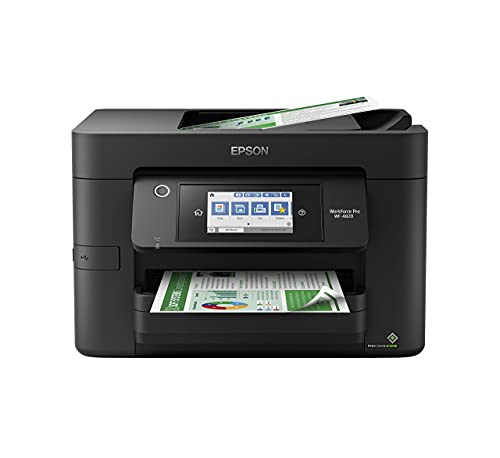
The first major decision is whether you need an inkjet or thermal printer. Inkjet models like the Epson Workforce Pro WF-4820 Wireless Color deliver vibrant color prints and are ideal for documents, photos, and mixed media. They use ink cartridges, which require periodic replacement but offer superior color accuracy.
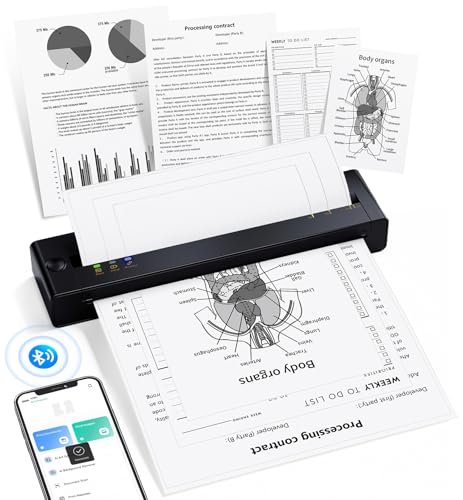
Thermal printers, such as the Gloryang Inkless Portable Printer for Travel, use heat to transfer images onto special paper. They require no ink, toner, or ribbons, making them incredibly cost-effective for black-and-white printing. Thermal models are perfect for labels, receipts, and text-heavy documents, but they cannot print in color. If you print mostly shipping labels or invoices, a thermal printer saves money and hassle.
Portability and Size
For on-the-go professionals, portability is key. Look for lightweight models under 2 pounds that can slip into a backpack or briefcase. The Portable Printers Wireless for Travel from TATTMUSE weighs just 1.5 pounds and supports multiple paper sizes, making it a versatile travel companion. Consider battery life as well; thermal printers often have longer battery life because they consume less power.
If you need a printer that stays on a desk, an all-in-one like the HP Envy 6155 Wireless All-in-One Color Inkjet offers scanning, copying, and duplex printing in a compact footprint. For more options, browse our printers category page.
Connectivity and Compatibility
Bluetooth is the standard for wireless printing, but not all implementations are equal. Some printers, like the KNAON Bluetooth Thermal Shipping Label Printer, require a dedicated app for mobile printing, while others support AirPrint and Mopria for direct printing from iOS and Android devices. Verify that the printer works with your operating system, especially if you use a Chromebook or Mac.
Many modern printers also include Wi-Fi Direct, which allows connection without a router. For Mac users, our guide on best printers for Mac provides additional tips. For Chromebook users, check out top picks for Chromebook printing.
Paper Handling and Media Types
Consider what you will print most often. Thermal printers typically use roll paper or fanfold labels, while inkjet printers handle standard letter-size sheets, envelopes, and photo paper. The Canon PIXMA TR160 Color Wireless Portable Printer supports borderless photo printing up to 8.5 x 11 inches, making it great for travel photos.
If you need to print on different media types, look for a printer with a bypass tray or adjustable paper guides. For professional office needs, see our recommendations for best professional printers.
Final Thoughts
In 2026, Bluetooth printers have become indispensable for anyone who values flexibility and convenience. For travelers and mobile workers who need a compact, ink-free solution, the Gloryang Inkless Portable Printer for Travel offers exceptional value with its thermal technology and included carrying case. If you require a full-featured office printer that handles color documents and high-volume printing, the Epson Workforce Pro WF-4820 Wireless Color delivers professional-grade results with robust connectivity options. Both models represent the best of their respective categories, ensuring you find the right tool for your printing needs.
Related Guides
Frequently Asked Questions
Can I print from my phone using a Bluetooth printer?
Yes, most Bluetooth printers in 2026 support direct printing from smartphones via dedicated apps or built-in protocols like Apple AirPrint and Mopria Print Service. Simply download the required app, connect via Bluetooth, and select your document or photo to print. Some models also support cloud printing from services like Google Drive or Dropbox.
Do thermal printers require special paper?
Yes, thermal printers require heat-sensitive paper that darkens when exposed to heat. This paper is widely available in rolls or sheets, and many printers come with starter rolls. Thermal paper is typically black-and-white only, so it is best for text documents, labels, and receipts. Always use the brand recommended by the manufacturer to ensure optimal print quality.
How far can a Bluetooth printer be from my device?
Bluetooth typically has a range of about 30 feet (10 meters) in open spaces. Walls, furniture, and other obstacles can reduce this range. For reliable printing, keep your device and printer in the same room. If you need longer range, look for printers that also support Wi-Fi, which offers greater distance and stability.
Are Bluetooth printers suitable for high-volume printing?
It depends on the model. Some Bluetooth printers, like the Epson Workforce Pro series, are designed for high-volume workloads with fast print speeds and large paper trays. Thermal printers are also efficient for high-volume label printing. However, portable Bluetooth printers may have smaller paper capacities and slower speeds, making them better suited for occasional or on-the-go use. For heavy office printing, consider a dedicated all-in-one printer with robust paper handling.


