

🔥 TV Black Friday Deals 2026: picks worth watching →
Are you tired of paying that monthly rental fee for your Xfinity modem and router? You’re not alone. Many households are making the switch to owning their own equipment, and for good reason. A quality modem router combo can pay for itself while often delivering better performance and coverage than the standard-issue gear from your internet service provider.
This guide is designed to help you navigate the world of cable modem routers specifically for Xfinity. We’ve evaluated top contenders from NETGEAR, ARRIS, and Motorola, focusing on DOCSIS standards, Wi-Fi capabilities, and overall value. Whether you’re a gamer needing low latency or a family streaming in 4K, we have a recommendation for you.
Before we dive into the reviews, if you’re also curious about options for other providers, be sure to check out our guides for Cox and Spectrum.






Buying Guide
DOCSIS Standard: Match Your Internet Plan
The DOCSIS standard determines the maximum speed your modem can handle. For Xfinity plans up to 800 Mbps, a DOCSIS 3.0 modem like the NETGEAR Nighthawk C7000 is sufficient. However, for gigabit plans and above, you’ll want a DOCSIS 3.1 modem for future-proofing and better performance during peak hours.
Most modern Xfinity plans now offer speeds up to 2 Gbps, so choosing a DOCSIS 3.1 model like the ARRIS SURFboard SB8200 is a smart investment. These modems also support the latest technologies like OFDMA, which can reduce latency and improve speeds during congestion.
Wi-Fi Technology: Coverage and Speed
Wi-Fi 6 (also known as 802.11ax) is the latest standard, offering faster speeds, better battery life for your devices, and improved performance in homes with many connected devices. If you have a large home or many smart devices, a Wi-Fi 6 router like the NETGEAR Nighthawk CAX30 is worth the investment.
For smaller homes or tighter budgets, Wi-Fi 5 (802.11ac) routers like the Motorola MT7711 still provide excellent performance. However, we recommend looking for models with at least AC1900 speed to ensure your Wi-Fi doesn’t become a bottleneck for your internet connection.
Compatibility and Approval with Xfinity
Not all cable modems are created equal, and Xfinity maintains a list of approved devices. Before you buy, always check that the modem router combo you’re considering is officially approved by Xfinity. This ensures it will work with your plan and that you can activate it without issues.
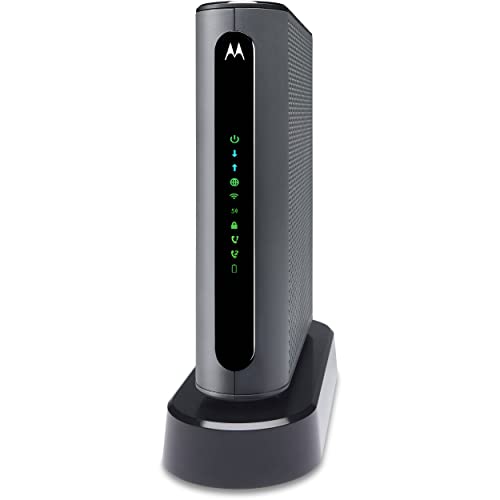
Products like the Motorola MT7711 are explicitly designed for Xfinity, while others like the NETGEAR Nighthawk series are compatible with multiple providers. We’ve included only Xfinity-compatible models in this guide, but it’s always a good idea to verify with your specific plan. For more insights, you can also check our comprehensive guide to Xfinity modem routers.
Number of Ethernet Ports and Voice Support
Consider how many wired devices you have. If you have a gaming console, desktop, and smart TV, you’ll need at least four Gigabit Ethernet ports. Some models, like the Motorola MT7711, also include phone ports for Xfinity Voice service, which can be a major convenience if you still use a landline.
If you don’t need voice support, a simpler modem router combo like the ARRIS Surfboard G34 might be a better fit. Always check the number of ports and any additional features like USB ports for media sharing. For those with larger homes, you might also want to explore gaming-optimized options that offer advanced QoS settings.
Final Thoughts
Choosing the right modem router combo for Xfinity ultimately comes down to your internet plan, home size, and budget. For most households, we recommend the ARRIS Surfboard G34 DOCSIS 3.1 Cable Modem & Wi-Fi for its excellent balance of speed and coverage, while those on a tighter budget or with smaller homes will find the NETGEAR Nighthawk Cable Modem and WiFi 5 Router a reliable and cost-effective choice. Both are excellent ways to eliminate monthly rental fees and enjoy a faster, more stable connection.
Frequently Asked Questions
What is the best modem router combo for Xfinity in 2026?
The best modem router combo for Xfinity in 2026 depends on your internet plan and home size. For most users, we recommend a DOCSIS 3.1 model like the NETGEAR Nighthawk CAX30 for its combination of speed and Wi-Fi 6 coverage. If you have a gigabit plan, look for a model with a 2.5 Gbps Ethernet port.
Will a modem router combo work with Xfinity?
Yes, a modem router combo will work with Xfinity as long as it’s approved by Comcast. Check the device’s specifications to ensure it’s certified for Xfinity internet plans. You’ll also need to activate the modem by contacting Xfinity or using their app, and you may need to provide the modem’s MAC address.
How much can I save by buying my own modem router for Xfinity?
By purchasing your own modem router combo, you can eliminate the monthly rental fee that Xfinity charges, which can add up to a significant amount over the course of a year. While we can’t provide a specific number, the savings often cover the cost of the device within a year or two. Plus, you’ll have better control over your network’s settings and performance.
Do I need a separate router if I have a modem router combo?
No, a modem router combo combines both functions into a single device, so you don’t need a separate router. However, if you have a very large home or need advanced networking features, you can always connect a separate router in access point mode to extend your network. For most users, a modem router combo provides sufficient coverage and performance.

