

🔥 TV Black Friday Deals 2026: picks worth watching →
You need a laptop that adapts to your day—whether you’re taking notes in class, sketching ideas, or binge-watching shows. A Chromebook with a touch screen offers that flexibility without the complexity of a full Windows device. This guide reviews the best chromebook touch screen laptops for 2026, focusing on models from Lenovo, Samsung, HP, and ASUS that balance affordability with performance. If you are also exploring other touch screen devices, check out our best touch screen laptops for work and gaming guide for more options.


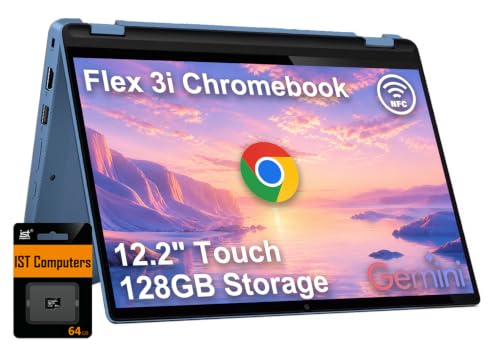

Buying Guide for Chromebook Touch Screen Laptops
Display Quality and Touch Responsiveness
The touch screen is the centerpiece of any Chromebook in this category. Look for Full HD (1920×1080) or higher resolution with IPS technology for wide viewing angles. A 360-degree hinge lets you switch between laptop, tent, stand, and tablet modes. The Samsung 12.2″ FHD 2-in-1 Touchscreen Chromebook and the ASUS Chromebook Flip CX1 both offer bright, vivid displays that respond accurately to finger gestures and stylus input. For more on display performance, see our top touch screen gaming laptops article.
Performance and Multitasking
Chromebooks rely on efficient processors and adequate RAM to handle everyday tasks. Models with Intel N100 or MediaTek Kompanio 520 processors, paired with 4GB or 8GB RAM, provide smooth web browsing, document editing, and video streaming. The Lenovo IdeaPad Flex 3i Chromebook with Intel N100 and 4GB LPDDR5 RAM is well-suited for students, while the ASUS Chromebook Flip CX1 with 8GB RAM offers extra headroom for heavier multitasking. If you need more power for creative work, consider our Best Gaming Laptops for MMO guide for high-performance alternatives.
Build Quality and Portability
A touch screen Chromebook should be lightweight and durable enough for daily carry. The Lenovo Flagship Chromebook weighs just 2.86 lbs and features a sturdy Abyss Blue chassis. The HP 14 2-in-1 Chromebook is a renewed model with a 360-degree hinge and military-grade durability. For gamers who also want touch functionality, our best gaming laptops for FPS article covers devices with higher refresh rates.
Operating System and App Ecosystem
Chrome OS is fast, secure, and integrates seamlessly with Google services. All Chromebooks in this guide support Android apps from the Google Play Store, giving you access to millions of productivity and entertainment apps. The Lenovo Chromebook 14″ Touchscreen Laptop and the Samsung 12.2″ model come with built-in virus protection and automatic updates, making them ideal for students and professionals who value simplicity.
Final Thoughts
After evaluating the top contenders, we recommend the Samsung 12.2″ FHD 2-in-1 Touchscreen Chromebook for its excellent display and included stylus pen, which is perfect for note-taking and creative tasks. For those who prioritize a larger screen and robust performance at a lower price point, the Lenovo IdeaPad Flex 3i Chromebook 12.2″ 2-in-1 offers great value with its Intel N100 processor and versatile 360-degree hinge. Both models deliver the flexibility and reliability that make Chromebooks a smart choice for modern computing.
Related Guides
Frequently Asked Questions
What is the best chromebook touch screen laptop for students in 2026?
For students, the Lenovo IdeaPad Flex 3i Chromebook offers a great balance of performance, portability, and price. Its 12.2-inch touch screen and Intel N100 processor handle online classes, note-taking, and streaming with ease. For more options, browse our best touch screen laptops for work and gaming guide.
Are Chromebook touch screens good for drawing?
Yes, many Chromebooks with touch screens support stylus input. The Samsung 12.2″ FHD 2-in-1 Chromebook includes a stylus pen and offers precise touch response, making it suitable for sketching and digital note-taking. Higher-end models may offer better pressure sensitivity, but for casual drawing, these devices work well.
How long do Chromebook touch screen laptops typically last?
Most modern Chromebooks receive automatic updates for up to 8 years from their release date. The Lenovo IdeaPad Flex 3i has an Auto Update Expiration (AUE) date of June 2031, ensuring long-term support. Battery life varies, but many models offer 10 to 12 hours of real-world use on a single charge.
Can you use a Chromebook touch screen as a tablet?
Yes, Chromebooks with 360-degree hinges can be flipped into tablet mode. The ASUS Chromebook Flip CX1 and the HP 14 2-in-1 Chromebook both support tent, stand, and tablet modes, giving you the flexibility to use them as a tablet for reading, browsing, or watching videos.


