You’ve just finished a long session, and your wrist aches from a mouse that doesn’t quite fit your grip. Or maybe you’re missing those crucial headshots because your current mouse’s sensor can’t keep up with your quick flicks. We’ve all been there, and it’s frustrating when your gear holds you back from performing at your best.
This guide is here to change that. We’ve evaluated a range of Cooler Master gaming mice, along with a few top contenders from other leading brands, to help you find the perfect companion for your setup. Whether you’re a competitive esports player, a casual gamer, or someone who needs a reliable mouse for work and play, we have you covered.


Buying Guide: How to Choose the Right Gaming Mouse
Before you click that buy button, it’s essential to understand what makes a gaming mouse great for you. Not every mouse is created equal, and the right one can significantly impact your performance and comfort. Let’s break down the key factors to consider.
Sensor and DPI: The Heart of the Matter
The sensor is what tracks your movements, and its quality directly translates to accuracy and responsiveness. Look for a mouse with a high-quality optical sensor that offers adjustable DPI (dots per inch) settings. A higher DPI allows for faster cursor movement, while a lower DPI provides more precision for tasks like sniping.
Most modern gaming mice, including the Cooler Master MM310, offer DPI ranges up to 12,000, which is more than enough for any gaming scenario. The ability to adjust DPI on the fly is also a valuable feature, letting you switch between different sensitivities without digging into software menus. For a deeper dive into what makes a great gaming mouse, you might find our guide to ASUS gaming mice helpful, as many of the same principles apply.
Wired vs. Wireless: Freedom vs. Reliability
The age-old debate: wired or wireless? Wired mice, like the Redragon M612, offer a plug-and-play experience with zero latency and no need to worry about battery life. They’re often lighter and more affordable, making them a great entry point. The downside, of course, is cable drag, though many modern wired mice come with ultra-flexible cables, like the Ultraweave cable on the Cooler Master MM310, to minimize this issue.
Wireless mice, such as the Logitech G305 Lightspeed, have come a long way. With technologies like LIGHTSPEED, they offer a 1 ms report rate that is indistinguishable from wired performance. The freedom from cables can declutter your desk and provide a more immersive experience. The trade-off is battery management, but with the G305’s incredible battery life, it’s a small price to pay for the convenience.
Ergonomics and Grip Style: Comfort for the Long Haul
Comfort is king, especially during long gaming sessions. Consider your grip style: palm, claw, or fingertip. A palm grip suits larger mice with a full-body shape, while a claw or fingertip grip often works better with smaller, lighter mice. The Cooler Master MM310 is designed for palm and claw grips, offering a comfortable shape for most hand sizes.
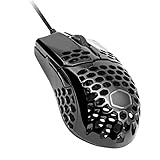
Weight also plays a crucial role. Lighter mice, like the sub-50g MM310, reduce fatigue and allow for quicker, more precise movements. Some mice feature a honeycomb shell to reduce weight, but this can affect aesthetics and collect dust. The MM310 achieves its light weight without holes, maintaining a clean look. If you’re exploring other brands, our Corsair gaming mouse guide offers insights into ergonomic designs that might interest you.
Buttons and Customization: Program Your Advantage
Extra buttons can give you a competitive edge by putting essential commands at your fingertips. Whether it’s melee attacks, ability casting, or quick communication, programmable buttons let you customize your controls. The Redragon M612 boasts 11 programmable buttons, while the Logitech G305 offers a more streamlined, classic design with two primary side buttons.
Software is the key to unlocking this customization. Most gaming mice come with companion software that allows you to remap buttons, adjust DPI, create macros, and customize RGB lighting. The Logitech G HUB software is particularly robust, offering deep customization and battery management options. For a look at how other brands handle customization, check out our guide to Razer wireless gaming mice.
Final Thoughts
Choosing the right gaming mouse ultimately comes down to your personal preferences and gaming style. For those seeking an ultra-lightweight wired option that won’t break the bank, the Cooler Master MM310 Wire Gaming Mouse White is a fantastic choice. If you prefer the freedom of wireless without compromising on performance, the Logitech G305 Lightspeed Wireless Gaming Mouse offers exceptional value and battery life. Both are excellent performers that will serve you well in any gaming scenario.
Frequently Asked Questions
What is the best Cooler Master gaming mouse for 2026?
The best Cooler Master gaming mouse for 2026 depends on your preferences. The Cooler Master MM310 is an excellent lightweight wired option for those who prioritize speed and simplicity. For those who want wireless convenience, exploring other brands like the Logitech G305 is also a great route, as Cooler Master’s wireless lineup is more limited.
Is a wired or wireless gaming mouse better for competitive gaming?
In 2026, both wired and wireless gaming mice offer excellent performance for competitive gaming. Modern wireless technology like Logitech’s LIGHTSPEED provides a 1 ms report rate that is virtually indistinguishable from wired. The choice comes down to personal preference, with wired mice offering a more budget-friendly and worry-free experience, while wireless provides freedom of movement.
How many DPI do I need for a gaming mouse?
The DPI you need depends on your gaming style and screen resolution. For most gamers, a DPI range of 800 to 1600 is sufficient for general use and most games. However, having a higher maximum DPI, like 12,000 on the Cooler Master MM310, gives you flexibility for higher-resolution monitors or games that require fast, sweeping movements. It’s more about having the option to adjust than needing the highest number.
Related Guides
What is the difference between a gaming mouse and a regular mouse?
Gaming mice are designed with performance and customization in mind. They typically feature higher-quality sensors with adjustable DPI, more responsive switches, and a faster polling rate for lower latency. They also often include programmable buttons, customizable RGB lighting, and ergonomic designs for extended use. Regular mice are built for basic productivity and lack these specialized features.