

🔥 TV Black Friday Deals 2026: picks worth watching →
Your Dell Inspiron is a workhorse, but even the best laptop can let you down when the battery dies mid-task or the charger gives out. Whether you’re a student rushing between classes, a professional in back-to-back meetings, or a home user streaming your favorite shows, a dead battery or faulty adapter can halt your momentum. That’s why we’ve curated a list of the best Dell Inspiron laptop accessories to keep you powered up and productive.
This guide covers top-rated chargers and a replacement battery designed specifically for Dell Inspiron models. We’ll break down what to look for when buying, so you can choose the right power solution for your needs. For more laptop recommendations, check out our best dell latitude laptops guide for business-focused options.




Buying Guide
Connector Compatibility
Before you buy a charger, verify the connector size. Dell Inspiron laptops typically use either a 4.5mm x 3.0mm or a 7.4mm x 5.0mm round tip. Check your laptop’s manual or measure the current adapter’s tip to ensure a secure fit.
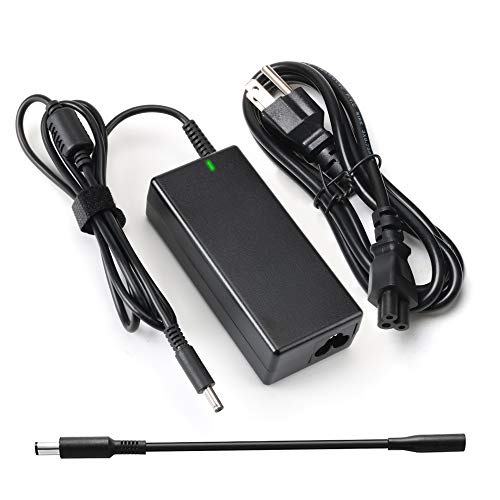
Using the wrong connector can damage the charging port or cause intermittent power issues. Many third-party chargers include multiple tips or a converter cable, like the one included with the Ostrich Charger, offering flexibility for different models.
Power Output and Wattage
The wattage of your charger must match or exceed your laptop’s requirements. Most Dell Inspiron models need a 65W adapter (19.5V, 3.34A). Using a lower-wattage charger may result in slow charging or no charging at all during heavy use.
Always check the original adapter’s output specs. A compatible charger with the correct wattage ensures efficient power delivery and prevents potential damage to your battery or motherboard.
Battery Health and Capacity
If you’re replacing a battery, consider the capacity measured in watt-hours (Wh). A higher Wh rating means longer battery life between charges. For example, a 42Wh battery, like the WDX0R, is standard for many Inspiron 15 models, but you might find higher-capacity options that offer extended runtime.
Ensure the battery’s voltage and cell configuration match your laptop’s specifications. Using an incompatible battery can lead to poor performance or safety risks. For more portable laptop options, explore our best laptops for computer engineering students guide.
Final Thoughts
Choosing the right power accessory for your Dell Inspiron comes down to compatibility and reliability. For a budget-friendly and versatile charger, the Ostrich Charger Compatible with Dell Laptop is a solid pick, while the 42Wh WDX0R Laptop Battery for Dell Inspiron 15 is perfect for those needing a reliable replacement battery. Both options deliver dependable performance to keep your Inspiron running smoothly.
Related Guides
Frequently Asked Questions
Can I use a higher wattage charger on my Dell Inspiron?
Yes, you can use a higher wattage charger (e.g., 90W instead of 65W) as long as the voltage matches and the connector fits. The laptop will only draw the power it needs, so it’s safe and can even charge faster in some cases.
How do I know which charger tip my Dell Inspiron uses?
Check the original adapter’s label for the output specs and connector size. You can also measure the outer diameter of the tip with a ruler. Common sizes are 4.5mm x 3.0mm and 7.4mm x 5.0mm, but some newer models use USB-C.
How long does a Dell Inspiron battery last?
Battery life varies based on model, usage, and age. On average, a healthy Inspiron battery lasts between 4 to 6 hours on a single charge. Over time, capacity degrades, so replacing it every 2-3 years is common for heavy users.
Is it safe to use third-party chargers for my Dell Inspiron?
Yes, as long as the third-party charger is certified (e.g., CE, FCC) and matches your laptop’s voltage and wattage requirements. Reputable brands like Ostrich and E ERSY include safety features to protect against overcharging and short circuits.


