

Your PlayStation 5’s internal storage fills up fast. With modern games often exceeding 100 GB, you need an external SSD that keeps up with the console’s speed without introducing lag. Whether you archive PS5 titles or play PS4 games directly, the right drive can transform your experience. In this guide, we evaluate three top contenders: the BUFFALO External SSD 1TB, the SanDisk 2TB Extreme Portable SSD, and the Western Digital 1TB P40 Game Drive SSD. We focus on compatibility, transfer speeds, durability, and value to help you find the best external SSD for PS5 in 2026.
If you are also looking to upgrade your display, check out our picks for the best 240Hz monitor to complement your gaming setup.


Buying Guide: What to Look For in a PS5 External SSD
Not every external SSD works well with the PlayStation 5. You need a drive that meets specific requirements for speed, form factor, and reliability. Here are the key factors we consider.
Speed and Interface
The PS5 supports USB 3.2 Gen 2 and Gen 2×2 for external drives. A faster interface means quicker load times and smoother transfers. For PS4 games, any SSD with read speeds above 500 MB/s will feel snappy. For archiving PS5 games, the drive must be at least USB 3.0, but we recommend USB 3.2 Gen 2 or Gen 2×2 for the best experience. The Western Digital 1TB P40 Game Drive SSD, for instance, reaches up to 2,000 MB/s with its USB 3.2 Gen 2×2 interface, making it one of the fastest options available.
Capacity and Value
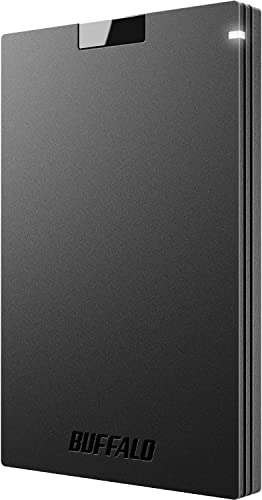
Storage needs vary. A 1TB drive can hold around 10 to 15 modern titles, while a 2TB drive doubles that. The BUFFALO External SSD 1TB offers a solid balance of price and performance for budget-conscious gamers. If you need more space, the SanDisk 2TB Extreme Portable SSD provides ample room for a large library. Consider how many games you keep installed at once and whether you prefer a lower upfront cost or maximum capacity.
Durability and Portability
External drives travel with you. A rugged design protects against drops and dust. The SanDisk Extreme is rated for 3-meter drop protection and IP65 water/dust resistance, making it ideal for LAN parties or travel. The WD_BLACK P40 survives drops up to 2 meters. The BUFFALO SSD also features a shock-resistant build. If you frequently move your drive between consoles or PCs, prioritize durability.
For more insights on high-performance storage, read our guide on the best external SSD for PC.
Compatibility and Extra Features
All three drives work with PS5, PS4, Windows, and Mac. Some offer extras like RGB lighting or hardware encryption. The WD_BLACK P40 features customizable RGB via the WD_BLACK Dashboard (Windows only), letting you match your setup. The SanDisk Extreme includes 256-bit AES hardware encryption for privacy. The BUFFALO SSD keeps things simple with a compact design and a 3-year warranty. Choose based on whether you value aesthetics, security, or simplicity.
If you also play on PC, you might appreciate our recommendations for the best 1440p gaming monitor to pair with your drives.
Final Thoughts
After reviewing these three drives, we believe the Western Digital 1TB P40 Game Drive SSD is the top choice for PS5 owners who want blazing-fast speeds and a stylish RGB design that matches their gaming rig. For those who need maximum capacity and ruggedness for travel, the SanDisk 2TB Extreme Portable SSD offers exceptional durability and generous storage. Both drives deliver the performance you need to expand your PS5 library without compromise, so pick the one that fits your lifestyle.
Related Guides
Frequently Asked Questions
Can I play PS5 games directly from an external SSD?
No, you cannot play PS5 games directly from an external SSD. You can only store and archive PS5 games on an external drive. To play them, you must transfer them back to the internal SSD. PS4 games, however, can be played directly from an external SSD.
What is the fastest external SSD for PS5 in 2026?
Among our picks, the Western Digital 1TB P40 Game Drive SSD offers the fastest speeds at up to 2,000 MB/s read, thanks to its USB 3.2 Gen 2×2 interface. The SanDisk 2TB Extreme Portable SSD reaches up to 1,050 MB/s, which is still very fast for most uses.
Do I need a heatsink for an external SSD on PS5?
No, external SSDs do not require a heatsink because they connect via USB and have their own enclosure that manages heat. Only internal M.2 SSDs installed in the PS5 expansion slot may need a heatsink.
How do I format an external SSD for PS5?
Simply connect the drive to your PS5 via USB, go to Settings > Storage > USB Extended Storage, and select Format as Extended Storage. The console will automatically format it to the required file system (exFAT). The process takes only a few seconds.
For more storage solutions, explore our Electronics category or check out the best external SSD for MacBook Pro if you also use Apple devices.



