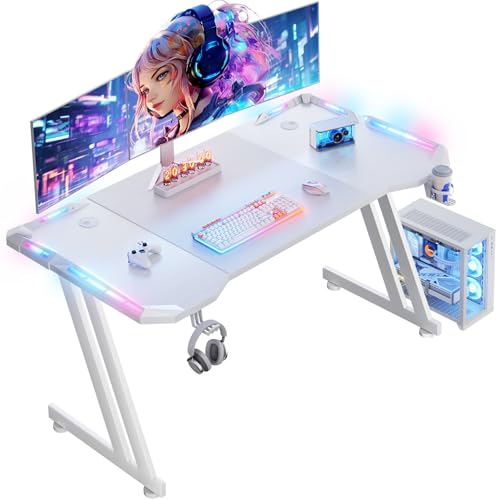
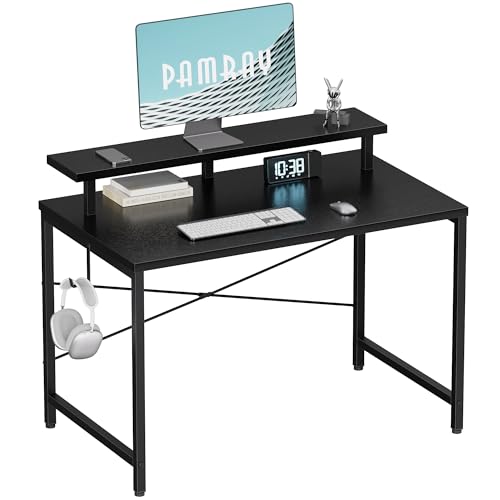
Your child has outgrown the makeshift table, and their gaming gear is everywhere. You need a desk that fits a small room, stays sturdy during intense play, and maybe even adds some fun lighting. In this guide, we review two excellent options for young gamers: the feature-rich HLDIRECT 47 Inch Gaming Desk with App-Controlled and the space-saving Pamray 32 Inch Small Computer Desk with Monitor. Both are designed with kids in mind, offering easy assembly and practical features.


Buying Guide: What to Look for in a Kids Gaming Desk
Size and Space Efficiency
Kids’ bedrooms are often tight on floor space. A desk that is too large can overwhelm the room, while one that is too small won’t hold a monitor and keyboard comfortably. The Pamray 32 Inch Small Computer Desk with Monitor fits narrow corners and even includes a monitor stand that lifts the screen to eye level. For growing gamers who need room for two monitors, the HLDIRECT 47 Inch Gaming Desk with App-Controlled offers a wider 47-inch surface without dominating the room. Consider your child’s current setup and future needs before choosing.
Stability and Safety
Kids tend to lean on desks, bump them, and occasionally jump up from their chairs. A wobbly desk is both frustrating and dangerous. The HLDIRECT model uses a unique Z-shaped frame that splits stress into two triangular supports, rated to hold up to 150 lb during normal use. The Pamray desk adds an X-shaped back brace to prevent side-to-side shifting. Both designs prioritize a solid foundation. For more tips on maintaining a stable gaming environment, see our guide on desks that support arm aiming.
Features That Appeal to Young Gamers
Kids love customization. The HLDIRECT desk comes with app-controlled RGB LED strips embedded on all four sides, offering infinite color switching and gradient effects. It also includes a large mouse pad, headphone hook, and cup holder. The Pamray desk keeps it simple with a built-in monitor stand and a side hook for headphones or bags. If your child wants a desk that doubles as a visual showpiece, check out our roundup of best looking gaming desks.
Assembly Ease
No parent wants to spend hours wrestling with instructions. Both desks are designed for quick setup. The HLDIRECT claims assembly in under 30 minutes with all tools included. The Pamray provides a video guide and clear printed instructions. For ergonomic considerations during setup, you might also find our ergonomic desk recommendations helpful.
Final Thoughts
Choosing the right gaming desk for your child comes down to space, features, and fun. For a compact, budget-friendly option that fits small rooms and provides a sturdy monitor stand, the Pamray 32 Inch Small Computer Desk with Monitor is a reliable choice. If your young gamer wants an immersive lighting experience and room to expand with multiple monitors, the HLDIRECT 47 Inch Gaming Desk with App-Controlled delivers on both style and stability. Either way, you are setting up a workspace that supports their passion and grows with them.
Frequently Asked Questions
What size gaming desk is best for a child?
For small bedrooms, a desk between 32 and 47 inches wide works well. The Pamray 32 Inch is ideal for a single monitor and limited space, while the HLDIRECT 47 Inch offers room for dual monitors or extra homework space. Always measure the room first to leave comfortable walking space.
Are RGB lights safe for kids’ desks?
Yes, the LED strips used on desks like the HLDIRECT are low voltage and sealed to prevent electrical hazards. They add ambiance without generating heat or consuming much power. Always supervise younger children around any electrical accessories.
How can I ensure the desk is stable and will not tip over?
Look for desks with a reinforced frame design. The HLDIRECT uses a Z-shaped structure that distributes weight evenly, and the Pamray has an X-shaped back brace. Place the desk against a wall and avoid overloading the surface with heavy items. For more stability tips, read our guide on desks for arm aiming.
Can young kids assemble these desks themselves?
Both desks are designed for adult assembly, but older children can help with simple steps like attaching legs or placing the monitor stand. The Pamray includes a video walkthrough, making the process straightforward. Plan for about 20 to 30 minutes of setup time with basic tools provided.