🔥 TV Black Friday Deals 2026: picks worth watching →
If you are a gamer who values both high frame rates and battery life when unplugged, a MUX switch is a game-changer. This hardware feature lets you route the display directly from the discrete GPU for maximum performance or switch to the integrated graphics for extended battery life. In 2026, several top-tier gaming laptops come equipped with this technology. We have evaluated the best gaming laptops with MUX switch from ASUS and Lenovo to help you find the perfect portable powerhouse for your needs. Whether you are a competitive esports player or a content creator on the go, these laptops offer the flexibility to adapt to any scenario. For more on high-refresh displays, check out our best 144Hz gaming laptops guide.


Buying Guide: What to Look for in a Gaming Laptop with MUX Switch
MUX Switch Implementation
A MUX switch is only as good as its implementation. Look for laptops that offer easy toggling via software or hardware, such as ASUS Armoury Crate or Lenovo Vantage. Advanced Optimus takes it a step further by automatically switching without a reboot. For a seamless experience, we recommend models with NVIDIA Advanced Optimus support, like the ASUS ROG Strix G16 series.
GPU Performance and Thermal Design
The graphics card is the heart of any gaming laptop. In 2026, NVIDIA RTX 50-series GPUs offer significant leaps in ray tracing and AI performance. Pair that with a high TGP (total graphics power) for consistent frame rates. The ASUS TUF A16 and ROG Strix G16 feature RTX 5070 and 5070 Ti with up to 140W TGP, ensuring smooth gameplay at high settings. For touchscreen options, see our best touchscreen gaming laptops roundup.
Display Refresh Rate and G-Sync
A high refresh rate display is essential for competitive gaming. All laptops on our list offer at least 144Hz or 165Hz panels with G-Sync support to eliminate screen tearing. The Lenovo LOQ provides a 144Hz FHD display, while the ASUS models boast 165Hz with 100% sRGB color accuracy. If you prefer higher resolutions, check out the best 1440p gaming laptops and monitor combos.
Build Quality and Portability
Gaming laptops with MUX switch come in various sizes and weights. The ASUS TUF series is known for its military-grade durability, while the ROG Strix G16 balances performance with a relatively slim profile. The Lenovo LOQ is a solid mid-range option. Consider your usage scenario: if you travel frequently, a lighter model like the ASUS TUF A16 at 4.79 lbs is easier to carry. For convertible gaming laptops, see our best 2 in 1 gaming laptops guide.
Final Thoughts
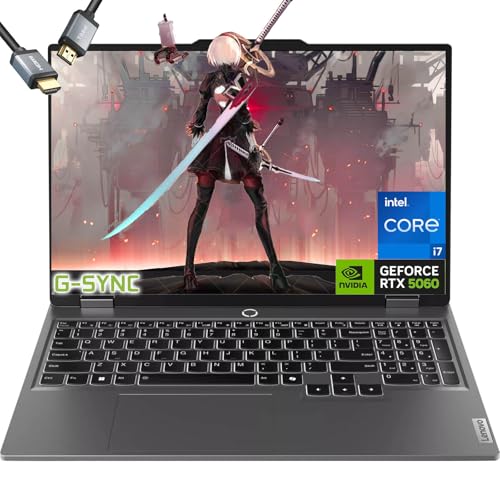
After evaluating the top contenders, the ASUS 2025 ROG Strix G16 Gaming Laptop stands out for its powerful AMD Ryzen 9 processor and RTX 5070 Ti GPU, making it ideal for demanding gamers and creators. For those seeking a more budget-friendly option without sacrificing MUX switch capability, the Lenovo-LOQ Gaming-Laptop RTX 5060 delivers excellent performance with its Intel i7 and RTX 5060 combo. Both models provide the flexibility you need to switch between gaming and battery-saving modes seamlessly.
Frequently Asked Questions
What is a MUX switch and why is it important for gaming laptops?
A MUX switch (multiplexer) allows you to choose whether the laptop’s display is driven by the integrated graphics or the discrete GPU. When set to discrete GPU mode, you get maximum gaming performance with minimal input lag. Switching to integrated graphics saves battery life for everyday tasks. This feature is crucial for gamers who want both high frame rates and portability.
Do all gaming laptops have a MUX switch in 2026?
No, not all gaming laptops include a MUX switch. It is more common in mid-range to high-end models, especially from brands like ASUS ROG, Lenovo Legion, and MSI. Budget gaming laptops often omit this feature to reduce cost. Our list focuses on the best gaming laptops with MUX switch that we have validated for 2026.
Can I use a MUX switch with an external monitor?
Yes, when you connect an external monitor directly to the laptop’s HDMI or DisplayPort, it typically bypasses the integrated graphics and uses the discrete GPU regardless of the MUX switch setting. However, the MUX switch still affects the internal display. For external gaming, you can enjoy full GPU performance without toggling the switch.
Is a MUX switch worth it for casual gamers?
If you primarily game plugged in, a MUX switch may not be essential, but it still helps reduce input lag. For casual gamers who also use their laptop for work or school, the ability to switch to integrated graphics can significantly extend battery life. It is a worthwhile feature that adds versatility. For more on portable options, see our best portable touch screen laptops guide.