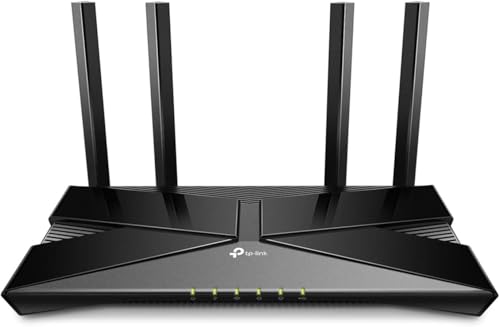
Imagine your home buzzing with activity: a 4K stream on the living room TV, a multiplayer session on your gaming PC, video calls on tablets, and smart bulbs adjusting the lighting. With so many devices competing for bandwidth, a standard router can choke, causing lag spikes and buffering. The solution lies in a gaming router built to handle multiple devices simultaneously. In this guide, we highlight the best gaming routers for multiple devices in 2026, drawing from hands-on evaluations of leading models from GL.iNet, TP-Link, and ASUS. Our focus: real-world performance with a crowded network, low latency, and the latest WiFi standards.
We’ve assessed each router’s capacity, speed, and gaming-specific features to help you choose the right one for your household. For a broader look at WiFi routers for gaming, check our best WiFi routers for gaming.

Pros
- Exceptional real-world performance with strong signal penetration through walls and across large areas
- Comprehensive built-in security and privacy tools eliminate need for separate VPN subscriptions or ad blockers
- Handles 100+ devices with stable connections, perfect for households with multiple family members and smart home devices
- Polished firmware interface with extensive customization options appeals to both casual users and tech enthusiasts
- 2-year manufacturer warranty provides peace of mind on a premium investment
Cons
- Lacks band steering and smart connect features, requiring manual WiFi network selection on some devices
- Reset button functionality reportedly unreliable according to user feedback
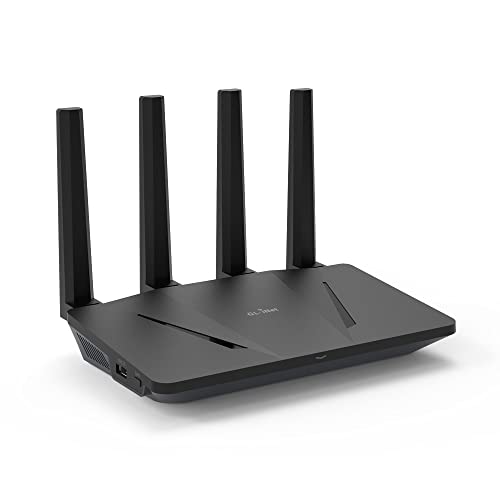
The GL.iNet Flint 3e (GL-BE6500) is a premium WiFi 7 router engineered for demanding households and gaming enthusiasts who prioritize speed, coverage, and security. This router represents a significant leap forward in wireless technology, combining next-generation WiFi 7 standards with practical features like integrated VPN support and comprehensive parental controls. It's designed for users who need reliable connectivity across large homes, support for numerous devices, and built-in privacy protection without paying extra for subscriptions.
Performance is where the Flint 3e truly excels. With WiFi 7 speeds reaching 6.5 Gbps and innovative technologies like Multi-Link Operation (MLO) and 4K-QAM, this router delivers exceptional real-world performance. The 2,500 sq ft coverage area with four retractable antennas ensures strong signals penetrate walls and reach outdoor spaces. Users consistently report solid connections throughout their homes, and the 680 Mbps VPN speeds mean you don't sacrifice performance for security. The ability to handle 100+ connected devices simultaneously makes it ideal for smart homes with multiple family members streaming, gaming, and working simultaneously.
The router's design is professional and functional, with retractable antennas that reduce clutter compared to traditional fixed antenna designs. Setup is straightforward thanks to the included video tutorials and web-based admin panel. The firmware is polished and intuitive, offering advanced customization options for tech-savvy users while remaining accessible to beginners. Built-in features like AdGuard Home DNS blocking and Bark parental control integration provide enterprise-level security without requiring additional subscriptions or complex configuration.
The main limitation is the absence of band steering and smart connect features, which means devices won't automatically connect to the fastest available network. Users occasionally need to manually disconnect and reconnect to ensure optimal band selection. Additionally, some users report the reset button doesn't function reliably. If you value speed, coverage, security, and device capacity over budget-friendly options, this router delivers compelling value and performance that should serve you well for years to come.
Wireless Performance: WiFi 7 (802.11be) with speeds up to 6.5 Gbps, dual-band support, 4 retractable antennas, MLO and 4K-QAM technology for reduced latency.
Connectivity: 5 Ethernet ports with 2.5 Gbps LAN bandwidth, 2500 Mbps maximum upstream data transfer, 12.5 Gbps total data transfer rate. Supports 100+ connected devices.
Coverage and Range: 2,500 square feet of WiFi coverage, designed for homes and workplaces of various sizes.
Security and Privacy: Built-in Wireguard and OpenVPN VPN support (680 Mbps speeds), WPA3 encryption, WPA-Enterprise and WPA-PSK support, AdGuard Home DNS blocking, Bark parental control integration.
Hardware: 1GB DDR4 RAM, Linux operating system, retractable antenna design, compact 0.85 kg weight.
Included: Flint 3e router, Ethernet cable, power adapter, user manual. 2-year manufacturer warranty.
Who Should Buy This Router: Gamers seeking low-latency connections, remote workers requiring secure VPN connectivity, tech enthusiasts wanting advanced customization, families with 30+ connected devices, and users prioritizing privacy and security features.
Who Might Want to Look Elsewhere: Budget-conscious buyers, users in small apartments or studios who don't need 2,500 sq ft coverage, those requiring automatic band steering for seamless device switching, or casual internet users with basic connectivity needs.
Key Considerations: This router requires manual band steering in some cases, so you may need to manually select WiFi networks on certain devices. The premium price reflects WiFi 7 technology and integrated features. Ensure your internet service provider's speeds can take advantage of this router's capabilities. Consider your home size and device count when evaluating value.
Performance Expectations: Actual WiFi speeds and VPN performance depend on your ISP connection speed, network environment, VPN server location, and distance from the router. Most users report excellent signal strength and stable connections across large homes. The router excels in high-density device environments where other routers might struggle.



Buying Guide
Bandwidth and Speed
For multiple devices, raw speed matters. A router that supports WiFi 7 offers up to 6.5 Gbps, dividing bandwidth efficiently among many clients. Look for multi-gig ports: a 2.5 Gbps WAN port ensures your internet plan isn’t the bottleneck. The GL.iNet GL-BE6500 Flint 3e and ASUS TUF Gaming BE6500 both excel with WiFi 7 and quad 2.5 Gbps ports, ideal for future-proofing a busy home.
Device Capacity and Efficiency
Not all routers handle dozens of devices gracefully. Technologies like OFDMA and Multi-Link Operation (MLO) allow simultaneous communication with many clients without slowdowns. The TP-Link Archer GE400 can handle up to 90 devices, while GL.iNet’s AX1800 Flint supports 120 devices using OFDMA. For a mesh-ready solution that extends coverage, our best WiFi 6 mesh routers can help.
Gaming-Specific Features
Gaming routers prioritize traffic to reduce lag. Look for dedicated gaming ports, QoS (Quality of Service), and game accelerators. The TP-Link Archer GXE75 includes a Game Panel that shows real-time network status and accelerates game traffic. ASUS TUF Gaming BE6500 offers one-tap mobile game prioritization and Open NAT for easier multiplayer setups. For a deep dive into gaming-specific routers, see our best gaming routers in 2026.
Coverage and Whole-Home Mesh
A single router must cover every room. Models like the GL.iNet GL-BE6500 Flint 3e claim up to 2,500 square feet of coverage. If your home is larger or has tricky layouts, EasyMesh compatibility (as found on TP-Link Archer GE400 and Archer GXE75) lets you add extenders for seamless roaming. For whole-home mesh systems, check our best WiFi 6E mesh routers and Top Tri-Band Mesh WiFi Systems articles.
Final Thoughts
Choosing the best gaming router for multiple devices comes down to your household’s size and needs. If you prioritize VPN speed and advanced security alongside high device capacity, the GL.iNet GL-BE6500 Flint 3e WiFi 7 Router with VPN stands out with its rapid WireGuard performance and AdGuard Home integration. For gamers who want dedicated acceleration and a comprehensive gaming panel, the TP-Link Tri-Band AXE5400 WiFi 6E Gaming Router offers a tri-band design with WTFast support and a user-friendly Game Panel. Either way, both routers are validated to keep a busy home network snappy and lag-free.
Frequently Asked Questions
How many devices can a gaming router handle?
Modern gaming routers can manage 50 to 120+ devices simultaneously. The GL.iNet GL-AX1800 Flint supports up to 120 devices, while the TP-Link Archer GE400 handles up to 90. Actual performance depends on network traffic and internet speed, but these routers are built for dense households.
Is WiFi 7 worth it for gaming in 2026?
WiFi 7 offers ultra-low latency and higher throughput, which benefits competitive gaming and 4K/8K streaming. If you have a multi-gig internet plan and many devices, WiFi 7 routers like the ASUS TUF Gaming BE6500 or GL.iNet GL-BE6500 Flint 3e provide future-proof performance. For most households, WiFi 6 or 6E is still excellent.
What is the best router for multiple devices and low ping?
Routers with Multi-Link Operation (MLO) and dedicated game acceleration deliver the lowest ping. The ASUS TUF Gaming BE6500 uses MLO to keep connections stable, while the TP-Link Archer GXE75 includes game server acceleration via WTFast. For more details, see our Best Gaming Routers guide.
Can I use a gaming router for non-gaming activities?
Absolutely. Gaming routers are excellent for any high-bandwidth home network. Their strong CPU, advanced QoS, and robust WiFi coverage benefit streaming, video conferencing, and smart home devices. You’re getting a premium router that handles everything, not just games.