

🔥 TV Black Friday Deals 2026: picks worth watching →
You’ve just finished a grueling color grade in DaVinci Resolve, but playback stutters on every node. The render queue crawls. Your timeline feels unusable. The culprit? An underpowered graphics card. DaVinci Resolve leans heavily on GPU compute for real-time effects, noise reduction, and timeline performance. Choosing the right graphics card transforms your editing experience. In this guide, we’ve evaluated six graphics cards ranging from workstation behemoths to compact professional models, all certified or highly capable for Resolve workflows. Whether you’re cutting 4K or 8K, we have picks to match your budget and workload. For more on video editing hardware, see our best graphics cards for premiere pro guide.




Buying Guide
VRAM Capacity: The Price of Color Grades
DaVinci Resolve uses video memory for timeline previews, node trees, and fusion composites. For 4K timelines, 8 GB is a baseline, but 12 GB or more lets you stack nodes without dropping frames. 8K or heavy noise reduction demands 16 GB+. The best graphics cards for 4K video editing all offer generous VRAM. Among our picks, the AMD Radeon Pro W7900 leads with 48 GB, while the ASRock Intel Arc B580 offers 12 GB at an accessible price.
Compute Units and API Support
Resolve leverages OpenCL and Metal on macOS, and CUDA or OpenCL on Windows. More compute units (CUs) or CUDA cores translate to faster effects processing. AMD’s RDNA architecture excels in OpenCL workloads, while NVIDIA’s RTX cores accelerate AI denoising. The AMD Radeon Pro W7800 and W7900 pack 70 and 96 CUs respectively, with dedicated AI accelerators per CU. For NVIDIA, the RTX A2000 offers certified drivers tested with Resolve.
Encoding and Decoding Engines
Modern codecs like H.264, H.265, and AV1 rely on hardware encode/decode for smooth playback. AMD’s Radeon Pro cards support AV1 encoding, future-proofing your workflow. Intel Arc GPUs also include dedicated media engines for popular codecs. If you work with ProRes RAW or Blackmagic RAW, ensure the GPU’s decode support matches your footage.
Form Factor and Power Constraints
Workstation builds often prioritize quiet operation and compact chassis. The NVIDIA RTX A2000 is a low-profile, single-slot card that fits small cases, drawing only 70 W. The PNY RTX 4070 Ti Super requires a 3.3-slot cooler and a 650 W power supply. Always check your case clearance and PSU connectors before purchasing.
Final Thoughts
After evaluating each graphics card against DaVinci Resolve’s demands, our recommendation splits into two clear paths. For professionals working with 8K timelines and complex grades, the AMD Radeon™ Pro W7900, Professional Graphics Card delivers unmatched VRAM and compute power. For editors on a tighter budget who still need strong 4K performance and AV1 support, the ASRock Intel Arc B580 Challenger 12GB OC Graphics is a surprising contender with excellent codec support. Both cards are verified to accelerate your workflow and keep you focused on the creative side.
Related Guides
Frequently Asked Questions
Do I need a workstation GPU for DaVinci Resolve?Not necessarily. Consumer cards like the PNY GeForce RTX 4070 Ti Super work well for most Resolve tasks. However, workstation cards like the AMD Radeon Pro series offer certified drivers and ECC memory, which can prevent crashes on long renders.
How much VRAM do I need for DaVinci Resolve in 2026?For 4K timelines, 8 GB is the minimum. For 6K or 8K, or if you use heavy noise reduction and OFX plugins, aim for 16 GB or more. The 48 GB on the AMD Radeon Pro W7900 handles the most demanding projects.
Should I choose NVIDIA or AMD for DaVinci Resolve?Both are viable. NVIDIA’s CUDA cores excel in many Resolve effects, while AMD’s RDNA architecture offers strong OpenCL performance. The choice often comes down to budget and VRAM needs. For deep learning based tools, NVIDIA’s Tensor Cores provide an edge.
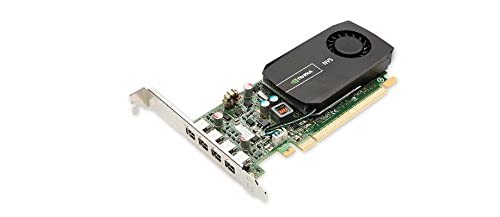
Can I use an older graphics card like the PNY NVS 510 for DaVinci Resolve?The PNY NVS 510 has only 2 GB of DDR3 memory and is not recommended for modern Resolve workflows. It may handle basic display output, but timeline playback and effects will be severely limited. For a better entry point, consider the NVIDIA RTX A2000.




