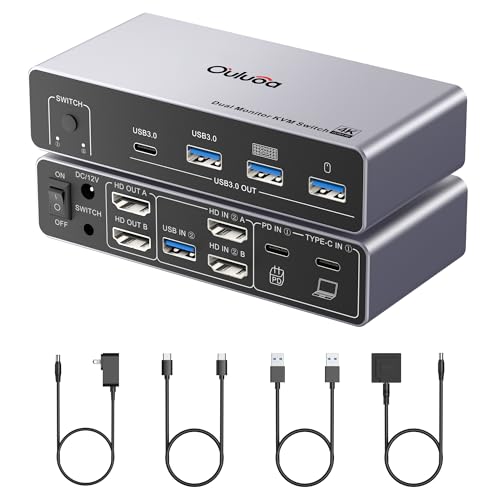
If you juggle a Mac and a PC on your desk, you know the clutter of two keyboards, two mice, and extra cables. A KVM switch (Keyboard, Video, Mouse) lets you control both computers with a single monitor, keyboard, and mouse. This guide covers the best KVM switch for Mac and PC in 2026, focusing on models that handle high resolutions, multiple USB ports, and easy switching. Whether you need a simple HDMI setup or a dual-monitor DisplayPort solution, we have you covered.
We evaluated the top contenders based on compatibility, video quality, switching speed, and build reliability. For more tips on keeping your workspace clean, see our guide to the best microfiber cleaning cloths.





Buying Guide: How to Choose the Best KVM Switch for Mac and PC
Video Resolution and Refresh Rate
Your monitor’s resolution matters. For sharp text and smooth video, look for a KVM switch that supports 4K at 60Hz or higher. Some models even reach 8K for future-proofing. If you game or edit video, a higher refresh rate like 144Hz reduces motion blur. The JCYMELE KVM switch, for example, offers 4K@144Hz and 8K@60Hz, ideal for demanding tasks.
Number of USB Ports and Speed
Shared peripherals like a keyboard, mouse, webcam, or printer need USB ports. USB 3.0 provides up to 5Gbps, enough for fast file transfers. The Hearvo KVM switch includes four USB 3.0 ports (three USB-A and one USB-C), giving you flexibility for modern devices. More ports mean less swapping.
Switching Methods and Convenience
You can switch between computers with a button on the KVM unit, a remote switch, or keyboard hotkeys. A wired remote lets you keep the switch hidden and the button on your desk. The Hearvo model includes both a button and a remote, while the JCYMELE uses a button and a remote switch, no hotkeys. Choose what fits your workflow.
Compatibility with Mac and PC
Not all KVM switches work perfectly with both operating systems. Look for explicit support for macOS, Windows, and Linux. The products we reviewed are compatible with Mac, Windows, and Linux. For a tidy workspace, also check out our best electric cleaning brushes to keep your desk spotless.
Final Thoughts
After comparing the top options, we recommend the Hearvo USB 3.0 HDMI KVM Switch for 2 Computers 1 for its excellent value, four USB 3.0 ports, and simple plug-and-play setup, perfect for a single 4K monitor. For users needing dual-monitor support and higher refresh rates, the 4K@144Hz KVM Switch 2 Monitors 2 Computers Display by JCYMELE is a powerful choice with DisplayPort connectivity and extended mode. Both work seamlessly with Mac and PC, freeing your desk from clutter.
Related Guides
Frequently Asked Questions
Will a KVM switch work with my Mac and PC at the same time?
Yes, most KVMs support both operating systems. The models reviewed here are compatible with macOS, Windows, and Linux. You can switch between computers instantly without disconnecting cables.
Do I need a separate power adapter for the KVM switch?
Some KVM switches are bus-powered, but models with multiple USB ports or high-resolution support often include a power adapter. The JCYMELE switch comes with a 12V adapter for stable operation, especially when using power-hungry peripherals.
Can I use a KVM switch with a laptop and a desktop?
Absolutely. Both computers connect via HDMI or DisplayPort cables and a USB cable. Laptops may need a USB-C to USB-A adapter if they lack full-size ports. For more workspace organization, see our best cordless spin scrubbers to keep your desk clean.
What is the difference between a KVM switch and a USB switch?
A USB switch only shares USB peripherals. A KVM switch shares keyboard, mouse, and video, allowing you to control multiple computers with one monitor. For dual-monitor setups, a DisplayPort KVM switch like the JCYMELE supports extended and mirror modes.