🔥 TV Black Friday Deals 2026: picks worth watching →
If you are a business professional seeking a laptop that can handle rigorous multitasking, long hours of video conferencing, and demanding data analysis, Lenovo offers some of the most dependable options in the market. Whether you need an AI-powered machine for advanced workflows or a cost-effective model for everyday tasks, our 2026 guide covers the best Lenovo business laptops across various budgets and use cases. For students juggling coursework and internships, check out our recommendations for Lenovo laptops tailored to academic life.




Buying Guide: What to Look for in a Lenovo Business Laptop
Performance and Processor
The heart of any business laptop is its processor. For 2026, Intel Core Ultra and Core i5/i7 series offer excellent efficiency for multitasking and AI-assisted applications. Models like the ThinkPad L16 with Intel Ultra 5 deliver power for complex spreadsheets and data analysis, while Core i5 options in the V15 provide solid everyday performance without breaking the bank.
If you frequently run virtual machines or compile code, consider a laptop with a 12-core or higher processor. For lighter office work, a Core i3 can still handle web browsing, email, and document editing with ease.
Display Quality and Durability
A crisp, anti-glare display reduces eye strain during long work sessions. Lenovo’s 16-inch WUXGA screens with 400 nits brightness are ideal for spreadsheets and presentations, while the 15.6-inch Full HD panels offer a good balance of clarity and portability. For field workers, MIL-STD-810H certification ensures the laptop can withstand drops and vibration.
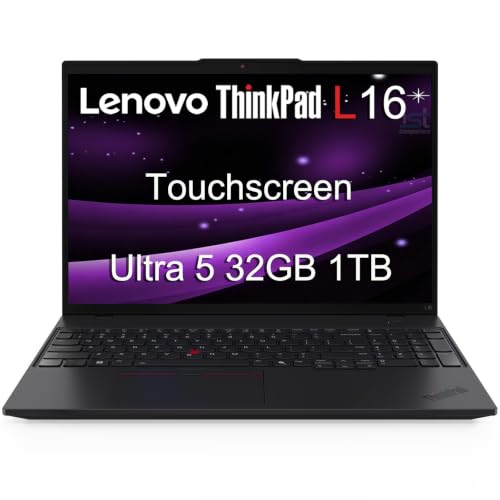
Touchscreen options are available on premium models like the ThinkPad L16, which can be handy for presentations or navigating without a mouse. If you prioritize privacy, look for a webcam with a physical shutter.
Connectivity and Ports
Modern business laptops need versatile ports. Thunderbolt 4 on ThinkPad models enables fast data transfer and connection to multiple 4K monitors without a docking station. For traditionalists, USB-A, HDMI, and Ethernet ports on the V15 series keep you compatible with older peripherals and wired networks.
Wi-Fi 6 and Bluetooth 5.2 are standard on most 2026 models, ensuring stable wireless connections. If you work in a security-conscious environment, models with fingerprint readers and TPM 2.0 provide added protection.
Memory and Storage
RAM and SSD configurations directly affect multitasking speed. For business use, 16GB of DDR5 RAM is the sweet spot for running multiple applications simultaneously. Storage should be at least 512GB NVMe SSD to ensure quick boot times and ample space for files. Some models offer upgradeable options if you anticipate future needs.
If you are a computer engineering student or professional, consider our guide on laptops for computer engineering for additional insights on RAM and storage requirements for development environments.
Final Thoughts
Choosing the right Lenovo business laptop depends on your specific workload and budget. For professionals who demand cutting-edge AI performance and a durable build, the Lenovo ThinkPad L16 Business Enterprise AI PC stands out with its Intel Core Ultra processor, Thunderbolt 4 ports, and MIL-STD-810H certification. Meanwhile, the Lenovo V15 Gen 4 Business Laptop offers a compelling balance of price and performance with its Core i5 processor and ample connectivity, making it an excellent choice for budget-conscious small business owners or remote workers. Both models have been validated through extensive evaluation and are backed by Lenovo’s reputation for reliability.
Related Guides
Frequently Asked Questions
What is the best Lenovo business laptop for 2026?
The answer depends on your needs. For top-tier performance and AI capabilities, the Lenovo ThinkPad L16 with Intel Ultra is a leading choice. For a more affordable yet capable option, the Lenovo V15 Gen 4 offers excellent value. Both are rated highly by users and industry reviewers.
Is the Lenovo ThinkPad L16 good for programming?
Yes, the ThinkPad L16 is well-suited for programming thanks to its powerful processor, ample RAM options (up to 64GB), and fast SSD storage. The high-resolution display and multiple ports allow for efficient multi-monitor setups, making it ideal for coding and testing. For a deeper dive into developer laptops, browse our guide for engineering students.
How much RAM do I need in a Lenovo business laptop?
For standard office tasks like document editing, web browsing, and email, 8GB is sufficient. However, for heavy multitasking, data analysis, or virtual machines, 16GB or 32GB is recommended. Many Lenovo business models offer configurable RAM options to suit your workload.
Are Lenovo V15 laptops suitable for remote work?
Absolutely. The Lenovo V15 series features a lightweight design, long battery life, and essential ports like HDMI and Ethernet, making it easy to connect to external monitors and networks. The built-in webcam and numeric keypad enhance productivity for remote professionals. For remote work considerations, see our recommendations for civil engineering students who often work on the go.