

🔥 TV Black Friday Deals 2026: picks worth watching →
Imagine you’re in your backyard, trying to stream a movie on your tablet, but the WiFi signal keeps dropping. Or you’re in the basement, and video calls are a pixelated mess. This is a common frustration for many homeowners, and the solution often lies in choosing a router that can actually cover your entire living space. If you’re tired of dead zones and lag, you’ve come to the right place. This guide will walk you through the top long range routers on the market, helping you pick the perfect one for your home’s unique layout and your family’s online habits.
We’ve analyzed a wide range of models, from budget-friendly options to high-performance gaming beasts, to find the ones that truly deliver on their coverage promises. Whether you have a large two-story house or need to extend your network to your backyard, we have insights that will make your decision easier. For more tailored advice, you might also want to check out our guide on routers for a two-story house to see which models are best suited for multi-level homes.

Pros
- Exceptional throughput with 6.6Gbps combined speeds across three frequency bands
- Intelligent AI QoS ensures gaming priority without manual configuration
- Powerful quad-core processor handles multiple simultaneous connections smoothly
- WiFi 6E future-proofs your setup with latest wireless standard support
- Attractive RGB lighting integrates with gaming room aesthetics
Cons
- Premium pricing may be steep for casual users with basic connectivity needs
- Requires WiFi 6E compatible devices to achieve maximum 6.6Gbps speeds
- RGB lighting and advanced features add complexity compared to basic routers
The MSI Radix AXE6600 is a premium WiFi 6E gaming router engineered for serious gamers and power users who demand maximum wireless performance. This tri-band system targets competitive players, content creators, and households where multiple users stream, game, and work simultaneously without compromise.
The standout feature is its AI QoS technology, which intelligently detects gaming traffic and automatically prioritizes packets for lag-free performance. Combined with the 1.8GHz quad-core processor and 8-stream tri-band architecture, this router handles demanding scenarios like 4K streaming on one device while gaming on another without noticeable degradation. Real-world performance benefits from the dedicated Game Accelerator feature that optimizes connections for popular esports titles.
Build quality reflects MSI's gaming heritage with an aggressive aesthetic design and customizable Mystic Light RGB that syncs with compatible peripherals. The tri-band approach spreads devices across 2.4GHz, 5GHz, and 6GHz frequencies, reducing congestion and maintaining consistent speeds even in crowded WiFi environments.
The main limitation is that achieving maximum 6.6Gbps speeds requires WiFi 6E compatible devices, which remain relatively expensive. Additionally, the feature-rich interface and RGB customization add setup complexity compared to basic routers, though the quick setup guide mitigates this concern.
The MSI Radix AXE6600 delivers exceptional value for gaming enthusiasts and demanding households. Its combination of raw speed, intelligent traffic management, and gaming-focused optimization makes it a solid choice for those willing to invest in premium wireless infrastructure.
Wireless Standards: WiFi 6E (802.11ax), Tri-band (2.4GHz, 5GHz, 6GHz)
Maximum Speed: 6.6Gbps combined (8-stream simultaneous support)
Processor: 1.8GHz Quad-Core CPU
Connectivity: Gigabit Ethernet, USB, WiFi
Special Features: AI QoS, Game Accelerator, Mystic Light RGB, Access Point Mode
Included: Gaming router, cables, quick setup guide
Recommended Use: Gaming, streaming, multi-device households
Best For: Competitive gamers, content creators, households with 10+ connected devices, and users in larger homes needing extended WiFi coverage.
Consider This If: You play online games competitively, stream 4K video, work from home, or have multiple family members using bandwidth-intensive applications simultaneously.
Skip If: You have basic browsing and streaming needs, live in a small apartment, or already own a quality WiFi 6 router. The WiFi 6E upgrade delivers diminishing returns without compatible devices.
Setup Tip: Place the router centrally in your home and use the 6GHz band for devices closest to the router for maximum speed benefits. The quick setup guide walks through initial configuration in minutes.


Pros
- Exceptional WiFi 6 performance handles multiple 8K streams and heavy gaming without buffering
- Outstanding device capacity supports dozens of connected devices with minimal congestion
- Reliable whole-home coverage reaches kitchens and bedrooms with strong signal strength
- Comprehensive security features included at no extra cost for network protection
- Modern aesthetic design with functional ventilation keeps the router cool and powerful
Cons
- Requires a modem for most internet service providers, adding to overall setup cost
- High-performance capabilities may be overkill for smaller homes or light internet users
- Premium security features beyond basics require paid subscription to HomeShield service
The TP-Link Archer AX73 is a premium WiFi 6 router engineered for power users, content creators, and families with heavy bandwidth demands. This router excels for households streaming multiple 8K videos, gaming competitively, or connecting dozens of smart home devices simultaneously without performance degradation.
What sets this router apart is its impressive 5400 Mbps total speed combined with intelligent MU-MIMO and OFDMA technology that dramatically increases device capacity. The 6-antenna configuration with beamforming technology delivers stable connections throughout your home, while the 4T4R structure on the 5 GHz band achieves maximum 4.8 Gbps ultra-fast connections for demanding applications. Real-world performance matches the specifications for speed and coverage, making it one of the most reliable options in its class.
The design is both functional and attractive, featuring a contemporary slant rectangle aesthetic with scaled armor styling. More importantly, the extensive ventilation design with 167 cm² of vent space prevents thermal throttling, allowing the router to maintain peak performance during extended use. The inclusion of a USB 3.0 port adds practical value for media sharing and cloud storage applications.
Security is handled comprehensively through TP-Link HomeShield, which provides DDoS protection, malicious site blocking, and port intrusion detection at no additional cost for basic features. The OneMesh compatibility allows seamless expansion with additional TP-Link routers for whole-home coverage without dead zones, making future upgrades straightforward.
The primary drawback is the requirement for a separate modem for most ISPs, and premium HomeShield features require a paid subscription. However, for users who need professional-grade WiFi performance and comprehensive security, the Archer AX73 delivers exceptional value and reliability that justifies the investment.
WiFi Performance: Up to 5400 Mbps total speed, 4.8 Gbps on 5 GHz band with HE160 technology, dual-band operation
Antenna Configuration: 6 external antennas with high-power FEM and beamforming for extended coverage and signal concentration
Device Capacity: MU-MIMO and OFDMA support enables 4x average throughput with reduced congestion for multiple simultaneous connections
Connectivity: 1x USB 3.0 port for media sharing, Gigabit Ethernet ports, compatible with all major ISPs including AT&T, Verizon, Xfinity, Spectrum, Cox, and others
Power & Operating Conditions: 12V 2.5A power supply, operating temperature range 0-40 degrees Celsius (32-104 degrees Fahrenheit)
Security: TP-Link HomeShield with network security scanning, IoT device identification, parental controls, and quality of service management
Network Expansion: OneMesh technology support for seamless whole-home WiFi coverage with multiple routers
Is This Router Right for You? The Archer AX73 is ideal if you have multiple family members streaming 4K or 8K content, competitive online gamers, smart home enthusiasts with 50+ connected devices, or work-from-home professionals requiring rock-solid connectivity. It's particularly valuable for larger homes where WiFi coverage is challenging.
When to Consider Alternatives: If you live in a small apartment, use the internet lightly, or primarily browse and email, a budget-friendly WiFi 5 router may be sufficient. Also consider alternatives if you already have a mesh system from another brand, as OneMesh works best with TP-Link products.
Setup Considerations: Remember you need an external modem for most internet providers, so factor that into your budget. The router supports all major ISPs, so compatibility is not an issue. The extensive ventilation design means it should be placed in an open area with good airflow for optimal performance.
Long-Term Value: WiFi 6 technology is future-proof for the next 5-7 years of device releases. The expandability through OneMesh and included security features make this a smart long-term investment for growing households and evolving connectivity needs.

Pros
- Exceptional Wi-Fi 6 performance with dual-band speeds perfect for 4K streaming and gaming
- 2.5G port future-proofs your router for next-generation internet speeds from ISPs
- Eight antennas with beamforming provide superior coverage and signal strength in large homes
- Advanced MU-MIMO and OFDMA reduce congestion and latency when connecting many devices
- OneMesh support enables seamless whole-home coverage expansion without complicated setup
Cons
- No customer reviews available yet, making real-world performance validation difficult
- Premium pricing reflects high-end features that may exceed needs for smaller homes or light users
- Requires a modem for most ISP connections, adding to overall setup cost
The TP-Link Archer AX80 is a premium Wi-Fi 6 dual-band router engineered for users who demand maximum performance and coverage. This is the ideal choice for large homes, content creators, gamers, and anyone with multiple connected devices who refuses to compromise on speed or reliability.
Performance is where the Archer AX80 truly excels. With Wi-Fi 6 technology delivering up to 4804 Mbps on the 5GHz band and 1148 Mbps on 2.4GHz, combined speeds reach an impressive 6952 Mbps. The standout feature is the 2.5G multi-gigabit ethernet port, which breaks through traditional gigabit limitations and prepares your network for the multi-gig internet era. MU-MIMO and OFDMA technologies work together to maintain low latency and high efficiency even when dozens of devices connect simultaneously.
The router's eight high-gain antennas with beamforming technology ensure exceptional coverage throughout expansive homes. The OneMesh compatibility feature lets you expand coverage seamlessly by adding compatible range extenders, creating a unified network that devices can roam across without dropping connection. Built-in VPN client support protects all connected devices at the network level, and Alexa compatibility brings convenient voice control to your smart home ecosystem.
The Archer AX80 comes with TP-Link HomeShield, offering free basic network security, IoT device identification, parental controls, and quality of service management. This adds genuine value for families concerned about network safety. The router works with all major ISPs including Comcast, Charter, AT&T, Verizon, and others.
The main limitation is the lack of customer reviews, which makes hands-on performance validation challenging. Additionally, this router's premium features and pricing may exceed the needs of smaller homes or casual internet users. A modem is required for most ISP connections, representing an additional investment. Overall, the Archer AX80 is an excellent choice for demanding users seeking top-tier performance, future-proof connectivity, and comprehensive smart home integration.
Wi-Fi Performance: AX6000 Wi-Fi 6 with up to 4804 Mbps on 5GHz and 1148 Mbps on 2.4GHz
Connectivity: One 2.5G multi-gigabit ethernet port, plus additional gigabit ports for wired connections
Antennas: Eight high-gain external antennas with beamforming technology
Advanced Features: MU-MIMO, OFDMA, VPN client support, OneMesh compatibility, Alexa voice control
Security: TP-Link HomeShield with network security, IoT protection, parental controls, and reporting
Compatibility: Works with all major ISPs and requires a modem for most connections
Perfect For: Large homes requiring extensive Wi-Fi coverage, gamers needing low-latency connections, content creators handling large file transfers, families with 50+ connected devices, users with multi-gig internet subscriptions, tech enthusiasts wanting future-proof networking.
Consider Alternatives If: You live in a small apartment or studio, your internet plan is under 500 Mbps, you have fewer than 20 connected devices, or you're on a tight budget and need basic Wi-Fi coverage.

Pros
- Excellent value for money with strong performance at an affordable price
- Simple setup process with intuitive Tether app for both Android and iOS
- Reliable dual-band performance handles multiple streaming and gaming devices smoothly
- Gigabit ports provide wired connectivity options for devices requiring stable connections
- Modern security features including WPA3 and parental controls protect your network
Cons
- WiFi range is limited in homes larger than 2000 square feet without additional extenders
- 5GHz band performance may degrade at distance, requiring placement closer to devices
- Not ideal as primary router for high-performance gigabit internet plans above 500 Mbps
The TP-Link Archer A6 is an AC1200 dual-band WiFi router designed for home users seeking reliable internet connectivity at an affordable price. It's best suited for small to medium-sized homes, basic to moderate internet users, and anyone looking to upgrade from older router technology without breaking the bank.
Performance is where this router shines for its price tier. The 5GHz band delivers up to 867 Mbps for streaming HD video and online gaming, while the 2.4GHz band handles everyday tasks like email and web browsing at 300 Mbps. The four external antennas with Beamforming technology work together to concentrate WiFi signals throughout your space, and MU-MIMO support ensures multiple devices can connect simultaneously without significant speed degradation.
Build quality is solid with a compact, durable design that fits easily in most home setups. The router includes four Gigabit LAN ports for wired connections, which is valuable for devices like gaming consoles or security cameras that benefit from stable, direct connections. Setup is straightforward using the free Tether app, and advanced features like parental controls, guest mode, and QoS settings provide good flexibility for managing your network.
The main limitation is WiFi range in larger homes. Users with spaces over 2000 square feet may experience weak signals in distant areas, requiring either closer router placement or additional OneMesh extenders. Additionally, if you have a high-speed gigabit internet plan, this router may not fully utilize those speeds due to its AC1200 specification.
The TP-Link Archer A6 is an excellent choice for budget-conscious buyers seeking dependable dual-band WiFi performance. It delivers genuine value through modern features like WPA3 security and OneMesh compatibility, making it a smart upgrade for homes with moderate WiFi demands.
WiFi Standards: 802.11a, 802.11ac, 802.11b, 802.11g, 802.11n (WiFi 5)
Speed: AC1200 (867 Mbps on 5GHz plus 300 Mbps on 2.4GHz)
Ports: 4 Gigabit LAN ports, 1 Gigabit WAN port
Antennas: 4 external fixed antennas with Beamforming
Security: WPA3, WPA2, WPA encryption protocols
Features: MU-MIMO, Access Point Mode, Guest Mode, Parental Controls, QoS, OneMesh support
Power: 12V power adapter included
Dimensions: 8.46 inches L x 4.92 inches W x 1.81 inches H
Weight: 11.36 ounces
Warranty: 2-year manufacturer warranty
Is This Router Right for You? The Archer A6 works best for small to medium homes (up to 2000 sq ft) with moderate internet usage. It's perfect for families that stream video, browse the web, and play online games without requiring maximum performance.
When to Buy: Choose this router if you want to upgrade from an older model, need a secondary router for a specific room or device, or seek reliable WiFi on a tight budget. It's also excellent for renters who need a portable solution.
When to Look Elsewhere: If you have a large home over 2000 square feet, a gigabit internet plan above 500 Mbps, or multiple power users streaming 4K content simultaneously, consider a higher-tier AC1900 or WiFi 6 model.
Setup Tips: Download the Tether app before setup for the easiest installation experience. Place the router in a central, elevated location away from walls and metal objects for optimal coverage. Set the 5GHz band for devices requiring speed and the 2.4GHz band for better range on older devices.
Expandability: The OneMesh compatibility means you can add compatible TP-Link WiFi extenders later to expand coverage without replacing your router.
Buying Guide
Coverage Area and Antenna Design
The most critical factor for a long range router is its coverage area. Manufacturers often advertise square footage, but real-world performance depends on your home’s construction, walls, and interference. Look for routers with high-gain antennas, like the 6dBi antennas on the Tenda WiFi 6 Router, or the beamforming technology in the TP-Link AX5400, which focuses the signal toward your devices.
For outdoor or ultra-large spaces, consider a dedicated outdoor unit like the TP-Link CPE710, which has a directional antenna designed for point-to-point transmission. If you have a two-story home, you might want to read our guide on wireless routers for large homes to understand how different antenna configurations perform across multiple floors.
WiFi Technology and Speed
WiFi 6 is the current standard for long range routers, offering faster speeds, better efficiency, and improved performance in congested areas. Look for features like MU-MIMO and OFDMA, which allow multiple devices to communicate simultaneously without slowing down the network. The TP-Link Archer AX80, for example, uses these technologies to deliver combined speeds of up to 6000 Mbps, making it ideal for households with many smart devices.
If you’re a gamer or stream 4K/8K content, a WiFi 6 router with a fast processor, like the MSI Radix AXE6600, will ensure low latency and minimal buffering. For more insights on optimizing your network for streaming, check out our article on routers for streaming multiple devices.
Ports and Connectivity Options
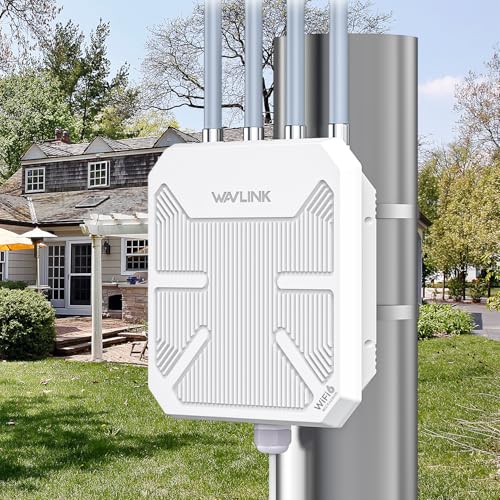
Consider the wired connections you need. A Gigabit Ethernet port is essential for connecting a gaming console, smart TV, or network-attached storage (NAS). Some routers, like the TP-Link Archer AX80, even include a 2.5G Multi-Gigabit port, which is perfect for internet plans faster than 1 Gbps. For outdoor routers like the WAVLINK AX3000, having a PoE (Power over Ethernet) port simplifies installation, as you only need one cable for both power and data.
If you have a large home, you might also want to consider a mesh system for seamless coverage. Our guide on routers for large homes can help you decide if a single long range router or a mesh system is the right choice for you.
Security and Parental Controls
In today’s connected world, security is non-negotiable. Look for routers with WPA3 encryption, which is the latest standard for protecting your network and connected devices. Many routers, like the TP-Link Archer AX73, come with built-in security suites like HomeShield, which offer features such as network scanning, IoT protection, and parental controls. These tools let you manage screen time and block inappropriate content, giving you peace of mind.
For more advanced security needs, some routers allow you to set up a VPN client, which encrypts all traffic from your home network. This is particularly useful if you work from home or want to protect your privacy online. The TP-Link Archer AX80 supports VPN clients, allowing you to secure your entire network without installing software on each device.
Final Thoughts
Choosing the right long range router can transform your internet experience, eliminating dead zones and ensuring smooth streaming, gaming, and browsing for the whole family. For a powerful and versatile option that handles heavy workloads with ease, consider the TP-Link AX6000 Wi-Fi 6 Dual Band Router. If you need a budget-friendly solution that still offers excellent coverage, the Tenda WiFi 6 Router for Home is a fantastic choice for medium to large households. Both are excellent performers, and your final decision should be based on your specific needs and budget.
Related Guides
Frequently Asked Questions
What is the best long range router for a large home in 2026?
The best long range router for a large home in 2026 depends on your specific needs, but models like the TP-Link Archer AX80 and the MSI Radix AXE6600 are top contenders. These routers offer excellent coverage and support the latest WiFi 6 technology, ensuring fast and stable connections throughout your entire house.
How can I improve the range of my current WiFi router?
You can improve your router’s range by placing it in a central, elevated location away from walls and electronic devices. Additionally, updating your router’s firmware and adjusting its antennas can help. If you’re still having issues, consider using a WiFi extender or upgrading to a mesh system for better coverage.
Are outdoor routers worth it for extending WiFi?
Yes, outdoor routers are worth it if you need to extend WiFi to your backyard, patio, or other outdoor areas. They are built to withstand weather conditions and offer long-range coverage. The WAVLINK AX3000 and TP-Link CPE710 are excellent options for outdoor use, providing reliable connections even in harsh environments.
What is the difference between a WiFi 5 and WiFi 6 router for long range?
WiFi 6 routers offer better performance, higher speeds, and improved efficiency compared to WiFi 5. They are better at handling multiple devices and have stronger security protocols like WPA3. For long range, WiFi 6 routers often have better beamforming and antenna technology, which can provide more stable and stronger signals over larger distances.


