

Imagine editing a photo on a plane and realizing the colors on your laptop screen are completely off. Or trying to enjoy a movie on a hotel TV that washes out every shadowy scene. If you value color accuracy and true blacks while working or playing away from home, an OLED portable monitor is the upgrade you need. These compact displays use self-lit pixels to deliver infinite contrast and vibrant colors that IPS screens can’t match. In this guide, we’ve evaluated four of the best OLED portable monitors of 2026 to help you find the perfect travel companion for your laptop, gaming console, or smartphone. Whether you’re a graphic designer, a remote worker, or a mobile gamer, one of these models will transform your on-the-go setup. Just as you need the right tool for a clean workspace, a high-quality monitor makes every task more enjoyable. (Check out our best microfiber cleaning cloths to keep your new screen spotless.)



Buying Guide: What to Look for in an OLED Portable Monitor
Resolution and Pixel Density
OLED technology excels at rendering deep blacks, but resolution determines how sharp the image appears. A 4K (3840×2160) panel on a 16-inch screen offers ultra-fine detail for photo editing and 4K video playback. On smaller screens like 14 inches, 4K can make text look tiny without scaling, but the pixel density is incredible. For general productivity and media consumption, a 2.5K (2560×1600) or FHD (1920×1080) OLED panel still looks crisp and saves battery life. Consider your primary use: if you work with high-resolution images, invest in a 4K model; for casual use, a lower resolution with accurate colors may be sufficient.
Touchscreen and Connectivity
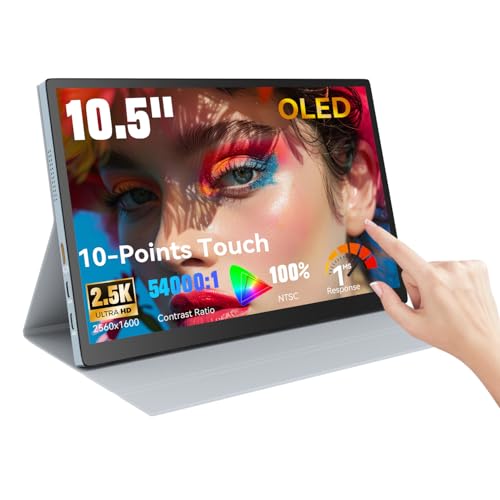
Many OLED portable monitors now offer 10-point touch support, which can boost productivity when used with Windows laptops or Android devices. However, note that touch functionality often does not work with iPhones, iPads, or gaming consoles. For connectivity, look for full-featured USB-C ports that handle both video and power delivery (PD). HDMI ports add compatibility with older laptops and gaming consoles. Some monitors include a mini-HDMI port, so check if you need an adapter. A single USB-C cable that powers the monitor and transmits video is the most convenient setup.
Keeping your workspace tidy is easier with fewer cables. For more home organization tips, read our best mop for small apartment guide to keep your floors clean while you work.
Portability and Build Quality
These monitors are designed to travel. Weight and thickness matter: the lightest models weigh just over a pound and are less than half an inch thick. A built-in kickstand or protective cover that doubles as a stand adds convenience. Aluminum alloy casings offer durability without adding heft. Check if a carrying case or sleeve is included. If you move between offices, coworking spaces, or coffee shops, an ultralight OLED monitor with a slim profile will slip into your bag effortlessly.
Traveling with fragile electronics? Our best reusable paper towels can help you wipe down surfaces without waste.
Color Accuracy and Brightness
OLED panels typically cover 100% DCI-P3 or 100% NTSC color gamuts, which means vibrant, lifelike colors. Brightness is measured in nits: 400 to 500 nits is comfortable for indoor use, but direct sunlight may cause glare. For photo and video work, look for monitors that support HDR and have factory calibration. Contrast ratios of 100,000:1 or higher ensure true blacks. If you edit color-critical content, a monitor with high color accuracy is essential.
Just as you need precision tools for cleaning, you need accurate colors for creative work. See our best grout cleaning brush for maintaining a tidy workspace.
Final Thoughts
Choosing the right OLED portable monitor comes down to your specific needs. For creative professionals who demand the highest resolution and color accuracy, the ViewSonic VX1655-4K-OLED 16 Inch 4K UHD OLED offers a stunning 4K panel with single-cable USB-C connectivity and a versatile stand. If you want a more affordable option with touch functionality for Windows or Android devices, the 10.5″ OLED Touchscreen Portable Monitor 2.5K 100% from Prechen delivers impressive colors and a compact design that fits in any bag. Both models will elevate your mobile experience, whether you are editing videos at a cafe or enjoying HDR movies on a long flight.
Frequently Asked Questions
Are OLED portable monitors good for gaming? Yes, OLED panels offer fast response times (as low as 1ms) and high contrast, making them excellent for immersive gaming. However, most portable monitors have a 60Hz refresh rate, which is fine for single-player titles but not ideal for competitive esports. Check the product specs for compatibility with your console or PC.
Can I use an OLED portable monitor with my smartphone? Many OLED portable monitors support video input via USB-C from smartphones that have DP Alt Mode, such as recent Samsung Galaxy and Huawei models. Touch functionality may not work with iPhones. Always verify compatibility before purchasing.
How do I clean an OLED screen? Use a soft, lint-free microfiber cloth slightly dampened with distilled water. Avoid ammonia-based cleaners or paper towels, as they can damage the delicate OLED coating. For stubborn smudges, a 50:50 mix of distilled water and white vinegar is safe. Our best microfiber cleaning cloths guide can help you choose the right cloth.
What is the difference between OLED and IPS in portable monitors? OLED uses self-illuminating pixels that can turn off completely for perfect blacks, while IPS uses a backlight that always shines, causing grayish blacks. OLED offers superior contrast and color vibrancy but can be more expensive and may have shorter lifespan if used at max brightness for extended periods. IPS is brighter and cheaper, but lacks the deep blacks of OLED.


