

So, you’re ready to build your first PC. The parts are picked, the budget is set, and you’re eager to see it all come together. But with so many cases on the market, choosing the right foundation for your new rig can feel overwhelming. You want something that looks great, has room to work, and won’t have you wrestling with cables for hours. This guide is here to help you navigate the options and find the perfect case for your first-time build.
We’ve evaluated a range of PC cases specifically with first-time builders in mind. Our focus is on ease of installation, good airflow, and features that simplify the building process. Whether you’re after a compact micro-ATX build or a full ATX showcase, we have recommendations that make your first experience enjoyable and rewarding. For more insights on cases with modern connectivity, check out our guide to PC cases with USB-C.



Buying Guide
Before you settle on a case, consider a few key factors that can make or break your first build experience. These criteria will help you choose a case that not only fits your components but also makes the building process smoother and more enjoyable.
Ease of Building
For a first-time builder, a case with a well-thought-out interior layout is a lifesaver. Look for features like grommeted cable routing holes, ample space behind the motherboard tray, and tool-free drive bays. These small touches can drastically reduce build time and frustration.
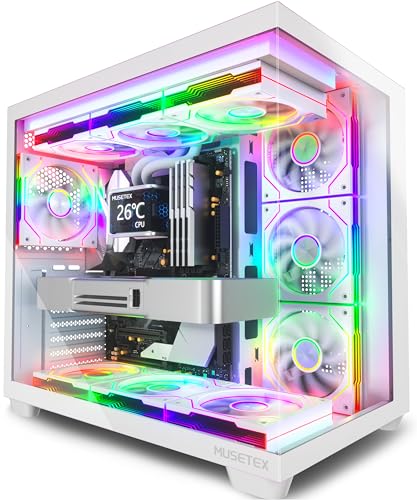
Cases like the MUSETEX ATX PC Case with its pre-installed fans and clear manual are designed with beginners in mind. The Okinos Aqua 3 also stands out with its quick-release glass panels, making it easy to access your components during installation. For more tips, you might find our article on PC cases with fans helpful.
Cooling Performance
Good airflow is essential to keep your components running cool and quiet. Cases with pre-installed fans, like the MUSETEX Y6 with its seven Infinity Mirror ARGB fans, offer excellent out-of-the-box cooling. This is especially beneficial for first-time builders who may not want to deal with the complexities of installing fans separately.
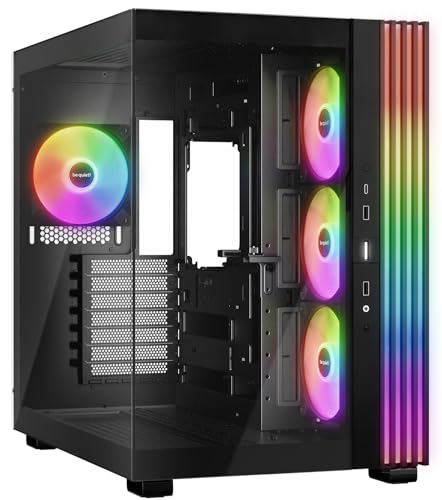
Consider the airflow path and fan placement. A case with a mesh front panel or multiple fan mounts will allow for better air intake and exhaust. The be quiet! Light Base 600 LX, for instance, offers a flexible layout with room for up to ten fans and multiple radiators, making it a great choice for future upgrades. For a deeper dive into cooling, check out our guide on aesthetic PC cases.
Size and Compatibility
Make sure the case you choose is compatible with your motherboard and other components. If you’re building a compact system, a micro-ATX case like the Okinos Aqua 3 is perfect. For a full ATX build, you’ll need a mid-tower or full-tower case that can accommodate larger graphics cards and CPU coolers.
Check the maximum supported GPU length and CPU cooler height. The MUSETEX Y6, for example, supports GPUs up to 410mm, giving you plenty of room for high-end graphics cards. Also, consider the PSU size and whether the case has enough drive bays for your storage needs.
Design and Aesthetics
Your PC case is a reflection of your style. Whether you prefer a sleek, minimalist look or a case with vibrant RGB lighting, there’s an option for you. Tempered glass panels, like those on the MUSETEX K2 and Y6, let you showcase your components and custom cooling setup.
If you love RGB, look for cases with pre-installed ARGB fans and controllers. The MUSETEX Y6 features Infinity Mirror fans that create a stunning visual effect. For a more understated look, the be quiet! Light Base 600 LX offers a large ARGB strip that can be synchronized with your motherboard for a subtle glow.
Final Thoughts
Choosing the right PC case is a crucial first step in your building journey. For a beginner-friendly option with pre-installed fans and a hassle-free build experience, the MUSETEX ATX PC Case 7 PWM ARGB Fans Pre-Installed is a fantastic choice. If you prefer a more compact and stylish build, the Okinos Aqua 3, Micro ATX Case offers a panoramic view and easy-to-use features. Both options provide excellent value and a great foundation for your first PC.
Frequently Asked Questions
What size case should I choose for my first build?
For a first build, a mid-tower ATX case is a safe bet, as it offers plenty of room for components and is easier to work in. If you prefer a smaller footprint, a micro-ATX case is also a great option, just make sure it supports your motherboard size. Consider your future upgrade plans when deciding on a size.
Do I need to buy extra fans for my new PC case?
Not necessarily. Many cases, like the MUSETEX Y6, come with several pre-installed fans that provide adequate cooling out of the box. If your case doesn’t include fans or you plan on running high-end components, adding extra fans can improve airflow and reduce temperatures. Check the case’s fan mounting points to see what’s possible.
Is tempered glass safe for a PC case?
Yes, tempered glass is safe and durable, but it can shatter if handled improperly. Always handle glass panels with care and avoid hitting them against hard surfaces. Cases like the Okinos Aqua 3 feature quick-release panels that are designed to be removed safely, reducing the risk of accidental breakage.
What is the best way to manage cables in a new PC build?
Start by routing cables behind the motherboard tray and using the provided cable ties to secure them. Use the grommets and cutouts to guide cables to their destinations. Taking your time with cable management not only improves airflow but also makes future upgrades much easier. Many cases, including the MUSETEX K2, have dedicated channels and velcro straps to help.


