

You are standing at your front door, arms full of groceries, trying to balance bags while searching for your keys. Wouldn’t it be better to just touch a fingerprint sensor or use your phone to unlock the door? Smart locks make this a reality, and you don’t have to spend a fortune to get one. In this guide, we have reviewed three of the best smart locks that offer robust features, reliable security, and easy installation without a high price tag. Whether you are a homeowner, renter, or Airbnb host, there is a perfect option for you. For more home security ideas, check out our Home & Living category.

Pros
- No extra hub or bridge needed for WiFi connectivity
- Multiple access methods: keypad, fingerprint, app, voice
- Easy installation on most standard doors (1-3/8" to 1-3/4")
- Real-time monitoring and access history via app
Cons
- Requires 2.4GHz WiFi and must be within 33 feet of the router
- Batteries not included; only standard 1.5V alkaline batteries recommended
- Auto-lock feature is off by default and must be enabled manually in the app
The Philips WiFi Keypad Deadbolt with Handle (4200 Series) is a smart lock designed for homeowners who want robust security without the complexity of a hub. It supports multiple access methods including keypad, fingerprint, and app control, making it a versatile choice for families, frequent guests, or rental properties.
Standout features include the 0.3-second fingerprint sensor and the ability to create custom passcodes for different users. The built-in WiFi connects directly to your home network, so you can lock or unlock from anywhere using the Philips Home Access App. Real-time status updates and access history give you peace of mind when you are away.
Design-wise, the matte black finish and integrated handle set offer a clean, modern look. Installation is straightforward for most standard doors, though you will need to ensure the door is compatible with the lock's orientation. The lock is pre-set for right-opening doors but can be adjusted for left-opening doors easily.
Potential drawbacks include the need for a 2.4GHz WiFi signal within 33 feet of the lock, and the lock does not come with batteries. The auto-lock feature is off by default, so you must activate it in the app. Additionally, using rechargeable or high-power lithium batteries is not recommended, which may be an inconvenience for some users.
Overall, the Philips 4200 Series is a solid choice for anyone seeking a reliable, hub-free smart deadbolt. Its combination of convenience, security, and ease of use makes it a strong contender for upgrading your front door.
Pros
- Six versatile unlocking methods accommodate different preferences and scenarios.
- Self-learning AI adapts to your fingerprints for quicker, more reliable access.
- Long 8-month battery life reduces the need for frequent replacements.
- Built-in Wi-Fi enables remote control without a separate bridge.
- Easy installation compatible with most standard deadbolts.
Cons
- Battery life may vary with heavy usage, potentially falling short of 8 months.
- Physical keys are included but the lock's keyway may not be compatible with existing key systems.
- Lack of Z-Wave or Zigbee support may limit integration with some smart home hubs.
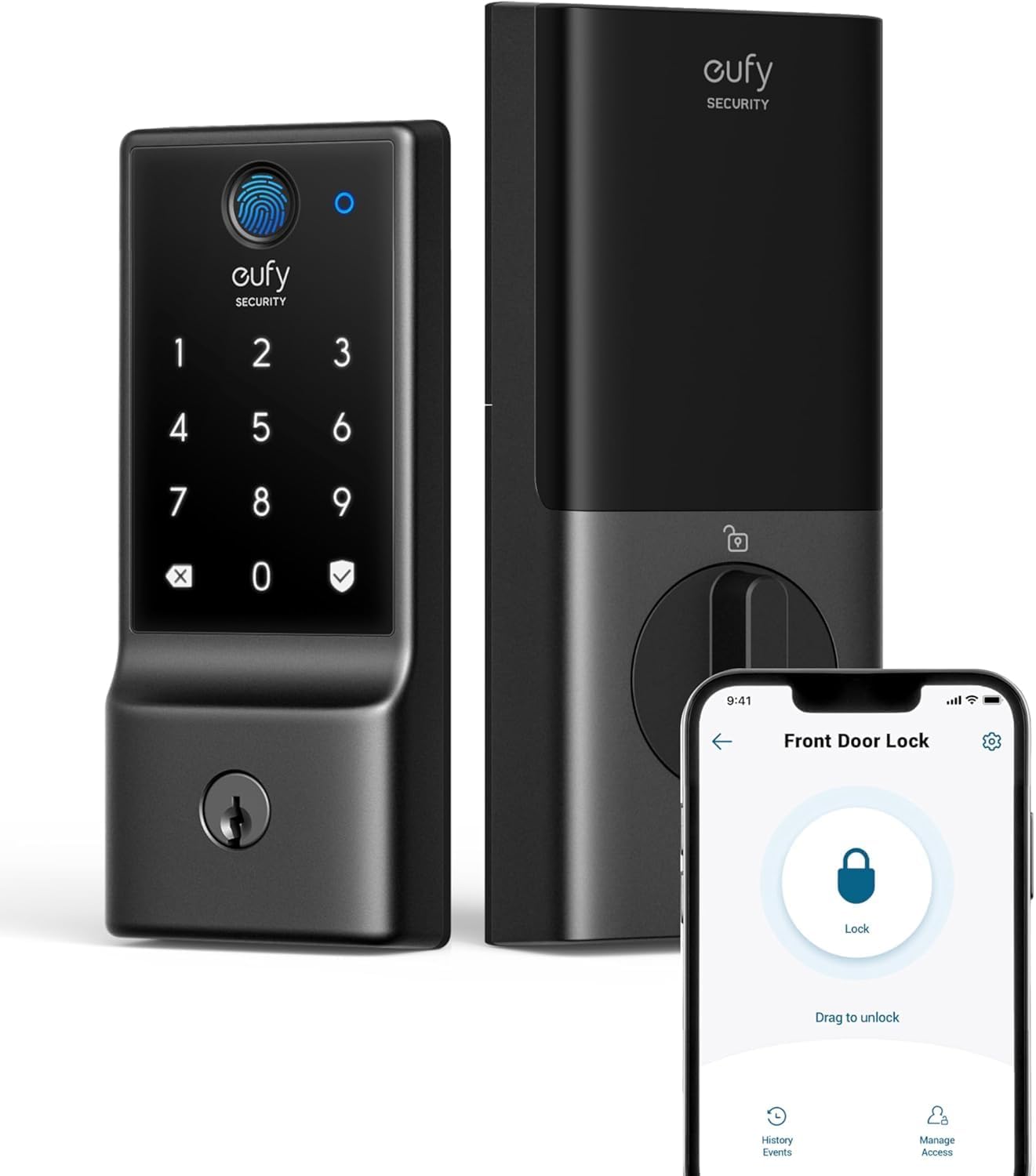
The eufy Security Smart Lock C220 is a versatile keyless entry deadbolt designed for modern homes. It offers six ways to unlock your door: a fast fingerprint sensor, a backlit keypad, a physical key, the eufy Security app, your Apple Watch, or voice commands via Alexa or Google Assistant. This flexibility makes it an excellent choice for families with varying needs and tech preferences.
Its standout feature is the self-learning AI, which adapts to your fingerprints over time for faster and more accurate unlocks. The built-in Wi-Fi allows remote control from anywhere without an extra hub, a convenience many smart locks lack. The lock also integrates with eufy's ecosystem, enabling automated routines with other eufy devices.
Installation is straightforward, taking about 15 minutes on a standard deadbolt without drilling. The lock feels solid, made from aluminum with a polished black finish, and carries a BHMA Grade 3 certification for durability after over 100,000 cycles. Its wide operating temperature range and IP53 waterproof rating make it suitable for exterior doors in most climates.
Potential drawbacks include battery life that may vary with heavy usage, and the lock's digital nature means you'll need to replace 8 AA batteries every 8 months or so. Also, the physical keys are provided, but the lock's keyway may not match your existing house keys.
Overall, the eufy Security Smart Lock C220 delivers strong performance, reliable security, and exceptional convenience at a competitive price. It is an ideal upgrade for homeowners seeking a smart, keyless entry solution that blends cutting-edge technology with robust build quality.

Pros
- No hub needed; connects directly to your existing WiFi network.
- Auto-Lock and DoorSense provide extra security and peace of mind.
- Unlimited programmable codes for different users and schedules.
- Rugged build suitable for harsh weather conditions.
- Easy keypad entry with backup key option.
Cons
- Requires a stable WiFi connection for full remote features.
- Battery life may vary depending on usage and WiFi signal strength.
- No built-in doorbell or camera (separate device needed for video monitoring).
The Yale WiFi Smart Lock Deadbolt is a keyless entry solution that integrates seamlessly into your smart home without requiring an additional hub. It is designed for homeowners who want the convenience of locking and unlocking their door from anywhere using their smartphone, as well as those who want to grant temporary or permanent access to others. With a rating of 4.2 out of 5 stars, this lock aims to balance reliability and modern features.
Standout features include the ability to control the lock remotely via the Yale Access app, Auto-Lock that secures the door after you leave, and DoorSense which confirms the door is fully closed. The lock recognizes when you are home and can unlock automatically, which is handy when carrying groceries. You can also create multiple codes with specific schedules, making it ideal for Airbnb rentals or service providers.
Build quality is solid: the deadbolt is BHMA Grade 2 certified, indicating commercial-grade durability. It operates in a wide temperature range from -22°F to 140°F, suitable for most climates. The black suede finish gives it a modern, understated look that fits many door styles. Installation is straightforward for those comfortable with basic tools, though some may prefer professional help.
Potential drawbacks include reliance on a stable WiFi connection for remote access; if your network goes down, you lose some smart functionality (keypad and key still work). Battery life depends on usage, but low-battery alerts help prevent surprises. There are no built-in camera or alarm features, so this lock focuses solely on access control. Some users might miss a physical keypad backlight, though it is not specified in the product data.
Overall, the Yale WiFi Smart Lock Deadbolt is a strong choice for anyone seeking a reliable, hub-free smart lock with flexible entry options and robust construction. It provides a good balance of convenience and security, though tech-savvy users may want additional smart home integrations. If you want to upgrade your door lock with WiFi control and keyless convenience, this model is worth considering.

Pros
- Multiple unlocking options provide flexibility and backup.
- Fast and accurate fingerprint scanner for quick entry.
- Easy DIY installation with no drilling required.
- App allows remote code generation and lock monitoring.
- Sturdy build quality with a modern, sleek appearance.
Cons
- WiFi gateway required for remote and Alexa voice control, sold separately.
- Bluetooth range may be limited for some users.
- Some users may need to scan fingerprints at multiple angles for best recognition.
The Yamiry Smart Door Handle Lock with Keypad is a versatile 6-in-1 keyless entry deadbolt designed for front doors. It combines a fingerprint knob, Bluetooth app control, keypad, key fob, and physical keys, with optional Alexa voice control via a separate WiFi gateway. This lock is perfect for homeowners, landlords, and Airbnb hosts seeking convenience and enhanced security.
Installation is straightforward and takes about 10 minutes with a screwdriver, fitting standard American wooden doors. The fingerprint reader is fast and accurate, responding instantly. The mobile app is easy to set up, allowing you to generate temporary passcodes for guests and track unlock history remotely.
The lock feels sturdy with its stainless steel and zinc construction, and the matte black finish gives it a modern look. Users report reliable performance, and the reversible handle works for both left and right-handed doors. The auto-lock feature adds an extra layer of security.
A key drawback is that the WiFi gateway must be purchased separately for remote control and Alexa integration. Some users may also need to register fingerprints at multiple angles for optimal recognition. Bluetooth range can be limited, so proximity to the door is needed for app control without WiFi.
Overall, the Yamiry smart lock offers excellent value with its multiple unlocking options, easy installation, and robust app features. It is a solid choice for anyone wanting to upgrade to a smart lock without breaking the bank. Its design and performance make it a reliable addition to any home or rental property.

Pros
- Fast and reliable fingerprint recognition that improves with use via AI learning.
- Easy installation and setup, with simple app connectivity and intuitive controls.
- Auto-lock feature provides peace of mind and prevents accidental lockouts.
- Long battery life with convenient USB-C emergency backup power.
- Sleek, durable design with tempered glass that resists scratches and smudges.
Cons
- Occasional fingerprint misreads may require a backup method like a keypad code or key.
- Keypad beep volume could be louder for better audible feedback when pressing numbers.
- A rare lockout issue was reported where the lock froze after multiple failed scans, requiring a reboot via the app.
The Wyze Auto-Lock Bolt v2 is a smart deadbolt that combines fingerprint recognition, AI learning, and Wi-Fi connectivity for a seamless keyless entry experience. Designed for homeowners who want to upgrade their front door security without sacrificing convenience, this lock offers multiple ways to enter: a fast fingerprint scanner, a backlit keypad with anti-peep technology, a physical backup key, or remote control via the Wyze app.
Standout features include the AI self-learning fingerprint scanner, which adapts to your unique touch over time to reduce failed scans and speed up unlocks. In real-world use, the lock opens in about half a second, and the auto-lock function engages within 5 to 10 seconds after closing the door, ensuring you never leave your home unsecured. The built-in Wi-Fi allows you to check the lock status and grant temporary access to guests from anywhere, and when paired with a Wyze Video Doorbell, you can unlock directly from the live feed.
Design and build quality are impressive for the price point. The lock body is made of aluminum with a tempered glass fingerprint sensor that resists scratches and smudges. It carries BHMA2 certification for durability and an IP53 rating for weather resistance, making it suitable for covered outdoor installations. Installation is straightforward, especially if you already have a standard deadbolt, and the included 8 AA batteries promise up to 8 months of use. A USB-C port provides emergency power if the batteries die.
Potential drawbacks are minor but worth noting. Some users reported occasional fingerprint misreads, especially if fingers are wet or dirty, so having a backup code is recommended. The keypad beep volume could be louder for better auditory confirmation, and a small number of users experienced a lockout situation after multiple failed scans, though a quick app reboot resolved it. Overall, these issues are infrequent and do not detract from the lock's reliability.
Verdict: The Wyze Auto-Lock Bolt v2 offers an exceptional balance of features, performance, and value. With its fast AI-learning fingerprint sensor, robust auto-lock, long battery life, and remote access, it is a top choice for anyone seeking a smart lock that simplifies daily entry while enhancing security. Highly recommended for homeowners who want a reliable, feature-rich upgrade without breaking the bank.
Buying Guide: What to Look for in a Smart Lock
When shopping for a smart lock, it pays to know what features matter most. Below we break down the key criteria to consider.
Connectivity: WiFi Built-in vs. Hub Required
Some smart locks connect directly to your home WiFi, while others need a separate hub or bridge. A built-in WiFi lock is easier to set up and lets you control the lock from anywhere using an app. If you want to integrate with other smart home devices, check for compatibility with Alexa or Google Assistant. For a deep dive into voice‑controlled options, see our best smart lock with Alexa guide.
All three locks we reviewed feature built-in WiFi, so you can skip the extra hardware. The Philips model even works with a 2.4GHz network without a hub, making setup a breeze.
Security and Durability: Grades and Certifications
Look for locks that have been certified by the Builders Hardware Manufacturers Association (BHMA). A higher grade means better durability and resistance to tampering. The Yale lock, for example, is Grade 2 certified, while the eufy model is Grade 3. Both provide reliable security for a typical home. If you want a lock that can withstand extreme temperatures, check the operating range. The eufy C220 works from -22°F to 158°F, making it suitable for many climates.
Ease of Installation and Use
Most smart locks install in about 15 minutes using just a screwdriver. They fit standard deadbolts, so you can replace your existing lock without drilling new holes. The Philips and eufy models come with handles, while the Yale lock includes a keypad and backup key. For a lock that works well with Apple HomeKit, visit our best smart lock with Apple HomeKit page.
Consider how many ways you can unlock the door. Fingerprint sensors, keypads, app control, and voice commands all add convenience. The Philips lock offers 0.3-second fingerprint access, while the eufy lock uses self-learning AI to improve fingerprint recognition over time.
Final Thoughts
After evaluating these three smart locks, we recommend the Philips WiFi Keypad Deadbolt with Handle for its fast fingerprint sensor, built-in WiFi, and versatile passcode options, making it a great all-around choice for families and frequent travelers. For those who prioritize remote access and a robust app ecosystem, the Yale WiFi Smart Lock Deadbolt with Keypad stands out with its auto-lock feature, DoorSense technology, and commercial-grade durability. Both offer excellent value without compromising on security or convenience.
Related Guides
Frequently Asked Questions
Can I install a smart lock myself?
Yes, most smart locks are designed for DIY installation. They fit standard deadbolts and come with clear instructions. The eufy C220, for example, takes about 15 minutes to install and requires no drilling. If you have a non-standard door, you may need a professional, but these models should work with most doors.
Do smart locks work with Alexa or Google Assistant?
Many smart locks, including the Philips and eufy models, are compatible with Alexa and Google Assistant. You can use voice commands to lock or check the status of your door. For a full list of compatible locks, see our best smart lock with Alexa guide.
How long do the batteries last in a smart lock?
Battery life varies by usage and features. The eufy C220 runs for up to 8 months on 8 AA batteries, while the Philips lock lasts up to 6 months. Both send low-battery alerts to your phone, so you are never caught off guard. Always use alkaline batteries to avoid damage.
Can I grant temporary access to guests or service providers?
Yes, smart locks like the Yale and Philips let you create temporary, recurring, or one-time passcodes through the app. This is ideal for Airbnb rentals, dog walkers, or house cleaners. You can also revoke access instantly. For more tips, check our best smart lock for Airbnb guide.



