

🔥 Soundbar Black Friday Deals: picks worth watching →
You have a Google smart speaker in your living room, and you want to stream music, podcasts, and videos directly to your TV soundbar without fiddling with cables or switching inputs. That is exactly where Chromecast built-in shines. It lets you cast audio from hundreds of apps straight to your soundbar, with high fidelity and no hiccups. In this guide, we review three top soundbars with Chromecast support from LG, Polk Audio, and Bose, each delivering a different balance of power, simplicity, and smart features. Whether you prioritize immersive surround sound or a compact footprint, one of these models can elevate your home audio setup. For a broader look at smart home audio, check out our roundup of the best smart soundbars.



Buying Guide
Audio Performance and Channel Configuration
A soundbar with Chromecast should deliver crisp dialogue and room-filling sound. Look for models that support Dolby Atmos or DTS:X for a three-dimensional theater experience. Multi-channel configurations like 5.1.3 or 2.1 add dedicated rear speakers or a subwoofer for deeper immersion. The LG S80TR features upward-firing speakers and rear surrounds, while the Bose Smart Dolby Atmos soundbar uses its proprietary TrueSpace technology to upmix non-Atmos content. For a detailed breakdown of soundbar audio formats, read our guide to wireless soundbars.
Connectivity and Smart Features
Chromecast built-in is the headline feature, but also consider Bluetooth, Apple AirPlay 2, and Wi-Fi streaming options. Some soundbars support multi-room audio via Google Home or Alexa ecosystems. Voice control is a bonus: the Bose model includes Amazon Alexa, while the LG works with Google Assistant through WOWCAST. For seamless casting, ensure your soundbar has a stable Wi-Fi connection. Learn more about network-ready audio in our best WiFi soundbars.
Design and Size
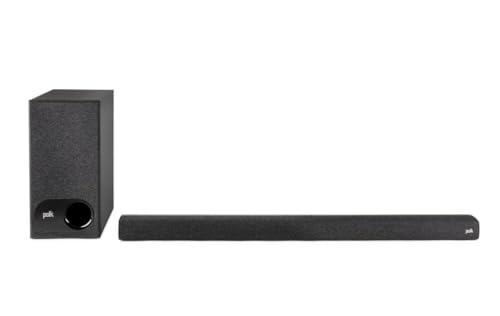
Soundbar dimensions matter, especially if you have a low-profile TV stand or wall mount. Slim designs like the Polk Audio Signa S3 (just 2 inches tall) fit easily without blocking your TV’s IR sensor. The LG S80TR is larger due to its multiple drivers and rear speakers, but it matches LG OLED TVs for a cohesive look. The Bose all-in-one model is compact yet packs five transducers. Consider whether you want a separate subwoofer or rear speakers, as these affect placement. For style tips, see our best soundbars with alexa article.
Ease of Setup and Control
No one wants a complicated installation. Look for soundbars that auto-calibrate to your room using built-in microphones, like the LG S80TR’s Advanced Room Calibration. Wireless rear speakers eliminate cable runs, and an HDMI ARC port simplifies connection to your TV. Voice assistants let you adjust volume or switch inputs hands-free. The Polk Audio Signa S3 gets you up and running with included cables and a straightforward remote. For a deeper dive into voice‑controlled audio, check out soundbars with Google Assistant.
Final Thoughts
Choosing the right soundbar with Chromecast comes down to your space and listening preferences. If you crave a full cinematic experience with Dolby Atmos, rear speakers, and wireless subwoofer, the LG S80TR 5.1.3 ch. OLED evo TV Matching Home is a powerhouse that fills even large rooms with immersive sound. For a sleek, smart solution that fits almost anywhere and includes built-in voice control, the Bose Smart Dolby Atmos Soundbar delivers shockingly good audio from a single bar. Either way, you get seamless Chromecast streaming, so you can cast your favorite content instantly and enjoy rich, clear audio every time.
Related Guides
- Top Soundbars of 2026 for Immersive Audio
- Best Soundbar for Apartment Living in 2026
- Top Computer Soundbars for Clear Audio
Frequently Asked Questions
Can I use Chromecast with any soundbar?
Chromecast requires a soundbar that either has Chromecast built-in or supports Chromecast Audio via an external device like Google Chromecast Audio dongle. Most modern smart soundbars include it, but you can also connect a separate Chromecast to an HDMI port for video casting. For a list of compatible models, see our guide to soundbars with Google Assistant.
Does Dolby Atmos work with Chromecast?
Yes, when you cast from an app that supports Dolby Atmos, the soundbar can receive the Atmos stream over Wi‑Fi via Chromecast. However, not all streaming services deliver Atmos through Chromecast, so check your app’s settings. Soundbars like the LG S80TR and Bose Smart Dolby Atmos are designed to decode and render Atmos content accurately.
How do I set up Chromecast on a soundbar?
Plug in the soundbar, connect it to your Wi‑Fi network using the Google Home app (iOS or Android), then follow the in‑app prompts to link your streaming accounts. Once set up, you can cast directly from any Chromecast‑enabled app by tapping the Cast icon and selecting your soundbar. Most soundbars also support voice commands via Google Assistant or Alexa.
Is Chromecast better than Bluetooth for soundbars?
Chromecast uses Wi‑Fi, which offers higher bandwidth for lossless audio, lower latency, and multi‑room synchronization with other Chromecast speakers. Bluetooth is simpler but can compress audio and suffers from range limitations. For stationary home audio, Chromecast is generally preferred for consistent quality and smart home integration.


