🔥 Soundbar Black Friday Deals: picks worth watching →
You have just finished mounting your new TV, but the built-in speakers leave you wanting more. Dialog sounds hollow, explosions fall flat, and you miss the immersive sensation of being inside the action. Adding a soundbar with wireless rear speakers can transform your living room into a cinematic space without the hassle of running cables across the floor. This guide covers the top models available for 2026, from all-in-one systems to expandable setups, helping you choose the perfect match for your space and budget.
We evaluated four leading options, focusing on sound quality, ease of setup, and wireless connectivity. Whether you want a complete soundbar package or dedicated rear speakers to upgrade your existing system, our picks include something for everyone. For more smart home audio options, check out our guide to the best smart soundbars.



Buying Guide
Wireless Connectivity and Range
Wireless rear speakers must maintain a stable connection to the soundbar without audio dropouts. Look for models that use dedicated wireless protocols (like 2.4 GHz or 5 GHz) rather than Bluetooth, which can introduce latency. A range of at least 30 feet ensures flexibility in speaker placement. The best WiFi soundbars often integrate seamlessly with home networks, but dedicated wireless rear systems offer plug-and-play simplicity.
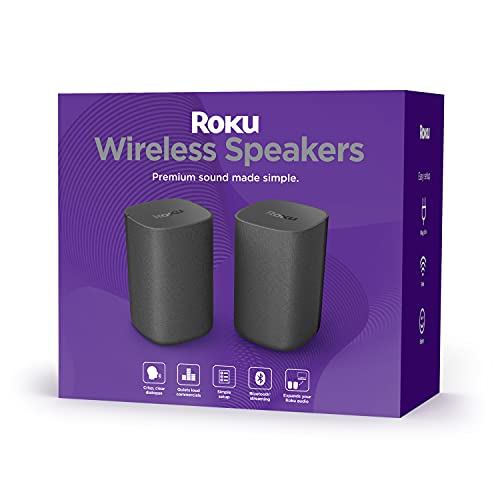
For example, the Bose Surround speakers maintain a wireless connection to compatible Bose soundbars up to 30 feet away, while Roku Wireless Speakers connect directly to Roku TV or audio devices using a proprietary low-latency link. ULTIMEA systems rely on wired rear speakers or virtual surround, so verify whether the model you choose supports true wireless rear channels.
Surround Sound Format Support
For the most immersive experience, your soundbar should decode Dolby Atmos or DTS:X. These formats place sounds in a three-dimensional space, making you feel like you are inside the movie. The ULTIMEA 5.1CH system with Dolby Atmos uses side-firing drivers and DSP to create a wide soundstage without physical rear speakers, while the ULTIMEA 7.1ch system uses four wired surround speakers for true directional audio.
If you already own a premium soundbar, adding dedicated wireless rear speakers like the Bose Surround or Roku Wireless Speakers can elevate the experience. For a broader selection, see our list of soundbars with Google Assistant for voice-controlled convenience.
Ease of Setup and Integration
No one wants to spend hours configuring speaker wires and syncing devices. The best soundbars with wireless rear speakers should pair with the main unit automatically or with a simple button press. Roku Wireless Speakers are designed exclusively for Roku TVs and soundbars, so setup is almost instantaneous once you select the option in the Roku menu.
Bose Surround speakers require a compatible Bose Soundbar (like the Bose 700 or 600) and a power outlet for each speaker, but the wireless pairing is handled through the Bose Music app. ULTIMEA systems vary: the Poseidon M60 uses a virtual surround that requires no rear speakers at all, while the Poseidon D70 includes four wired rear speakers that need to be connected to the soundbar. Always check compatibility with your existing TV or soundbar before purchasing.
Sound Quality and Room Filling
The primary goal of adding rear speakers is to create a convincing surround sound field. Look for systems with dedicated drivers for each channel and a subwoofer for bass. The ULTIMEA Poseidon D70 offers 410W peak power with four wired surround speakers, while the Bose Surround system adds two compact satellite speakers that blend into any room. For a complete home theater, visit our Soundbars category page for more options.
Final Thoughts
Choosing the right soundbar with wireless rear speakers depends on your current setup and how much you value simplicity versus raw power. For a turnkey solution with true rear speakers and deep bass, the ULTIMEA 7.1ch Sound Bar for TV with 4 Surround delivers remarkable value with four wired surround speakers and a wireless subwoofer. If you already own a compatible Bose Soundbar and want to expand to a full surround system without wires, the Bose Surround Sound System for Home Theater provides premium build quality and a seamless wireless experience. Both options will transform your movie nights into memorable cinematic events.
Related Guides
- Top Soundbars of 2026 for Immersive Audio
- Best Soundbar for Apartment Living in 2026
- Top Computer Soundbars for Clear Audio
- Best Soundbars for Small Spaces: Top Picks for Compact Audio in
Frequently Asked Questions
Can I add wireless rear speakers to any soundbar?
Not all soundbars support wireless rear speakers. You need a soundbar that either comes with its own wireless rear speaker system or is compatible with dedicated wireless surround speakers from the same brand. For example, Roku Wireless Speakers only work with Roku TVs and soundbars, while Bose Surround speakers require a compatible Bose Soundbar. Third-party wireless rear speaker kits are also available but may require additional adapters.
Do wireless rear speakers need power?
Yes, most wireless rear speakers need to be plugged into a wall outlet to power the built-in amplifiers and wireless receiver. They do not require an audio cable connecting them to the soundbar, but they still need electricity. Some models can be battery powered, but that is rare for home theater use. Plan speaker placement near power outlets for convenience.
What is the difference between virtual surround and real rear speakers?
Virtual surround sound uses digital signal processing to create the illusion of sound coming from behind you without any physical rear speakers. It can be effective, but it rarely matches the precision and immersion of actual rear speakers placed behind the listener. For the most convincing home theater experience, real wireless rear speakers are recommended, especially for Dolby Atmos content.
Will wireless rear speakers work with my 2026 TV?
Most modern TVs support HDMI ARC or optical audio output, which can connect to a soundbar that in turn sends audio wirelessly to rear speakers. The key is compatibility with the soundbar itself. If you choose an all-in-one system like the ULTIMEA Poseidon D70, the rear speakers connect to the soundbar via included cables. For a wireless system, ensure your soundbar supports the brand’s proprietary wireless protocol. Check our guide to smart soundbars for models that integrate well with 2026 TVs.