🔥 TV Black Friday Deals 2026: picks worth watching →
You need a printer that won’t let you down, whether for a busy home office or a growing business. The choice between Brother vs HP printers often comes down to your priorities: speed, cost per page, or versatility. In this guide, we compare top models from both brands to help you decide which one fits your workflow.
We’ve evaluated six popular printers, from Brother’s high-volume laser workhorses to HP’s all-in-one ink tank and enterprise models. By the end, you’ll know exactly which printer matches your printing habits, and we’ll point you to the best options for different needs. Let’s dive in.


Buying Guide: What to Look For in a Printer
Before you pick between Brother and HP, consider how you’ll use the printer. Do you print hundreds of pages daily, or just occasional documents and photos? Your answer determines which features matter most.
Print Speed and Volume
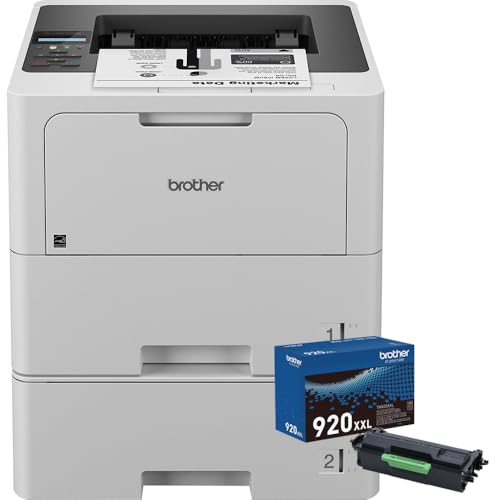
For offices with heavy printing, speed is non-negotiable. Brother’s business laser models, like the Brother Business Monochrome Laser Printer White, reach up to 50 pages per minute. HP’s LaserJet Enterprise 6500N/DN even hits 57 ppm, making it a strong contender for high-demand environments.
If you print only a few pages a day, a slower, more affordable model may suffice. The HP Smart Tank 5101 Wireless All-in-One Refillable focuses on low cost per page rather than speed, making it ideal for home use.
Cost Per Page and Toner Yield
Long-term savings come from using high-yield toner cartridges or refillable ink tanks. Brother’s ultra high-yield TN920UXXL cartridge prints up to 18,000 pages, cutting operating costs significantly. HP’s Smart Tank models include ink for up to two years, which is great for budget-conscious users.
For photo printing, the HPRT Photo Printer 4×6 with 108 Sheets Photo Paper uses dye sublimation, offering a lower cost per print than traditional inkjets. If you print many photos, this could be a cost-effective choice.
Connectivity and Ease of Use
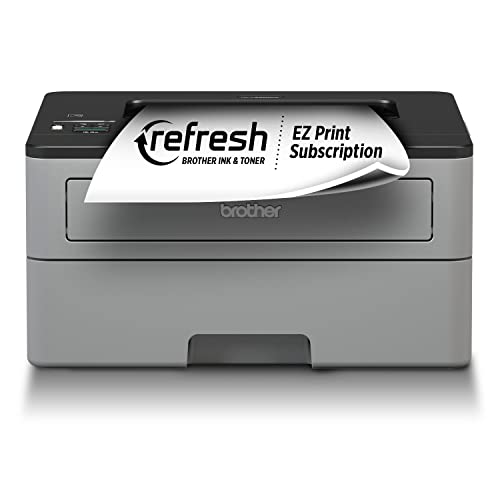
Modern printers need flexible connectivity. Brother models offer dual-band wireless and Gigabit Ethernet, while HP devices feature wireless and mobile printing via the HP Smart app. The Brother MFC-L2710DW Wireless All-in-One Monochrome also supports Alexa voice printing, adding convenience.
If you’re looking for a printer that handles scanning and faxing, the MFC-L2710DW is a solid all-in-one. For a compact photo printer, the HPRT CP4100 offers easy setup with a dedicated app, perfect for on-the-go printing.
Paper Handling and Expandability
Large paper capacities reduce the need for constant refills. Brother’s HL-L6210DWT and the Business Monochrome model come with dual 520-sheet trays, expandable up to 1,660 sheets. HP’s LaserJet Enterprise includes a 550-sheet input feeder, suitable for busy offices.
For home users, a 250-sheet tray is usually enough. The HP Smart Tank 5101 offers a simple, compact design that fits small desks. If you need to print on envelopes or custom media, look for a multipurpose tray as found on Brother models.
Final Thoughts
After evaluating these Brother vs HP printers, the right choice depends on your specific needs. For high-volume, low-cost monochrome printing, the Brother Business Monochrome Laser Printer White is a top pick with its dual trays and ultra high-yield toner. If you prefer an all-in-one with refillable ink for budget-friendly color printing, the HP Smart Tank 5101 Wireless All-in-One Refillable is an excellent choice for home use. Both offer reliable performance and long-term value, so you can’t go wrong.
Frequently Asked Questions
Which is better for home use, Brother or HP?
For home use, HP’s Smart Tank series is often more cost-effective because it includes ink for up to two years. Brother’s laser printers are better if you need fast, sharp text documents. Consider your printing volume and whether you need color.
Are Brother printers cheaper to maintain than HP?
Brother’s ultra high-yield toner cartridges offer a lower cost per page, especially for monochrome printing. HP’s ink tank models provide low refill costs, but laser toner typically lasts longer. Your choice depends on whether you print mostly text or graphics.
Can I print photos with a Brother laser printer?
Brother laser printers are designed for text documents, not high-quality photo printing. For vibrant photos, consider a dedicated photo printer like the HPRT CP4100, which uses dye sublimation for professional results. Alternatively, HP inkjet models can handle occasional photos.
What is the best printer for a small office in 2026?
For a small office, the Brother HL-L6210DWT offers fast printing, dual trays, and advanced security features. If you need scanning and faxing, the Brother MFC-L2710DW is a versatile all-in-one. Both are reliable choices for productivity.
Check out our guide to the best HP printer scanner copier for home use for more home-oriented options. You might also find our canon PIXMA TS6520 review useful if you’re open to other brands.