Picture this: you are working remotely from a coffee shop, and your laptop screen feels cramped as you juggle a spreadsheet and a video call. Or maybe you are a gamer who wants a second display for your console on the go. InnoView portable monitors solve these challenges with a lineup that spans from budget-friendly 1080p screens to professional-grade 4K and dual-screen setups. In this InnoView portable monitor review, we evaluate nine models to help you find the perfect match for your workflow, gaming, or creative projects in 2026.
Whether you are a remote worker, student, or digital nomad, InnoView has a monitor tailored to your needs. For more budget-friendly tech options, check out our guide on the best technology on a budget.

Pros
- Easy plug-and-play setup with single USB-C cable for most modern devices.
- Lightweight and portable at 2.65 pounds with a slim profile, ideal for travel.
- Versatile connectivity works with laptops, smartphones, and gaming consoles.
- IPS panel provides good color accuracy and wide viewing angles for the price.
- Included protective case acts as a stand, adding convenience and durability.
Cons
- Requires a device with USB-C DP Alt Mode or Thunderbolt for single-cable use; otherwise needs separate power and HDMI cables (not included).
- Built-in speakers are adequate but not powerful for immersive audio.
- Some users may experience flickering if the connected device provides insufficient power; an external power source may be needed.
The InnoView 15.6 inch portable monitor is a practical solution for anyone needing a second screen on the go. Designed for travelers, remote workers, students, and gamers, this FHD 1080P IPS display connects easily to laptops, MacBooks, smartphones, and consoles like PS5 and Switch. Its lightweight build and included protective case make it a reliable travel companion.
Standout features include true plug-and-play functionality via a single USB-C cable, supporting Thunderbolt 3/4 and USB 3.1 DP Alt Mode. The IPS panel delivers vivid colors and wide 178 degree viewing angles, enhanced by HDR for richer images. The low blue light and flicker-free technology help reduce eye strain during extended use, making it suitable for both work and entertainment.
Design is practical: the monitor is slim and weighs just 2.65 pounds, fitting easily into a backpack. The smart PU leather cover protects the screen and doubles as a stand with two adjustable grooves for landscape or portrait orientation. This versatility helps save desk space and adapts to different tasks.
Potential drawbacks include the need for a compatible USB-C port for single-cable operation; otherwise, you must use HDMI and a separate power source (not included). The built-in speakers are adequate for basic use but lack bass and volume for immersive audio. Some users may need to power the monitor externally if their device output is insufficient, to avoid flickering.
Overall, the InnoView portable monitor offers excellent value for its price, delivering essential features for productivity and entertainment on the move. It is a solid choice for those seeking a budget-friendly, reliable external display for laptops, gaming consoles, and mobile devices.




Buying Guide: How to Choose the Right InnoView Portable Monitor
Resolution and Display Quality
Resolution determines how sharp and detailed your content looks. For everyday tasks like document editing or web browsing, a Full HD (1080p) monitor is sufficient. However, if you work with high-resolution images, edit 4K video, or want a premium viewing experience, consider a 4K or 2K model. InnoView offers options like the 4K UHD 18.5-inch monitor for creators who demand color accuracy with 100% sRGB coverage.
For those on a tighter budget, the 1080p models still deliver vibrant colors and good contrast, especially with HDR support. If you are looking for affordable tech, our list of top tech finds under $100 includes some excellent portable monitors.
Portability and Build
Portable monitors vary in size and weight. Smaller 15.6-inch screens are ideal for travel, fitting easily into a backpack. Larger 23.8-inch models offer more screen real estate but are heavier and better suited for a home office setup. InnoView includes protective sleeves or built-in stands with most models, and some have 180-degree tilt adjustments for ergonomic viewing.
Consider your usage scenario: if you commute daily, a lightweight model under 2 pounds is a smart choice. For a stationary dual-monitor setup, a larger screen might be worth the trade-off.
Connectivity and Compatibility
Most InnoView monitors feature USB-C and HDMI ports, ensuring broad compatibility with laptops, phones, tablets, and gaming consoles. Some models support power pass-through, so you can charge your device while using the monitor. For Mac users, certain dual-screen models require a driver download for extended display mode, while Windows systems are plug-and-play.
Check your device’s port capabilities before purchasing. If your laptop lacks a full-featured USB-C port, you may need an adapter. For more tips on getting the most value from your tech, see our guide on best technology for the money.
Special Features: Touchscreen and Dual-Screen Options
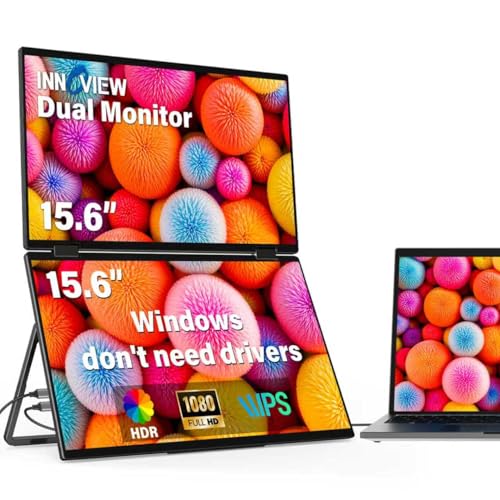
InnoView offers unique models like a 10-point touchscreen monitor for intuitive interaction and dual-screen monitors that fold out to double your workspace. The dual-screen models are especially useful for programmers, financial analysts, or anyone who needs multiple windows open simultaneously. Some dual monitors feature 315-degree rotation for easy screen sharing during collaborations.
Think about your workflow: a touchscreen can streamline tasks like photo editing or presentations, while a dual-screen setup boosts multitasking efficiency.
Final Thoughts
After evaluating the entire InnoView lineup, we recommend the InnoView 4K Portable Monitor 18.5″ 3840×2160 UHD for professionals who demand stunning clarity and color accuracy, making it a top choice for creative work. For users seeking a portable dual-screen solution, the InnoView Dual Portable Monitor 15.6″ 1920×1080 offers exceptional versatility for multitasking on the go, with a foldable design that saves space. Both models deliver reliable performance and are backed by InnoView’s warranty, ensuring peace of mind in 2026.
Frequently Asked Questions
Can I use an InnoView portable monitor with my phone?
Yes, most InnoView monitors work with smartphones that support USB-C video output, such as recent Samsung Galaxy or Huawei models. Simply connect via a USB-C cable, and your phone screen will mirror or extend onto the monitor.
Do InnoView monitors require external power?
Some models can be powered directly by a laptop’s USB-C port, but for optimal performance, especially with larger screens or higher resolutions, we recommend using the included power adapter. This ensures stable brightness and prevents flickering.
Are InnoView dual monitors compatible with MacBooks?
Yes, InnoView dual monitors support MacBooks, but for extended display mode on macOS, you need to install a driver from the monitor’s settings menu. Without the driver, only duplicate and split-screen modes are available.
What is the warranty on InnoView portable monitors?
InnoView offers an 18-month warranty and 30-day return policy on most monitors, along with 24/7 customer support. This coverage applies to manufacturing defects but excludes physical damage. For more budget-friendly tech options, explore our top tech finds under $100.