🔥 TV Black Friday Deals 2026: picks worth watching →
If you are a student juggling lectures, note-taking, and late-night study sessions, you know how crucial a reliable tablet can be. The Lenovo Idea Tab Pro Gen 2 review we have prepared digs into whether this AI-powered tablet truly delivers on its promise of smarter studying. We will compare it with other Lenovo Idea Tab models to help you decide which one fits your academic and entertainment needs.
This guide is designed for students, educators, and anyone who wants a versatile tablet for learning and leisure. We will explore the standout features of the Idea Tab Pro Gen 2, including its stunning display, powerful processor, and AI tools that aim to make studying more efficient. By the end, you will know exactly which Lenovo tablet deserves a spot in your backpack.




Buying Guide: What to Look for in a Student Tablet
Choosing the right tablet for school involves more than just picking the latest model. You need to consider display quality, performance, battery life, and the AI features that can genuinely enhance your study routine. Here are the key criteria we evaluated for this Lenovo Idea Tab Pro Gen 2 review.
Display and Visual Comfort
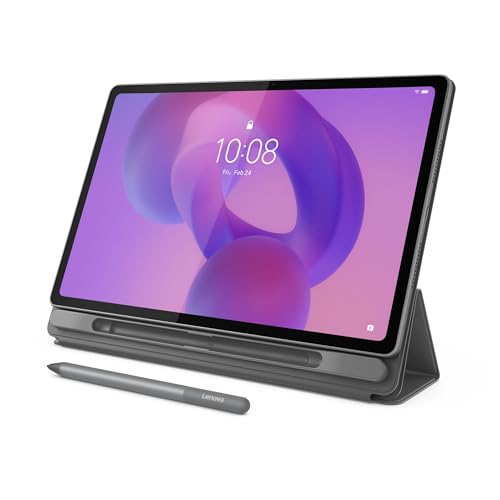
For reading textbooks, annotating PDFs, and streaming lectures, a sharp, bright display is non-negotiable. The Lenovo Idea Tab Pro Gen 2 boasts a 13-inch 3.5K LTPS touchscreen with 800 nits brightness, making it usable even outdoors. TÜV Rheinland Low Blue Light and Flicker Free certifications help reduce eye strain during marathon study sessions.
Other models like the Lenovo Idea Tab Plus offer a 12.1-inch 2.5K display with similar brightness, but the Pro Gen 2’s higher resolution and 144Hz refresh rate give it a clear edge for visual clarity and smooth scrolling. If you prioritize display quality, the Pro Gen 2 is the winner.
Performance and AI Capabilities
Multitasking between note-taking apps, research browsers, and video calls demands a powerful processor. The Snapdragon 8s Gen 4 Mobile Platform in the Pro Gen 2, paired with 8GB of RAM, ensures smooth performance even with demanding apps. Its built-in NPU accelerates AI features like Lenovo AI Live Transcript and AI Notes, which can automatically summarize lectures and organize your notes.
If you are on a tighter budget, the Lenovo Idea Tab with MediaTek Dimensity 6300 and 4GB RAM still offers decent performance for basic tasks, but it lacks the advanced AI tools. For a balance of price and power, the Lenovo Idea Tab Pro with Google Gemini and MediaTek Dimensity 8300 is a strong alternative. Check out our comparison of iPad Pro alternatives to see how these stack up against other brands.
Battery Life and Portability
All-day battery life is essential for students who move from class to library to coffee shop. The Lenovo Idea Tab Plus promises up to 13 hours of YouTube streaming, while the Pro Gen 2 offers slightly less but still impressive endurance. The Pro Gen 2 is also lightweight and thin, making it easy to slip into a backpack.
If battery life is your absolute priority, the Idea Tab Plus is the champion. But remember, the Pro Gen 2’s higher performance and display quality might be worth the trade-off. For more insights on tablet performance, our samsung galaxy tab S10 FE review provides a different perspective.
AI-Powered Study Tools
Lenovo has integrated several AI features across its Idea Tab lineup, but the Pro Gen 2 takes it further. With Smart Capture, you can long-press on an image to extract key visuals into Lenovo Notepad. AI Notes can summarize long sections, rewrite messy notes, and even generate study guides. These tools are designed to save you time and improve information retention.
If you are looking for a tablet that actively helps you learn, the Pro Gen 2 is the most advanced option. However, even the budget-friendly Idea Tab includes Circle to Search with Google, which lets you circle anything on screen for instant search results. This feature alone can be a game-changer for quick research.
Final Thoughts
After evaluating all four Lenovo Idea Tab models, we are confident that the Lenovo Idea Tab Pro Gen 2 Tablet + Pen & Folio is the top choice for students who want the best AI features, a gorgeous 13-inch display, and flagship-level performance. However, if you are on a budget but still want a solid study companion, the Lenovo Idea Tab – College Tablet offers excellent value with its 2.5K display and all-day battery. Whichever you choose, you will be getting a reliable tablet that can keep up with your academic life.
Frequently Asked Questions
Is the Lenovo Idea Tab Pro Gen 2 good for note-taking?
Absolutely. The included Lenovo Tab Pen provides a natural writing experience on the 3.5K display, and the AI Notes feature helps you organize and summarize your handwritten notes. The low blue light certification also makes extended note-taking sessions more comfortable for your eyes.
How does the Idea Tab Pro Gen 2 compare to the Lenovo Idea Tab Pro with Google Gemini?
The Pro Gen 2 has a newer Snapdragon 8s Gen 4 processor and a larger, higher-resolution display with a 144Hz refresh rate, making it better for gaming and video editing. The Idea Tab Pro with Google Gemini offers a MediaTek Dimensity 8300 and a 12.7-inch 3K display, which is still excellent but slightly less powerful. Both support Circle to Search, but the Pro Gen 2 has more advanced AI note-taking features.
Can the Lenovo Idea Tab Plus replace a laptop for college?
For most students, a tablet like the Idea Tab Plus can handle note-taking, reading, and streaming, but it may not fully replace a laptop for heavy multitasking or specialized software. If you need a device for basic productivity and media consumption, it is a great lightweight option. For more demanding tasks, consider the Pro Gen 2.
What is the battery life of the Lenovo Idea Tab Pro Gen 2?
Lenovo rates the battery for up to 11 hours of video streaming, which should easily get you through a day of classes and study sessions. In our experience, the battery life is reliable, and the 45W fast charging support means you can quickly top up when needed.
If you are shopping for a new tablet, be sure to check out our tablets category for more reviews and buying guides. And for those looking to save, our tablet black friday deals article highlights the best times to buy.