You have just moved into a new home or upgraded your internet plan. You need a router that can handle streaming, gaming, and smart devices without lag. The choice often comes down to two major brands: TP-Link and NETGEAR. This guide compares their top models to help you pick the right one for your needs in 2026.
Both brands offer reliable hardware, but they excel in different areas. TP-Link focuses on value and mesh systems, while NETGEAR targets performance and advanced features. We have reviewed six products from both brands to highlight their strengths. For more on secure networking, check out our guide on the best router with Built-in VPN.


Buying Guide
Coverage and Range
Think about the size of your home and where you place the router. A mesh system like the best router with mesh system covers large areas without dead zones. The TP-Link Deco W6000 system covers up to 5,000 square feet, making it ideal for multi-story homes. For outdoor needs, the TP-Link CPE710 offers long-range directional coverage up to several miles.
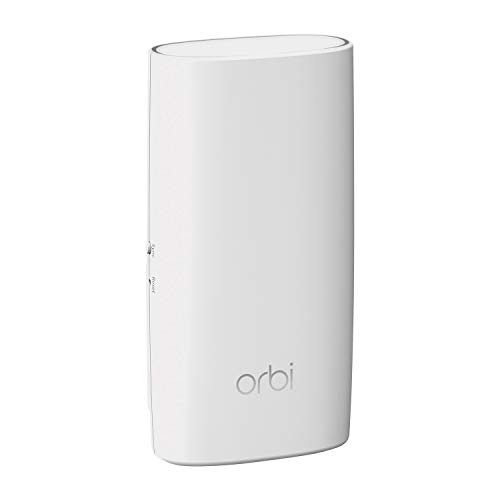
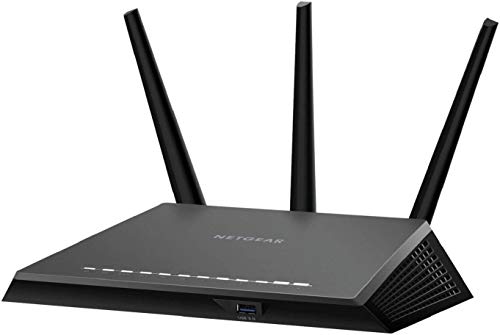
NETGEAR options include the Orbi wall-plug satellite, which adds 1,500 square feet to an existing Orbi network. If you need a standalone router with strong range, the Nighthawk R7350 uses high-power amplifiers and external antennas. Consider your home layout and whether you need a mesh network or a single powerful router.
Speed and Performance
Speed matters for gaming, 4K streaming, and video calls. The NETGEAR Nighthawk R7350 delivers up to 2400 Mbps with MU-MIMO technology, handling multiple devices simultaneously. The TP-Link CPE710 offers 867 Mbps over 5GHz with a directional antenna, perfect for point-to-point links. For whole-home speed, the Deco W6000 uses Wi-Fi 6 for faster throughput and better efficiency.
If you have a gigabit internet plan, look for a router with a 2.5 Gig Ethernet port. The NETGEAR Nighthawk CM3000 modem supports multi-gig speeds up to 2.5 Gbps, future-proofing your network. For most homes, Wi-Fi 6 routers like the Deco W6000 provide excellent speed without breaking the bank.
Ease of Setup and Management
You do not want to spend hours configuring your router. Both brands offer user-friendly apps. The Nighthawk app lets you set up and manage your network from anywhere. TP-Link’s Deco app simplifies mesh setup with step-by-step guidance. For advanced users, the TP-Link CPE710 includes Pharos Control software for detailed configurations.
If you prefer a plug-and-play experience, the NETGEAR Orbi wall-plug satellite is simple to add to an existing Orbi network. The TP-Link Tapo C500 camera also offers easy setup via the Tapo app. For more tips on extending coverage, read our guide on the best router with extender.
Special Features and Use Cases
Some routers include features like QoS, VPN support, or security cameras. The NETGEAR Nighthawk R7350 has advanced QoS for lag-free gaming and streaming. The TP-Link Tapo C500 is an outdoor security camera with person detection and two-way audio. If you need a modem-router combo, the NETGEAR Nighthawk CM3000 works with cable providers like Xfinity and Spectrum.
For those with specific ISP requirements, check our recommendations for the best router for spectrum 1 gig and the best router for spectrum internet. These guides help you choose a compatible device for your plan.
Final Thoughts
Choosing between TP-Link and NETGEAR depends on your priorities. If you want a budget-friendly mesh system with solid coverage, the TP-Link Wi-Fi 6 AX3000 Mesh Router System | 2 is a strong choice for whole-home Wi-Fi. For those who need maximum performance and advanced features, the NETGEAR Nighthawk R7350 AC2400 Router delivers exceptional speed and QoS for gaming and streaming. Both brands offer reliable hardware, so focus on your specific needs and home setup.
Frequently Asked Questions
Which brand is better for gaming, TP-Link or NETGEAR?
NETGEAR routers like the Nighthawk R7350 often include advanced QoS and MU-MIMO, which prioritize gaming traffic and reduce lag. TP-Link’s Deco W6000 also handles gaming well with Wi-Fi 6, but NETGEAR typically offers more gaming-oriented features in 2026.
Can I use a TP-Link router with a NETGEAR modem?
Yes, most routers and modems are compatible as long as they support the same standards. For example, you can pair a TP-Link router with a NETGEAR modem like the CM3000. Just ensure the modem is approved by your ISP.
What is the difference between a mesh system and a traditional router?
A mesh system uses multiple nodes to create a single seamless network, ideal for large homes. A traditional router covers a smaller area but often offers higher peak speeds. For whole-home coverage, consider a mesh system like the TP-Link Deco W6000 or NETGEAR Orbi.
Do I need a separate modem for a cable internet plan?
Yes, most cable providers require a modem. The NETGEAR Nighthawk CM3000 is a standalone modem that works with Xfinity, Spectrum, and Cox. You can pair it with any router for wireless connectivity. For more details, visit our Routers category page.