

If you still rely on physical media for software installs, movie playback, or data archiving, finding a PC case with an optical drive bay in 2026 can feel like a treasure hunt. Most modern cases have ditched the 5.25-inch slot, leaving builders who need a DVD or Blu-ray drive with limited choices. This guide covers the best PC cases with optical drive support, from spacious full-towers with room for a dozen drives to compact enclosures that keep your desk clean. We also include external drive solutions for those who prefer flexibility. Whether you are building a retro gaming rig or a functional home server, you will find a match here. For more vintage-inspired builds, check out our best retro PC cases roundup.



Buying Guide
Case Size and Drive Bay Count
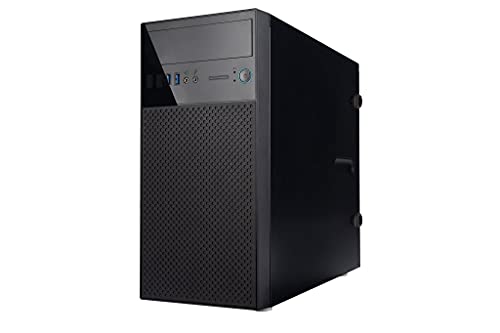
The first decision is how many optical drives you need. Full-tower cases like the anidees AI Raider XL offer up to twelve 5.25-inch bays, perfect for stacking multiple Blu-Ray burners or using the slots for hot-swap hard drive cages. Mini towers such as the in Win EN708 provide a single bay, which is enough for a typical DVD drive. If you only need occasional disc access, an external USB optical drive may save desk space and let you skip the internal bay entirely. For a deeper look at compact builds, see our best modern PC cases guide.
Cooling and Airflow with Multiple Bays
Filling multiple optical bays with drives or cages can restrict airflow. Look for cases with front mesh panels and multiple fan mounts. The anidees AI Raider XL supports up to 20 fans and large radiators, ensuring your hardware stays cool even with a full array of drives. For high-airflow designs, refer to our best PC cases with fans roundup.
Front Panel Connectivity
Modern cases should include USB-C and USB 3.0 ports for fast data transfer. The anidees AI Raider XL offers one USB-C and two USB 3.0 ports on its top panel. The in Win EN708 has dual USB 3.0 ports and HD audio. If you need more connectivity, consider options from our best PC cases with USB-C collection.
Internal vs. External Drive Solutions
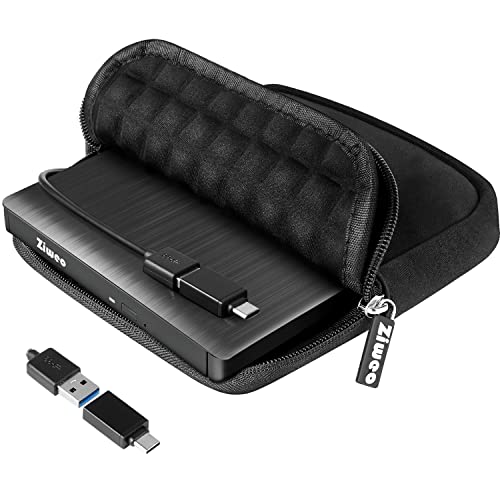
Not every build needs an internal optical drive. External USB drives like the ORIGBELIE or Ziweo models are plug-and-play, work with laptops and compact desktops, and can be stored away when not in use. For users who want to reuse an old internal drive, enclosures such as the Zunate or NexStar DX2 convert any SATA optical drive into an external unit. These alternatives are especially useful if your preferred case lacks a bay. For more unconventional cases, see our best unique PC cases list.
Final Thoughts
Choosing the right PC case with an optical drive comes down to how many discs you use and what form factor you prefer. For maximum expansion and top-notch cooling, the anidees AI Raider XL Full Tower Tempered Glass can handle a dozen drives and massive radiators. If you need a compact, budget-friendly build with a single bay, the in Win EN708 Micro ATX Mini Tower Computer Case delivers reliable performance without taking over your desk. Both offer the classic optical drive support that is becoming rare in 2026.
Frequently Asked Questions
Can I still find new PC cases with optical drive bays in 2026?
Yes, though the selection is smaller than in previous years. Full-tower and some mid-tower cases from brands like IN WIN and anidees still include at least one 5.25-inch bay. You can also use an external USB optical drive with any modern case. For more examples, check our best sleeper PC cases guide, which often feature optical drive bays for a retro look.
How many optical drive bays do I need?
One bay is sufficient for a single DVD or Blu-ray drive. If you plan to install multiple drives for disc ripping or duplication, look for cases with two or more bays, such as the anidees AI Raider XL with twelve bays. You can also convert unused bays into hard drive cages using adapters like the Prelineva 5-bay cage.
Can I add an external optical drive to any PC?
Yes, any computer with a USB port can use an external CD/DVD drive. Models like the ORIGBELIE and Ziweo drives are plug-and-play and support both USB-A and USB-C connections. They work with Windows, macOS, and Linux without extra drivers.
What is the difference between an internal and external optical drive?
Internal drives mount inside a 5.25-inch bay and are powered by the PC’s power supply. External drives connect via USB and have their own power source (or draw power from the USB port). Internal drives often provide faster data transfer, but external drives offer portability and compatibility with laptops and tablets.


