🔥 TV Black Friday Deals 2026: picks worth watching →
You settle into your couch, dim the lights, and press play on a 4K HDR movie. Then the dreaded buffering wheel appears. This frustration is almost always a network issue, not a content problem. The right router eliminates buffering, keeps multiple devices happy, and delivers the crisp, fluid 4K experience you paid for. In this guide, we review the best routers for 4K streaming in 2026 across different budgets and home sizes. Whether you need a budget-friendly upgrade or a future-proof Wi-Fi 7 beast, we have you covered. For a broader look at networking gear, visit our routers category page.

Pros
- Exceptional real-world performance with strong signal penetration through walls and across large areas
- Comprehensive built-in security and privacy tools eliminate need for separate VPN subscriptions or ad blockers
- Handles 100+ devices with stable connections, perfect for households with multiple family members and smart home devices
- Polished firmware interface with extensive customization options appeals to both casual users and tech enthusiasts
- 2-year manufacturer warranty provides peace of mind on a premium investment
Cons
- Lacks band steering and smart connect features, requiring manual WiFi network selection on some devices
- Reset button functionality reportedly unreliable according to user feedback
The GL.iNet Flint 3e (GL-BE6500) is a premium WiFi 7 router engineered for demanding households and gaming enthusiasts who prioritize speed, coverage, and security. This router represents a significant leap forward in wireless technology, combining next-generation WiFi 7 standards with practical features like integrated VPN support and comprehensive parental controls. It's designed for users who need reliable connectivity across large homes, support for numerous devices, and built-in privacy protection without paying extra for subscriptions.
Performance is where the Flint 3e truly excels. With WiFi 7 speeds reaching 6.5 Gbps and innovative technologies like Multi-Link Operation (MLO) and 4K-QAM, this router delivers exceptional real-world performance. The 2,500 sq ft coverage area with four retractable antennas ensures strong signals penetrate walls and reach outdoor spaces. Users consistently report solid connections throughout their homes, and the 680 Mbps VPN speeds mean you don't sacrifice performance for security. The ability to handle 100+ connected devices simultaneously makes it ideal for smart homes with multiple family members streaming, gaming, and working simultaneously.
The router's design is professional and functional, with retractable antennas that reduce clutter compared to traditional fixed antenna designs. Setup is straightforward thanks to the included video tutorials and web-based admin panel. The firmware is polished and intuitive, offering advanced customization options for tech-savvy users while remaining accessible to beginners. Built-in features like AdGuard Home DNS blocking and Bark parental control integration provide enterprise-level security without requiring additional subscriptions or complex configuration.
The main limitation is the absence of band steering and smart connect features, which means devices won't automatically connect to the fastest available network. Users occasionally need to manually disconnect and reconnect to ensure optimal band selection. Additionally, some users report the reset button doesn't function reliably. If you value speed, coverage, security, and device capacity over budget-friendly options, this router delivers compelling value and performance that should serve you well for years to come.
Wireless Performance: WiFi 7 (802.11be) with speeds up to 6.5 Gbps, dual-band support, 4 retractable antennas, MLO and 4K-QAM technology for reduced latency.
Connectivity: 5 Ethernet ports with 2.5 Gbps LAN bandwidth, 2500 Mbps maximum upstream data transfer, 12.5 Gbps total data transfer rate. Supports 100+ connected devices.
Coverage and Range: 2,500 square feet of WiFi coverage, designed for homes and workplaces of various sizes.
Security and Privacy: Built-in Wireguard and OpenVPN VPN support (680 Mbps speeds), WPA3 encryption, WPA-Enterprise and WPA-PSK support, AdGuard Home DNS blocking, Bark parental control integration.
Hardware: 1GB DDR4 RAM, Linux operating system, retractable antenna design, compact 0.85 kg weight.
Included: Flint 3e router, Ethernet cable, power adapter, user manual. 2-year manufacturer warranty.
Who Should Buy This Router: Gamers seeking low-latency connections, remote workers requiring secure VPN connectivity, tech enthusiasts wanting advanced customization, families with 30+ connected devices, and users prioritizing privacy and security features.
Who Might Want to Look Elsewhere: Budget-conscious buyers, users in small apartments or studios who don't need 2,500 sq ft coverage, those requiring automatic band steering for seamless device switching, or casual internet users with basic connectivity needs.
Key Considerations: This router requires manual band steering in some cases, so you may need to manually select WiFi networks on certain devices. The premium price reflects WiFi 7 technology and integrated features. Ensure your internet service provider's speeds can take advantage of this router's capabilities. Consider your home size and device count when evaluating value.
Performance Expectations: Actual WiFi speeds and VPN performance depend on your ISP connection speed, network environment, VPN server location, and distance from the router. Most users report excellent signal strength and stable connections across large homes. The router excels in high-density device environments where other routers might struggle.




Pros
- WiFi 6E delivers future-proof performance with access to the uncongested 6 GHz spectrum for faster, more stable connections
- Exceptional value at this price point for a tri-band router with PCMag Editors' Choice recognition
- Superior device capacity with 4x increase in simultaneous connections through OFDMA technology
- Robust security features including VPN server and client support plus HomeShield protection at no extra cost
- Excellent customer support with 24/7 availability and extended 3-year warranty coverage
Cons
- Requires a separate modem for most internet service providers, adding to overall setup costs
- 6 GHz band adoption still limited as many devices lack WiFi 6E compatibility, though backward compatibility ensures broad device support
- Advanced features like VPN and HomeShield premium features may require technical knowledge for optimal configuration
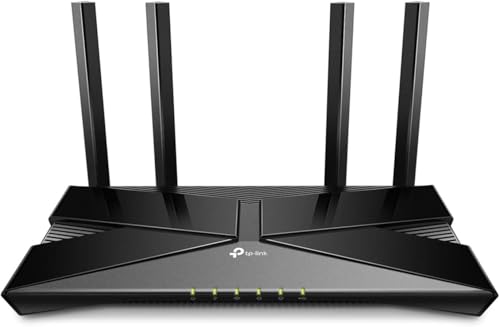
The TP-Link Archer AXE75 represents a significant leap forward in home networking, bringing WiFi 6E technology to users who demand next-generation performance. This tri-band router is engineered for households with multiple devices, gamers seeking competitive advantages, and streaming enthusiasts who refuse to compromise on speed or reliability.
What sets the AXE75 apart is its access to the new 6 GHz band, which provides a dedicated, interference-free channel for your most demanding tasks. The 5400 Mbps total bandwidth is distributed across three bands, with 2402 Mbps on both the 6 GHz and 5 GHz bands, plus 574 Mbps on 2.4 GHz. This architecture, combined with OFDMA technology, increases device capacity by four times compared to standard routers, meaning you can connect significantly more devices without experiencing slowdowns or lag.
The hardware design emphasizes longevity and reliability, featuring a 1.0 GHz dual-core CPU, 512 MB of high-speed memory, and an optimized housing design for superior heat dissipation. These specifications translate to consistent performance during extended use and fewer connection drops during peak usage times. EasyMesh compatibility allows you to expand your network seamlessly by adding compatible routers or extenders, effectively eliminating dead zones throughout your home.
Security and privacy features are comprehensive, including VPN server and client support for OpenVPN, PPTP, and L2TP protocols. The included HomeShield service provides network security scanning, IoT device identification, and parental controls at no additional cost, with premium features available for enhanced protection. Universal ISP compatibility means the router works with virtually every major internet provider without requiring proprietary equipment.
The primary consideration is that most ISPs require a separate modem, and full benefits require devices that support WiFi 6E, though backward compatibility ensures excellent performance with existing devices. At this price point with PCMag Editors' Choice recognition, the AXE75 delivers exceptional value for anyone ready to upgrade to next-generation wireless technology.
Performance: Total WiFi Speed: 5400 Mbps (6 GHz: 2402 Mbps, 5 GHz: 2402 Mbps, 2.4 GHz: 574 Mbps). Processor: 1.0 GHz Dual-Core CPU. Memory: 512 MB High-Speed RAM.
Connectivity: WiFi 6E Tri-Band Router. Gigabit Ethernet ports for wired connections. EasyMesh compatible for network expansion. Works with all major ISPs including Comcast, Verizon, AT&T, Charter, Xfinity, Spectrum, and others.
Security: VPN Server and Client support (OpenVPN, PPTP, L2TP). TP-Link HomeShield with basic network security, IoT device identification, parental controls, and quality of service management.
Support: 24/7 technical support. 3-year warranty coverage. EasyMesh technology for seamless whole-home mesh network expansion.
Best For: Power users, gamers, content creators, and households with 10+ connected devices. Ideal for those seeking future-proof WiFi 6E technology, low-latency gaming, 4K streaming, and comprehensive network security without monthly subscription fees.
Consider If: You have a large home with multiple dead zones, rely on multiple simultaneous high-bandwidth activities, need VPN capabilities for privacy, or want access to the latest WiFi standard at an affordable price.
May Not Be Right If: You only need basic WiFi for light browsing and email, have a very small space, or your devices don't support WiFi 6E (though backward compatibility with older devices is fully supported).

Buying Guide: Key Features for a 4K-Ready Router
Not every router can handle 4K streaming reliably. Here are the essential criteria to consider before making your choice.
Wi-Fi Standard and Speed
For smooth 4K streaming, you need at least Wi-Fi 5 (802.11ac), but Wi-Fi 6 or Wi-Fi 6E is strongly recommended for 2026. Wi-Fi 6 offers higher throughput, better efficiency in crowded homes, and lower latency. The latest Wi-Fi 7 routers, like the GL.iNet GL-BE6500 Flint 3e Wi-Fi 7 Router with VPN, push speeds beyond 6 Gbps, making them overkill for today’s 4K streams but future-proof for 8K and beyond. If you are on a budget, a solid Wi-Fi 6 router such as the Tenda AX3000 WiFi 6 Router provides excellent performance for multiple 4K streams.
Coverage and Mesh Capability
Large homes or spaces with thick walls often suffer from dead zones. A single router may not suffice. Mesh systems like the AmpliFi HD WiFi System by Ubiquiti Labs use multiple nodes to blanket up to 10,000 square feet with strong, consistent signals. For a more affordable approach, some routers support EasyMesh, allowing you to add extenders later. Check our recommendations for routers handling multiple devices if your household has many connected gadgets.
Device Capacity and MU-MIMO
Modern homes have dozens of connected devices: phones, tablets, smart TVs, gaming consoles, IoT gadgets. Routers with MU-MIMO and OFDMA technology can communicate with multiple devices simultaneously without slowing down. The TP-Link AXE5400 Tri-Band WiFi 6E Router uses tri-band and OFDMA to increase capacity by four times, making it ideal for busy households. If you often game while streaming, see our guide to gaming routers for streaming.
VPN and Security Features
Streaming services sometimes throttle or block content based on location. A router with built-in VPN capabilities lets you encrypt your traffic and bypass geo-restrictions without slowing down your connection. The GL.iNet GL-BE6500 supports WireGuard and OpenVPN at up to 680 Mbps, so your 4K stream stays smooth even with a VPN active. For families, parental controls and ad blocking (like AdGuard Home) add extra value. Budget options like the Tenda AC1200 offer basic guest networks and parental scheduling.
For a deeper dive into router comparisons, check out our detailed router reviews and the best gaming routers under $100 if you are on a tighter budget.
Final Thoughts
Choosing the best router for 4K streaming boils down to your home size, device count, and future-proofing needs. For maximum performance and advanced features like Wi-Fi 7 and high-speed VPN, the GL.iNet GL-BE6500 Flint 3e Wi-Fi 7 Router with VPN is an outstanding choice. If you prefer a budget-friendly solution that still delivers excellent 4K streaming across multiple devices, the Tenda AX3000 WiFi 6 Router offers incredible value. Pair either with a streaming device like the Roku Streaming Stick 4K with Voice Remote for a complete, buffer-free home theater experience.
Frequently Asked Questions
What internet speed do I need for 4K streaming?
Most streaming services recommend at least 25 Mbps for a single 4K stream. However, if multiple people stream, game, or video call simultaneously, a 100 Mbps or faster plan paired with a capable router is ideal. The router itself must not become the bottleneck.
Is Wi-Fi 6 necessary for 4K streaming in 2026?
Not strictly necessary, but highly recommended. Wi-Fi 6 (802.11ax) handles multiple streams more efficiently and reduces latency. If you have a busy home with many devices, Wi-Fi 6 ensures consistent 4K playback without interruptions. Wi-Fi 5 can still work for a single stream, but may struggle in congested environments.
Should I get a mesh system or a single router for 4K streaming?
If your home is under 2,000 square feet and has open floor plans, a single high-end router like the TP-Link AXE5400 is usually sufficient. For larger homes, multi-story buildings, or areas with signal-blocking materials, a mesh system like the AmpliFi HD provides seamless coverage everywhere. You can also start with a single router and add EasyMesh extenders later.
Do I need a separate modem for these routers?
Yes, most routers listed here are not modems. You will need a modem from your internet service provider (ISP) or a compatible third-party modem. Some ISPs offer combined modem-router units, but a separate router often gives better performance and control. Check our router buying tips for more details.