🔥 TV Black Friday Deals 2026: picks worth watching →
You are locked in a tense round of Call of Duty. The kill feed is quiet, but you hear it: a soft scuff to your left, growing louder. That footstep tells you exactly where the enemy is pushing. Without a headset that can deliver crisp, directional audio, you are at a severe disadvantage. In this guide, we have evaluated four top gaming headsets specifically for their ability to reproduce footsteps with clarity and precision. Whether you are a console warrior or a PC tactician, these picks will elevate your situational awareness.
For a broader look at gaming audio, check out our Headsets category page for more recommendations.



Buying Guide: What to Look for in a Footstep-Focused Gaming Headset
Sound Signature and Driver Quality
For hearing footsteps, you need a headset that emphasizes mid and high frequencies without muddying the low end. Drivers with a balanced or slightly bright tuning let you distinguish subtle environmental cues like gravel crunch or door creaks. Look for models with 40 mm or 50 mm neodymium drivers, as they offer a wider frequency response. The best gaming headsets for audiophiles often excel here, but even budget options can deliver with proper tuning.
Surround Sound and Positional Audio
Virtual surround sound (7.1 or 3D) can dramatically improve your ability to pinpoint the direction of footsteps. Software like Razer Synapse or Logitech G Hub offers customizable audio profiles. However, a well-tuned stereo headset can also provide excellent spatial awareness. If you prefer an open soundstage, consider best open back gaming headsets for a more natural audio experience.
Comfort for Long Sessions
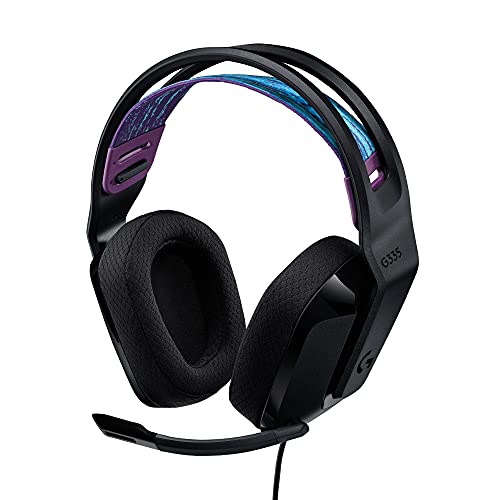
Competitive gaming sessions can last hours. A lightweight design with plush ear pads and a well-padded headband prevents fatigue. Memory foam and breathable materials like sports mesh keep your ears cool. The Logitech G335, for example, weighs only 240 grams and uses suspension headband for a custom fit. Never underestimate comfort; a headset that hurts after an hour will distract you from those critical footsteps.
Microphone Clarity and Noise Isolation
While footstep detection is your priority, a clear microphone ensures your callouts are heard by teammates. Look for a cardioid or noise-isolating mic that filters out background noise. Passive noise cancellation from closed earcups also helps you focus on in-game sounds. For wireless options, check out top bluetooth gaming headsets that combine freedom with low latency.
Final Thoughts
After evaluating each headset for footstep clarity and overall performance, our top recommendation for competitive gamers is the NUBWO Wireless Gaming Headset with Mic for Ps5 Ps4, which offers zero-latency wireless and immersive 3D sound at an unbeatable value. For those who prefer a lightweight wired option with proven comfort, the Logitech G335 Wired Gaming Headset delivers crisp stereo audio and a snug fit that keeps you focused through long sessions. Both headsets excel at making every footstep count, giving you the edge you need.
Frequently Asked Questions
Can a budget headset really help me hear footsteps?
Absolutely. Many affordable headsets like the NUBWO Wireless model use large 50 mm drivers and virtual surround sound to deliver clear positional audio. You do not need to spend a fortune to gain a competitive advantage in 2026.
Is wireless or wired better for footstep detection?
Both can work well, but wired headsets typically have zero latency and consistent audio quality. However, modern wireless headsets with 2.4 GHz connections (like the NUBWO) achieve sub-30 ms latency, making them virtually indistinguishable from wired for footstep audio.
Do I need 7.1 surround sound to hear footsteps?
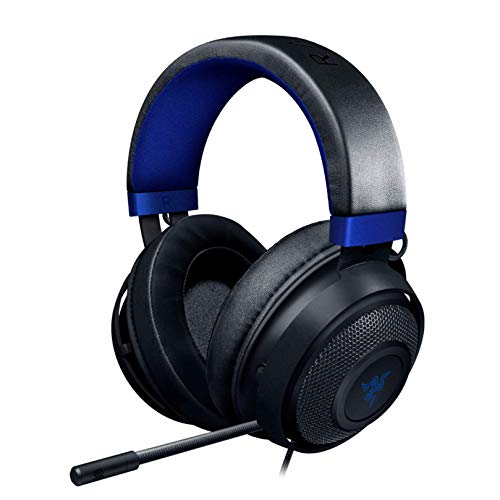
Not necessarily. A well-tuned stereo headset can provide excellent directional cues. Surround sound can enhance spatial awareness, but many gamers prefer stereo for its clarity. The Razer Kraken offers 7.1 surround on PC, while the Logitech G335 relies on precise stereo imaging.
How do I adjust my headset settings for better footstep audio?
Start by boosting the mid and high frequencies in your equalizer while reducing the bass slightly. Many gaming headsets have companion apps (Razer Synapse, Logitech G Hub) with presets for FPS games. Experiment with these settings to find what works best for your ears.